Bevezetés
Köszönöm a vásárlástasing the Dierya DK68 Wireless Mechanical Gaming Keyboard. This manual provides detailed instructions on how to set up, operate, and maintain your keyboard. Please read this manual thoroughly before use to ensure optimal performance and longevity of your device.

Image: The Dierya DK68 wireless mechanical gaming keyboard, showcasing its compact 60% layout and RGB backlighting.
Főbb jellemzők
- Kompakt 60%-os elrendezés: 68-key design for space efficiency, with all functions accessible via FN key combinations. Ideal for portability and maximizing desk space.
- Tri-Mode Seamless Connectivity: Supports USB-C wired, Bluetooth, and 2.4GHz wireless receiver connections. Easily switch between up to 3 devices (PC, Mac, smartphone/tablet).
- Customizable 16.8 Million Color RGB Backlight: Features 21 dynamic lighting effects. Adjust effects and colors using FN key combinations.
- Long-Lasting Battery & Standby: Equipped with a 3000mAh battery, providing approximately 8 hours of continuous use with backlight on, or up to 90 hours with backlight off. Standby time up to 360 hours (approx. 15 days).
- Durable Mechanical Switches: Utilizes Dierya's proprietary mechanical switches with a 60 million keystroke lifespan. Red switches (linear, silent) are suitable for gaming and office work.
- N-Key Rollover (NKRO): Ensures all key presses are registered accurately, even during simultaneous inputs, for competitive gaming.
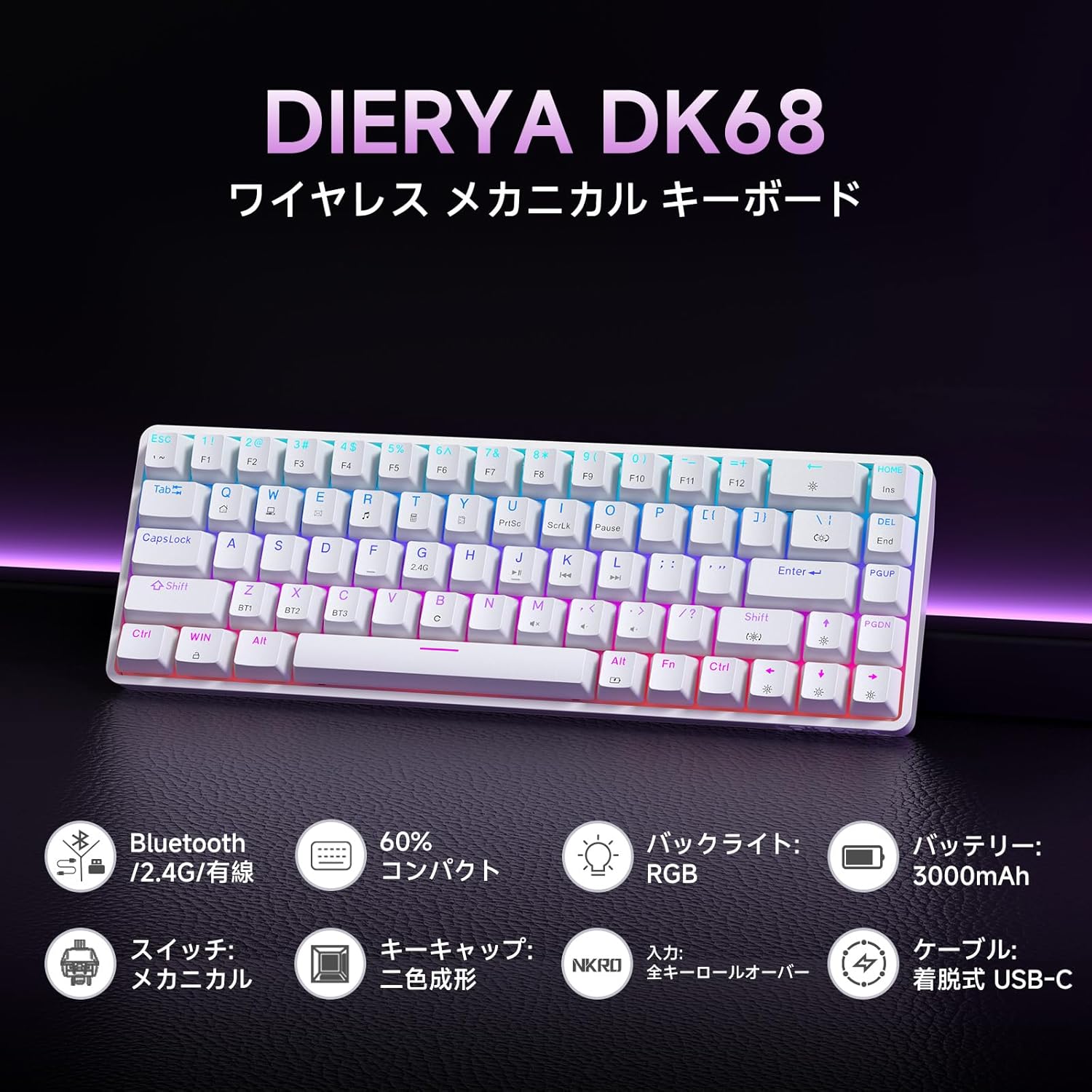
Kép: Egy overview of the Dierya DK68 keyboard's main features, including Bluetooth/2.4G/Wired connectivity, 60% compact design, RGB backlight, 3000mAh battery, mechanical switches, double-shot keycaps, N-Key Rollover, and a detachable USB-C cable.
Beállítás
1. A billentyűzet töltése
Before first use, fully charge the keyboard using the provided USB-C cable. Connect the cable to the keyboard's USB-C port and to a power source (e.g., computer USB port, USB wall adapter).
- A töltésjelző lámpa mutatja a töltés állapotát.
- A teljes feltöltés általában néhány órát vesz igénybe.
2. A billentyűzet csatlakoztatása
The DK68 supports three connection modes: USB-C wired, 2.4GHz wireless, and Bluetooth.
USB-C vezetékes csatlakozás
- Csatlakoztassa a mellékelt USB-C kábelt a billentyűzet USB-C portjához.
- Csatlakoztassa a kábel másik végét a számítógép szabad USB-portjához.
- A billentyűzet automatikusan felismerésre kerül, és használatra kész.
2.4GHz vezeték nélküli kapcsolat
- Locate the 2.4GHz USB receiver (usually stored in a compartment on the keyboard or packaging).
- Csatlakoztassa az USB-vevőt a számítógép egy szabad USB-portjához.
- Kapcsold be a billentyűzetet. A billentyűzetnek automatikusan csatlakoznia kell a vevőegységhez.
- If connection is not established, press FN + R to switch to 2.4GHz mode.
Bluetooth kapcsolat
The keyboard can store up to three Bluetooth device pairings.
- Kapcsolja be a billentyűzetet.
- Nyomja meg és tartsa lenyomva FN + Z, FN + X, vagy FN + C for 3-5 seconds to enter pairing mode for BT1, BT2, or BT3 respectively. The indicator light will flash rapidly.
- On your device (PC, Mac, smartphone, tablet), enable Bluetooth and search for new devices.
- Select "Dierya DK68" from the list of available devices.
- A párosítás után a jelzőfény abbahagyja a villogást, és folyamatos marad.
- To switch between paired Bluetooth devices, press FN + Z, FN + X, vagy FN + C röviden.

Image: Diagram illustrating the three connection modes: USB-C wired, Bluetooth, and 2.4GHz wireless, along with compatibility icons for Windows, Mac, iOS, Android, Xbox, PC, Laptop, and Tablet.
Kezelési útmutató
1. FN Key Combinations
Due to the compact 60% layout, many functions are accessed using the FN kulcs más kulcsokkal kombinálva.
| Kombináció | Funkció |
|---|---|
| FN + 1-0 (top row) | F1-F10 |
| FN + - = | F11, F12 |
| FN + Backspace | Toggle Backlight ON/OFF |
| FN + Shift | Háttérvilágítás színének módosítása |
| FN + | | Háttérvilágítás mód módosítása |
| FN + felfelé mutató nyíl | Növelje a háttérvilágítás fényerejét |
| FN + lefelé mutató nyíl | Csökkentse a háttérvilágítás fényerejét |
| FN + Balra nyíl | Csökkentse a háttérvilágítás sebességét |
| FN + Jobbra nyíl | Növelje a háttérvilágítás sebességét |
| FN + Z/X/C | Switch Bluetooth Device (BT1/BT2/BT3) |
| FN + R | Switch to 2.4GHz Wireless Mode |
| FN + T | Switch to USB-C Wired Mode |
| FN + WIN | A Windows kulcs zárolása/feloldása |

Image: A visual guide to customizing the RGB backlight on the Dierya DK68 keyboard using FN key combinations for turning the light on/off, changing colors, modes, brightness, and speed.
2. RGB háttérvilágítás testreszabása
The keyboard features over 20 dynamic RGB lighting effects. Use the FN key combinations listed above to personalize your lighting experience.
- Sajtó FN + Backspace a háttérvilágítás be- vagy kikapcsolásához.
- Sajtó FN + Shift to cycle through different backlight colors.
- Sajtó FN + | to switch between various lighting effects.
- Használat FN + Up/Down Arrow to adjust brightness and FN + Left/Right Arrow to adjust effect speed.
3. Energiatakarékos mód
To conserve battery life, the keyboard will automatically enter sleep mode after approximately 3 minutes of inactivity. Press any key to wake it up.
Karbantartás
- Tisztítás: Use a soft, dry cloth to wipe the keyboard surface. For deeper cleaning, you may use a can of compressed air to remove dust and debris from between the keycaps. Avoid using harsh chemicals or abrasive materials.
- Tárolás: A billentyűzetet hűvös, száraz helyen tárolja, távol a közvetlen napfénytől és a szélsőséges hőmérsékletektől.
- Az akkumulátor gondozása: To prolong battery life, avoid fully discharging the battery frequently. Charge the keyboard regularly, especially if it will be stored for an extended period.
- Billentyűsapka eltávolítása: If you need to remove keycaps for cleaning or switch replacement, use a keycap puller to avoid damage. Pull straight up with gentle force.
Hibaelhárítás
- A billentyűzet nem reagál:
- Győződjön meg arról, hogy a billentyűzet be van kapcsolva.
- Ellenőrizze az akkumulátor töltöttségi szintjét, és szükség esetén töltse fel.
- Verify the correct connection mode (USB-C, 2.4GHz, or Bluetooth) is selected.
- For 2.4GHz, ensure the receiver is properly plugged in.
- For Bluetooth, re-pair the device if connection is lost.
- Próbáld meg USB-C kábellel csatlakoztatni, hogy kizárd a vezeték nélküli problémákat.
- A kulcsok nem regisztrálódnak, vagy duplán íródnak be:
- Tisztítsa meg a billentyűsapkák alatti területet a szennyeződésektől.
- Ensure the switches are properly seated.
- RGB backlight not working:
- Ensure the backlight is turned on (FN + Backspace).
- Check battery level; low battery might disable backlighting.
- Bluetooth-kapcsolat instabil:
- Ensure the keyboard is within range of the device.
- Minimalizálja a más vezeték nélküli eszközök okozta interferenciát.
- Try re-pairing the keyboard with your device.
Műszaki adatok
| Funkció | Részlet |
|---|---|
| Márka | DIERYA |
| Modellszám | DK68 |
| Elrendezés | 60% (68 billentyű) |
| Kapcsolódás | 2.4 GHz-es vezeték nélküli, Bluetooth, USB-C vezetékes |
| Kapcsoló típusa | Mechanical Red Switches (Linear, Silent) |
| Működtető erő | 45gf (±15gf) |
| Actuation Travel | 2.0 mm (± 0.6 mm) |
| Keystroke Lifespan | kb. 60 millió |
| Háttérvilágítás | RGB (16.8 million colors, 21+ effects) |
| Akkumulátor kapacitása | 3000 mAh lítium akkumulátor |
| Battery Life (Backlight ON) | kb. 8 óra |
| Battery Life (Backlight OFF) | kb. 90 óra |
| Készenléti idő | Kb. 360 óra (15 nap) |
| Kompatibilitás | Windows, Mac, iOS, Android, Xbox, PC, Laptop, Tablet |
| Méretek (H x Sz x Ma) | 372 x 115 x 51 mm |
| Súly | 830 g |
| Kulcstartók | Double-shot (OFS height) |
| Anti-Ghosting | Full N-Key Rollover (NKRO) |

Image: A diagram showing the compact 60% layout of the Dierya DK68 keyboard with its dimensions: 372mm length, 115mm width, and 51mm height, highlighting its 68-key configuration.

Kép: Közeli kép view of the Dierya DK68's mechanical red switches, detailing their linear and silent operation, 45gf actuation force, 2.0mm travel, and pre-lubricated design for smooth keystrokes.

Image: An exploded diagram of the Dierya DK68 keyboard, showing its internal layers including ABS keycaps, mechanical switches, positioning plate, EVA mat, PCB, high-density sound-absorbing foam, and bottom case, highlighting its robust construction.
Garancia és támogatás
DIERYA products are designed for durability and performance. For warranty information or technical support, please refer to the official DIERYA webweboldalukon, vagy vegye fel a kapcsolatot közvetlenül az ügyfélszolgálatukkal. Őrizze meg a vásárlási nyugtát vásárlási bizonylatként garanciális igények esetén.


