1. Bevezetés
This manual provides essential information for the safe and efficient operation of your VIZIO 50-inch 4K UHD LED Smart TV, model V4K50C-08. Please read this manual thoroughly before using your television and retain it for future reference.
The VIZIO V4K50C-08 Smart TV delivers vivid 4K picture quality with Dolby Vision HDR, enhancing detail, contrast, and color. It features WiFi 6 for faster streaming and gaming, and built-in VIZIO Home for instant access to applications, free channels, and on-demand titles.

1.1. kép: Elöl view of the VIZIO 50-inch 4K UHD LED Smart TV.
2. Biztonsági információk
A televízió használata során mindig tartsa be az alapvető biztonsági óvintézkedéseket a tűz, az áramütés és a személyi sérülés kockázatának csökkentése érdekében. Tartsa kéznél ezt a kézikönyvet referenciaként.
- Ne tegye ki a készüléket esőnek vagy nedvességnek.
- Ne takarja el a szellőzőnyílásokat. A gyártó utasításainak megfelelően telepítse.
- Ne telepítse hőforrások, például radiátorok, hőregiszterek, kályhák vagy más készülékek (beleértve a ampemelők), amelyek hőt termelnek.
- Óvja a tápkábelt attól, hogy rálépjenek vagy becsípjék, különösen a csatlakozóknál, a csatlakozóaljzatoknál és azon a helyen, ahol azok kilépnek a készülékből.
- Csak a gyártó által meghatározott tartozékokat/tartozékokat használja.
- Minden szervizelést bízzon szakképzett szervizszemélyzetre.
3. A doboz tartalma
Your VIZIO 50-inch 4K UHD LED Smart TV package includes the following items:
- VIZIO 50-inch 4K UHD LED Smart TV
- Hangvezérlő
- 2 db AAA elem (a távirányítóhoz)
- Tápkábel
- TV-állvány (2 darab)

Image 3.1: Included components and TV dimensions.
4. Beállítás
4.1 Az állvány rögzítése
- Óvatosan helyezze a TV-t képernyővel lefelé egy puha, tiszta felületre a sérülések elkerülése érdekében.
- Igazítsa az egyes állványdarabokat a TV alján található megfelelő nyílásokhoz.
- Rögzítse az állvány minden egyes darabját a mellékelt csavarokkal. Győződjön meg arról, hogy szorosan meg vannak húzva.
4.2 Perifériák csatlakoztatása
Connect your external devices to the appropriate ports on the back or side of your VIZIO TV.
- HDMI: For high-definition video and audio devices (e.g., Blu-ray players, gaming consoles). Your TV features multiple HDMI ports, including HDMI 1 (eARC) for enhanced audio return channel functionality.
- USB: USB-tárolóeszközök csatlakoztatásához.
- Antenna: Föld feletti antenna csatlakoztatásához.
- Optikai audio kimenet (S/PDIF): Soundbarhoz vagy audiovevőhöz való csatlakoztatáshoz.
- Ethernet: Vezetékes hálózati kapcsolat esetén.
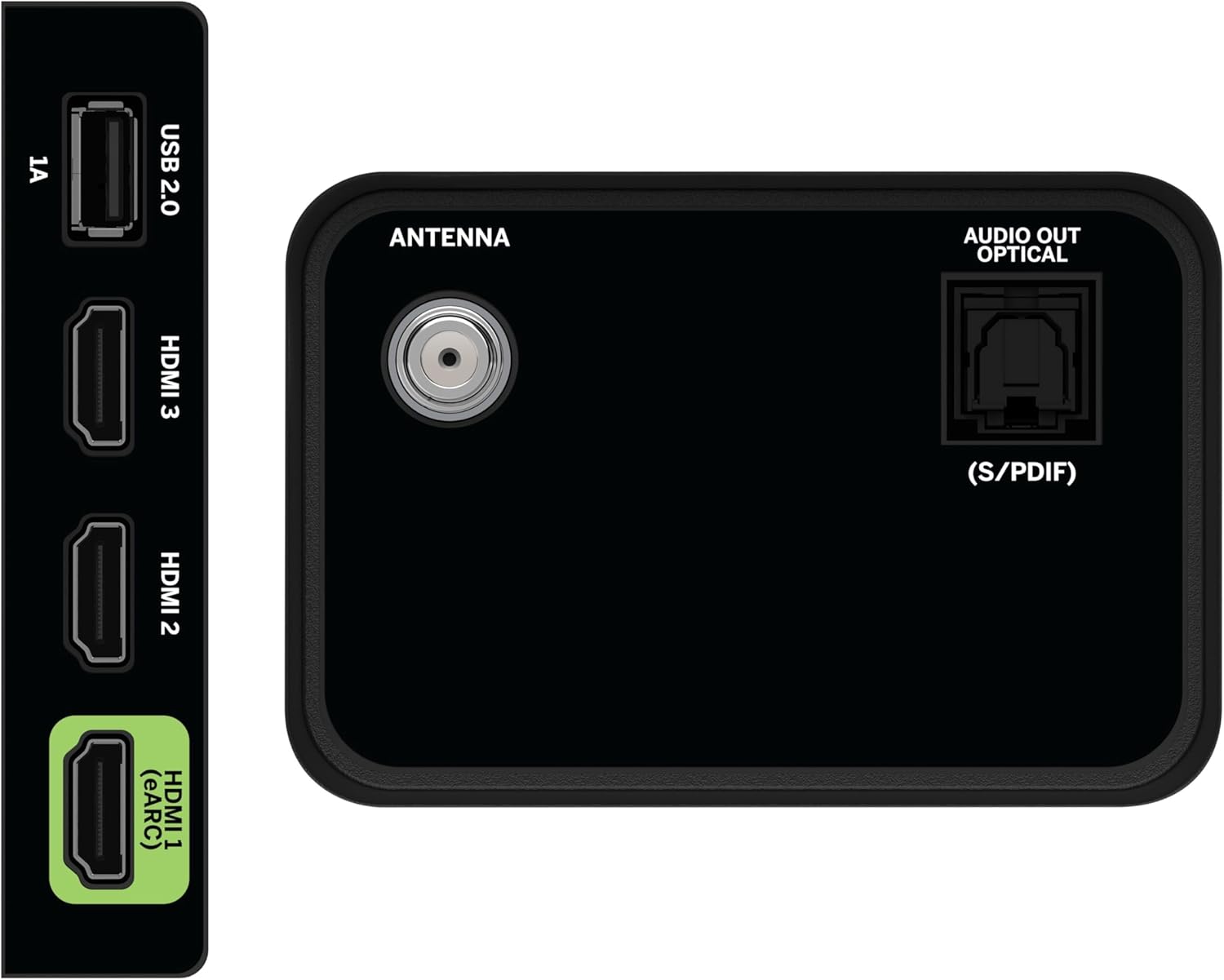
Image 4.1: Rear and side input/output ports.
4.3 Kezdeti bekapcsolás és hálózati csatlakozás
- Csatlakoztassa a tápkábelt a TV-hez, majd egy konnektorba.
- Press the Power button on the remote or on the TV.
- Follow the on-screen prompts to select your language, country, and connect to your Wi-Fi network (WiFi 6 supported for faster performance).
4.4 VIZIO Account Setup
A VIZIO Account is required for Smart TV functionality and product updates. Follow the on-screen instructions to create or log in to your VIZIO Account. This allows access to VIZIO Home, app subscriptions, and free channels.

Image 4.2: VIZIO Account setup via mobile device.
5. A TV kezelése
5.1 Távirányító átview
The included Voice Remote provides intuitive control over your TV. It features dedicated buttons for popular streaming apps and voice assistance integration.
- Bemenet: Váltás a csatlakoztatott eszközök között.
- Hatalom: Kapcsolja be/ki a TV-t.
- Navigációs pad: A menükben való navigáláshoz használja az iránygombokat és az OK gombot.
- Otthon: Access the VIZIO Home screen.
- WatchFree+: Direct access to VIZIO's free streaming service.
- Hang gomb: Hangutasítások aktiválása.
- Hangerő/Csatorna: Hangerő állítása és csatornaváltás.
- Alkalmazás-parancsikonok: Quick access to pre-installed streaming applications.

Image 5.1: VIZIO Voice Remote and mobile app functionality.
5.2 Navigating VIZIO Home
The VIZIO Home screen is your central hub for all entertainment. It provides quick access to:
- Alkalmazások és bemenetek: Browse and launch your favorite streaming apps (Netflix, Prime Video, Hulu, Disney+, etc.) and switch between connected inputs.
- Élő TV: Access hundreds of free channels and thousands of free On Demand titles with the built-in WatchFree+ app.
- Trending Now: Discover popular movies and shows.

Image 5.2: The VIZIO Home screen, your destination for easy streaming.
5.3 Képbeállítások
Your VIZIO TV features Dolby Vision HDR, HDR10+, HDR10, and HLG for a true-to-life picture with a wider range of color and detail. Adjust picture modes (e.g., Calibrated, Vivid, Game) in the settings menu to optimize your viewtapasztalattal.

Image 5.3: Breathtaking details for a crystal-clear 4K picture with Dolby Vision.
5.4 Hangbeállítások
Experience immersive sound with DTS Virtual:X setting. You can also connect Bluetooth headphones for private listening.

Image 5.4: Pair your wireless Bluetooth headphones for uninterrupted audio.
5.5 Intelligens szolgáltatások
The VIZIO Smart TV supports Apple AirPlay and Google Cast Built-in, allowing you to stream content directly from your compatible devices. WiFi 6 ensures better streaming and gaming performance in a congested smart home environment.
5.6 Játékfunkciók
For gamers, the TV offers Dolby Vision HDR Gaming for enhanced in-game color. When a console or PC is detected, Auto Low Latency Mode is automatically enabled to reduce input lag.

Image 5.5: Venture into game realism with Dolby Vision HDR.
6. Karbantartás
6.1 A TV tisztítása
- Tisztítás előtt mindig húzza ki a TV-készülék csatlakozóját a konnektorból.
- Puha, szöszmentes ruhával óvatosan törölje át a képernyőt és a burkolatot.
- Do not use liquid or aerosol cleaners directly on the TV.
6.2 Szoftverfrissítések
Your VIZIO TV will automatically receive software updates when connected to the internet. Ensure your TV is connected to a network for optimal performance and access to the latest features.
7. Hibaelhárítás
If you encounter issues with your VIZIO TV, try the following common solutions:
- Nincs áram: Ensure the power cable is securely connected to both the TV and the outlet. Try a different outlet.
- Nincs kép/hang: Check all cable connections (HDMI, audio). Ensure the correct input source is selected.
- Nem működik a távirányító: Cserélje ki az elemeket. Győződjön meg arról, hogy nincsenek akadályok a távirányító és a TV között.
- Hálózati kapcsolati problémák: Indítsd újra a routert és a modemet. Csatlakoztasd újra a tévét a Wi-Fi hálózathoz a beállítások menün keresztül.
- Rossz képminőség: Check the source content resolution. Adjust picture settings in the TV menu.
For further assistance, refer to the VIZIO support weboldalon, vagy lépjen kapcsolatba az ügyfélszolgálattal.
8. Műszaki adatok
| Funkció | Specifikáció |
|---|---|
| Márka | VIZIO |
| Modellszám | V4K50C-08 |
| Képernyőméret | 50 hüvelyk |
| Kijelző technológia | LED |
| Felbontás | 4K UHD |
| HDR támogatás | Dolby Vision HDR, HDR10+, HDR10, HLG |
| Frissítési gyakoriság | HDMI VRR |
| Csatlakozási technológia | Bluetooth, HDMI, Wi-Fi (WiFi 6) |
| Különleges jellemzők | Apple AirPlay, Bluetooth Headphone compatibility, Built-in apps with VIZIO Home, Closed Captioning, Google Chromecast, Sleep Timer, Voice Assistance Integration, Voice Remote |
| Termék méretei | 9.68"M x 43.69"Sz x 27.57"Ma |
| Tétel súlya | 28.4 font |
| Képarány | 16:9 |
9. Garancia és támogatás
For warranty information and customer support, please visit the official VIZIO website or refer to the warranty card included with your product. VIZIO provides award-winning customer support to assist with any questions or issues you may have.


