1. Bevezetés
Thank you for choosing the DOOMAY Digital Alarm Clock. This compact and modern alarm clock is designed for convenience and reliability, featuring an LCD display, adjustable volume, snooze function, weekend mode, and indoor temperature display. This manual provides detailed instructions to help you set up and operate your new alarm clock effectively.

1. ábra: Elöl view of the DOOMAY Digital Alarm Clock.
2. A csomag tartalma
- DOOMAY digitális ébresztőóra (1 db)
- AAA elemek (2 db)
- Használati utasítás (ez a dokumentum)
3. Beállítás
3.1 Az akkumulátor beszerelése
The DOOMAY Digital Alarm Clock is powered by two AAA batteries. These batteries are included in the package.
- Keresse meg az elemtartó rekesz fedelét az ébresztőóra hátulján.
- A rekesz kinyitásához csúsztassa lefelé a fedelet.
- Helyezzen be két AAA elemet, ügyelve a helyes polaritásra (+ és -), a rekesz belsejében jelzett módon.
- Helyezze vissza az elemtartó rekesz fedelét úgy, hogy felfelé csúsztatja, amíg a helyére nem kattan.

2. ábra: Hátul view with battery compartment and control buttons.
Jegyzet: When the display flashes '8888' and the clock beeps, it indicates that the batteries are low and need to be replaced.
4. Használati útmutató
The DOOMAY Digital Alarm Clock offers various functions for timekeeping, alarming, and environmental monitoring. Refer to the buttons on the back of the clock for settings.
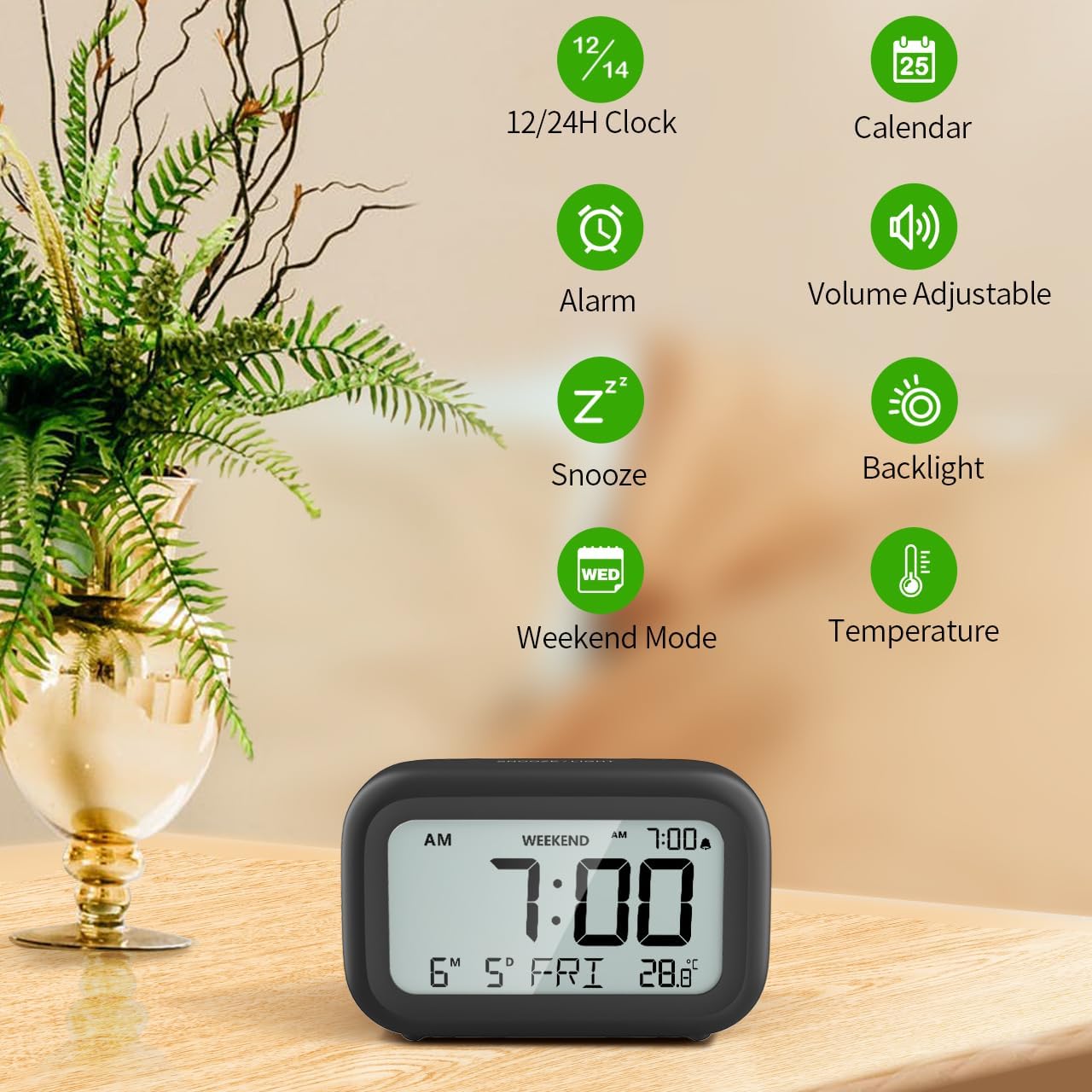
3. Ábra: Végeview of clock features.
4.1 Idő és dátum beállítása
Az aktuális idő és dátum beállításához:
- Nyomja meg és tartsa lenyomva a gombot KÉSZLET button (usually represented by a clock icon or '12/24H' button) on the back of the clock until the numbers on the display begin to flash.
- Használja a + és - buttons to adjust the flashing value (Year, Month, Day, Hour, Minute).
- Nyomja meg a KÉSZLET button again to confirm the setting and move to the next value.
- Once all values are set, the display will stop flashing. The day of the week will automatically update based on the date.
For a visual guide, refer to the video below, specifically from 0:18 for Date Setting és 0:32 for Time Setting.
4.2 Riasztás beállítása
To set your alarm time:
- Nyomja meg a RIASZTÁS button (bell icon) on the back of the clock. The alarm time will appear and flash.
- Használja a + és - buttons to adjust the desired alarm hour and minute.
- Nyomja meg a RIASZTÁS button again to confirm the alarm setting.
- Az ébresztő be- vagy kikapcsolásához egyszerűen nyomja meg a RIASZTÁS button once. An alarm icon will appear on the display when the alarm is active.
For a visual guide, refer to the video below, specifically from 0:13 for turning alarm ON/OFF és 0:37 for Alarm Setting.
4.3 Szundi funkció
When the alarm sounds, gently touch the SNOOZE / FÉNY button located on the top of the clock. This will activate the snooze function, providing an additional 9 minutes of sleep before the alarm sounds again. You can repeat this process multiple times.

Figure 4: Activating the snooze function.
To turn off the alarm completely after it sounds, press any button on the back of the clock.
For a visual guide, refer to the video below, specifically from 0:46 for Snooze function.
4.4 Hétvégi mód
The Weekend Mode allows you to set the alarm to only sound from Monday to Friday, preventing it from disturbing you on weekends.
- Nyomja meg a HÉTVÉGI button (calendar icon) on the back of the clock to toggle Weekend Mode ON or OFF.
- When Weekend Mode is active, 'WEEKEND' will be displayed on the screen, and the alarm will be automatically disabled on Saturday and Sunday.

Figure 5: Weekend Mode and Alarm Volume Levels.
For a visual guide, refer to the video below, specifically from 0:50 for Weekend Mode ON/OFF.
4.5 Háttérvilágítás funkció
The clock features a convenient 5-second on-demand backlight for viewaz idő mérése gyenge fényviszonyok között.
- Simply touch the SNOOZE / FÉNY button on the top of the clock to activate the backlight.
- The backlight will illuminate for approximately 5 seconds and then automatically turn off to conserve battery life.

Figure 6: Backlight in use.
For a visual guide, refer to the video below, specifically from 0:54 for 5 Seconds Backlight.
4.6 Hőmérséklet kijelző
Az óra a beltéri hőmérsékletet mutatja. Celsius (°C) és Fahrenheit (°F) mértékegységek között válthat.
- Nyomja meg a ° C / ° F button on the back of the clock to toggle between Celsius and Fahrenheit.

Figure 7: Indoor Temperature Display.
4.7 12/24 Hour Time Format
You can switch the time display between 12-hour (with AM/PM indicator) and 24-hour formats.
- Nyomja meg a 12/24H button on the back of the clock to switch between the two formats.
For a visual guide, refer to the video below, specifically from 0:58 for 12/24Hr Time Format Switchable.
4.8 Riasztási hangerő beállítása
The alarm clock offers two volume levels for the alarm sound: LOW (70dB) and HIGH (85dB).
- While setting the alarm, or when the alarm is sounding, you can cycle through the volume levels by pressing the appropriate button (often the + or - button, or a dedicated volume button if available). Refer to the icons on the back of your clock.
For a visual guide, refer to the video below, specifically from 0:42 for 2 Levels of Volume Adjustable.
Operating Instructions Video Guide
Video 1: Comprehensive guide on setting up and operating the DOOMAY Digital Alarm Clock. This video demonstrates battery installation, setting time and date, alarm functions, snooze, weekend mode, backlight, and volume adjustment.
5. Karbantartás
- Tisztítás: Törölje át az órát puha, száraz ruhával. Ne használjon súrolószereket vagy oldószereket.
- Elem csere: Replace batteries when the low battery indicator appears (flashing '8888' and beeping). Always use new AAA batteries.
- Tárolás: Ha hosszabb ideig tárolja az órát, vegye ki az elemeket a szivárgás elkerülése érdekében.
6. Hibaelhárítás
| Probléma | Lehetséges ok | Megoldás |
|---|---|---|
| Az óra kijelzője üres vagy halvány. | Az elemek lemerültek vagy helytelenül vannak behelyezve. | Cserélje ki az elemeket új AAA elemekre, ügyelve a helyes polaritásra. |
| Nem szólal meg a riasztás. | Alarm is not activated or Weekend Mode is ON. | Press the ALARM button to activate. Check if Weekend Mode is active and disable if necessary. |
| Az idő/dátum helytelen. | Nincs megfelelően beállítva, vagy kivették az elemeket. | Follow instructions in Section 4.1 to reset time and date. |
| Backlight does not stay on. | Ez normális működés. | The backlight is designed to illuminate for 5 seconds to conserve battery life. It is not a continuous backlight. |
7. Műszaki adatok
- Modell: 5293B
- Kijelző típusa: Digitális LCD
- Áramforrás: 2 x AAA elem (tartozék)
- Termék méretei: 4.29"W x 2.72"H (approx. 10.9cm x 6.9cm)
- Anyag: Akrilnitril-butadién-sztirol (ABS)
- Jellemzők: Alarm, Snooze, Weekend Mode, Indoor Temperature (°C/°F), 12/24H Time Format, 5-second Backlight
- Riasztás hangereje: 2 levels (70dB, 85dB)
- Tétel súlya: 4.48 uncia (kb. 127 g)
8. Garancia és támogatás
DOOMAY products are manufactured with high-quality materials and craftsmanship. For any questions, concerns, or technical support regarding your DOOMAY Digital Alarm Clock, please contact the seller or refer to the product listing on the platform where it was purchased. Please retain your proof of purchase for warranty claims.


