Bevezetés
This manual provides comprehensive instructions for the setup, operation, maintenance, and troubleshooting of your Reloop RP2000 Professional Direct Drive USB Turntable System. Please read this manual thoroughly before using the product to ensure proper function and longevity.
The Reloop RP-2000 USB Mk2 is a versatile turntable designed for DJs and vinyl enthusiasts. It features a direct drive motor for high torque and stable platter rotation, a built-in phono pre-amplifier, and a USB audio output for digitizing vinyl records. The Mk2 version includes an improved top panel construction and enhanced metallic buttons for a better tactile experience.
A csomag tartalma
Kicsomagoláskor kérjük, ellenőrizze, hogy az alább felsorolt összes alkatrész megvan-e és jó állapotban van-e:
- Reloop RP-2000 USB Mk2 Turntable Unit
- Tál
- OM Black hangszedő rendszer (Ortofon)
- Fejhéj
- Slipmat
- Ellensúly
- Tápkábel
- Használati utasítás (ez a dokumentum)
If any items are missing or damaged, please contact your dealer or Reloop customer support immediately.
Beállítás
1. Kicsomagolás és elhelyezés
Carefully remove the turntable from its packaging. Place the turntable on a stable, level surface, away from direct sunlight, heat sources, and excessive vibration. Ensure adequate ventilation around the unit.

Image: The Reloop RP2000 USB Mk2 turntable with its dust cover open, showcasing the platter, tonearm, and controls. This view illustrates the overall design and components of the unit.
2. Platter Installation
- Óvatosan helyezze a tányért a lemezjátszó középső tengelyére.
- Ensure the platter sits securely and rotates freely.
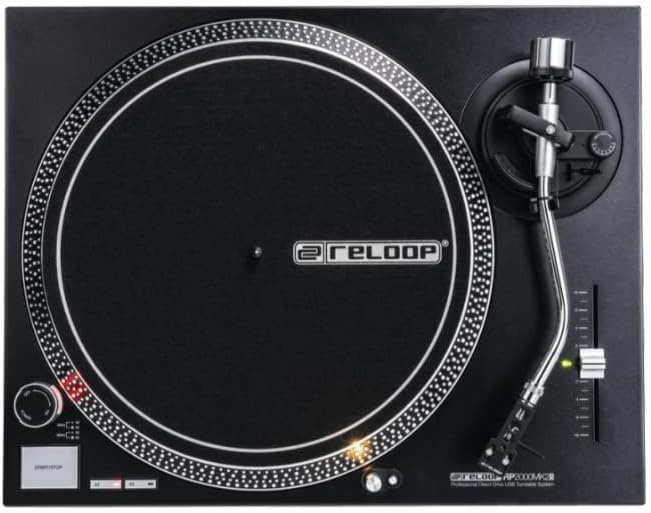
Image: A top-down perspective of the Reloop RP2000 USB Mk2 turntable, highlighting the precision-engineered platter and the layout of the controls on the top panel.
3. Tonearm and Cartridge Assembly
- Attach the provided headshell with the pre-fitted OM Black pick-up system to the tonearm. Secure it by rotating the locking ring.
- Thread the counterweight onto the rear of the tonearm.
- Adjust the counterweight to balance the tonearm horizontally. Once balanced, set the tracking force according to the cartridge manufacturer's recommendations (typically 2-4 grams for the OM Black).
- Állítsa be a csúszásgátló tárcsát a követőerő beállításának megfelelően.
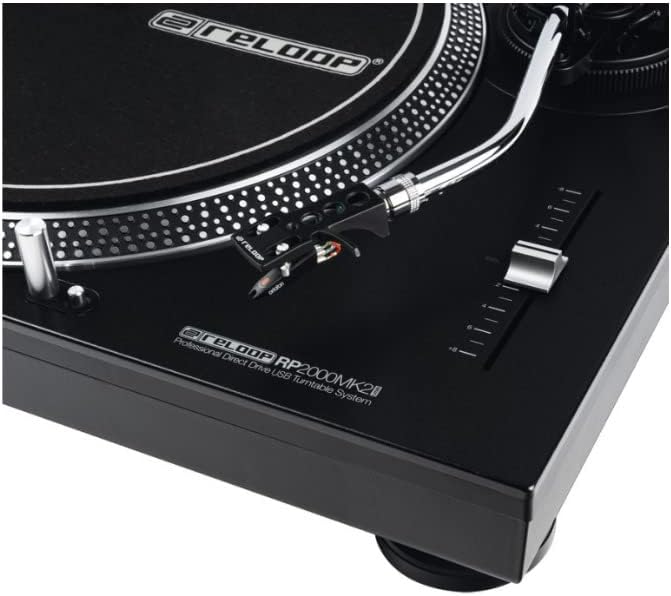
Image: A detailed close-up of the tonearm and pitch control slider on the Reloop RP2000 USB Mk2 turntable, showing the headshell and stylus assembly.
4. Audio csatlakozások
The RP-2000 USB Mk2 features a built-in phono pre-amplifier, allowing for direct connection to a line-level input on your mixer or amplifier. No separate grounding wire is required.
- Connect the RCA cables from the turntable's audio output to a line-level input (e.g., CD, AUX) on your audio system.
- For digital recording, connect the USB cable from the turntable's USB port to your computer.

Kép: Egy oldal view of the Reloop RP2000 USB Mk2 turntable, clearly showing the USB output port and power input, indicating its connectivity options.
5. Tápfeszültség csatlakozás
Connect the power cord to the turntable and then to a suitable electrical outlet. Ensure the power switch is in the OFF position before connecting.
Kezelési útmutató
1. Alapvető lejátszás
- Place a vinyl record on the slipmat on the platter.
- Select the desired speed (33 1/3 or 45 RPM) using the speed selector buttons.
- A tálca forgatásának megkezdéséhez nyomja meg a START/STOP gombot.
- Gently lift the tonearm using the cue lever and position the stylus over the desired groove on the record.
- Slowly lower the cue lever to place the stylus onto the record.
- To stop playback, lift the tonearm, return it to the tonearm rest, and press the START/STOP button.
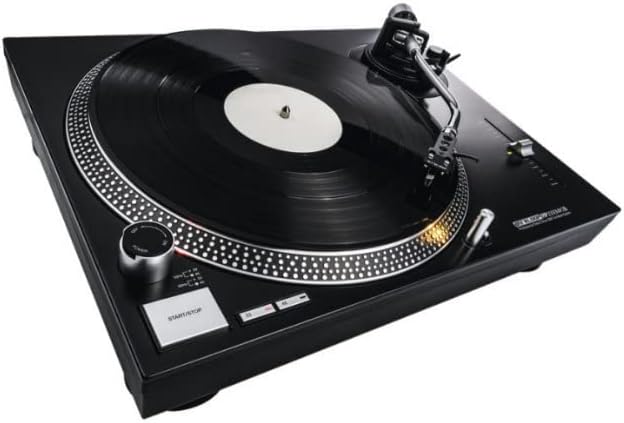
Image: The Reloop RP2000 USB Mk2 turntable with a vinyl record spinning on its platter, demonstrating its primary function for audio playback.
2. Hangmagasság szabályozása
The pitch control slider allows for fine adjustment of the playback speed, with a range of +/- 8%. Move the slider up or down to increase or decrease the platter speed.
3. Target Light
The aluminum target light can be extended by pressing its button. This illuminates the needle position, which is particularly useful in low-light environments.
4. Digitizing Vinyl via USB
The RP-2000 USB Mk2 can be connected to a computer via USB to digitize your vinyl collection. No special drivers are required for most operating systems.
- Connect the turntable to your computer using a USB cable.
- Open your preferred audio recording software (e.g., Audacity, GarageBand).
- Select the turntable as the audio input device within your software settings.
- Begin recording in your software, then start playback on the turntable.
- Monitor audio levels to prevent clipping.
- Save your digitized audio files in your desired format.

Image: The Reloop RP2000 USB Mk2 turntable connected to a laptop, illustrating its capability for digitizing vinyl records through its USB audio output.
Karbantartás
1. Tisztítás
- Regularly wipe the turntable's surface with a soft, dry, lint-free cloth.
- Makacs foltok esetén használjon enyhén damp ronggyal, majd alaposan szárítsa meg. Kerülje a súrolószereket és oldószereket.
- Clean the stylus gently with a soft brush designed for stylus cleaning, moving from back to front.
2. Érintőceruza cseréje
The stylus (needle) is a consumable part and will wear out over time. A worn stylus can damage your records and degrade sound quality. Replace the stylus according to the manufacturer's recommendations or if you notice a decrease in sound quality or increased record wear.
3. Porvédő
Használaton kívül tartsa zárva a porvédőt, hogy megvédje a lemezjátszót a portól és a törmeléktől.
Hibaelhárítás
| Probléma | Lehetséges ok | Megoldás |
|---|---|---|
| Nincs erő | A tápkábel nincs csatlakoztatva; Hibás a konnektor | Ensure power cord is securely connected; Try a different power outlet |
| Nincs hang, vagy halk a hangkimenet | RCA cables not connected correctly; Amplifier/mixer input incorrect; Stylus dirty or damaged | Check RCA connections; Ensure correct input is selected on amplifier/mixer; Clean or replace stylus |
| Torz hang | Tracking force incorrect; Stylus worn; Record dirty | Adjust tracking force; Replace stylus; Clean record |
| A tányér nem forog | START/STOP button not pressed; Power issue | Press START/STOP button; Check power connection |
| Zúgó zaj | Grounding issue (unlikely with built-in pre-amp); Interference from other electronics | Ensure all connections are secure; Move turntable away from other electronic devices |
Műszaki adatok
| Funkció | Részlet |
|---|---|
| Modell neve | RP-2000 USB MK2 Professional Direct Drive USB Turntable System |
| Tétel modellszáma | AMS-RP-2000-USB-MK2 |
| Meghajtó típusa | Közvetlen hajtás |
| Motor | Quartz-driven |
| Sebesség | 33 1/3, 45 RPM |
| Hangmagasság szabályozása | +/- 8% |
| Hangkar | Statically balanced S-shaped tonearm with hydraulic lift and anti-skating mechanism |
| Patron | Ortofon OM Black (pre-fitted) |
| Hangkimenet | Line-level RCA (built-in phono pre-amp) |
| Digitális kimenet | USB Audio (no driver required) |
| Méretek (Sz x Mé x Ma) | 17.72 x 13.86 x 5.67 hüvelyk (kb. 450 x 352 x 144 mm) |
| Súly | 17.94 font (kb. 8.14 kg) |
| Szín | Fekete |
| Áramforrás | Vezetékes elektromos, 220 voltos |
| Anyag | Műanyag |
Jótállási információk
Reloop products are covered by a limited warranty against defects in materials and workmanship. The specific terms and duration of the warranty may vary by region and retailer. Please retain your proof of purchase for warranty claims.
For detailed warranty information, please refer to the warranty card included with your product or visit the official Reloop webtelek.
Támogatás
For technical assistance, troubleshooting beyond this manual, or spare parts inquiries, please contact Reloop customer support or your authorized dealer.
You can find contact information and additional resources on the official Reloop webtelek: www.reloop.com


