1. Bevezetés
This manual provides instructions for the Perixx PX-1000 Backlit Gaming Keyboard. It covers setup, operation, maintenance, and troubleshooting to ensure optimal performance and user experience. The PX-1000 is designed for various environments, including office, home, and gaming, featuring adjustable backlighting and a Windows key lock function.
2. Termék végeview
2.1 Főbb jellemzők
- Háttérvilágítású gombok: Three-level adjustable backlighting for visibility in low-light conditions.
- Szín opciók: Switch between blue, red, and purple backlight colors.
- Windows Lock Function: Disable the Windows key to prevent accidental interruptions during gaming.
- USB csatlakozás: Standard USB connection for broad compatibility.
2.2 Billentyűzetkiosztás
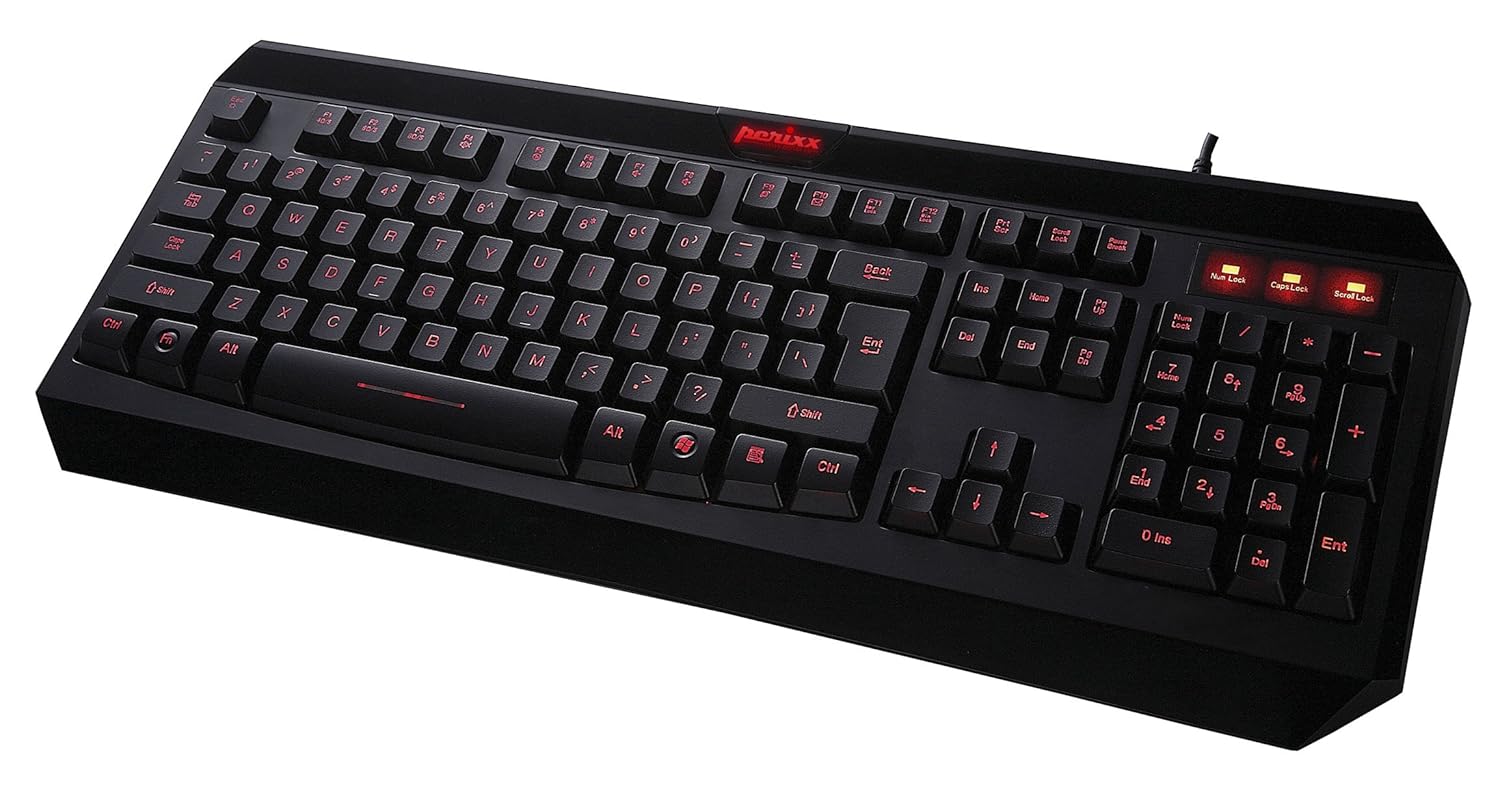
2.1. ábra: Felülről lefelé view of the Perixx PX-1000 keyboard with red backlighting activated. This image displays the full QWERTY layout, numeric keypad, and function keys.

Figure 2.2: Technical diagram illustrating the key layout and dimensions of the Perixx PX-1000 keyboard.
3. Beállítás
- Kicsomagolás: Carefully remove the keyboard from its packaging. Ensure all components, including the USB cable, are present.
- Kapcsolat: Csatlakoztassa a billentyűzet USB-csatlakozóját a számítógép egy szabad USB-portjához.
- Illesztőprogram telepítése: The Perixx PX-1000 is a plug-and-play device. Your operating system (Windows) should automatically detect and install the necessary drivers. No additional software installation is typically required.
- Elhelyezés: Position the keyboard comfortably on your desk.
4. Használati útmutató
4.1 háttérvilágítás szabályozás
The PX-1000 features adjustable backlighting with multiple color options.
- Changing Backlight Color: Nyomja meg a Fn + gomb Scroll Lock key simultaneously to cycle through the available backlight colors: Blue, Red, and Purple.
- A háttérvilágítás fényerejének beállítása: Nyomja meg a Fn + gomb Oldal fel key to increase brightness, and Fn + gomb Oldal lefelé key to decrease brightness. There are three brightness levels.
- Turning Backlight On/Off: To turn off the backlight, cycle through the brightness levels until it is off, or press Fn + gomb Scroll Lock until the backlight is off.
4.2 Windows Key Lock Function
To prevent accidental activation of the Windows Start menu during intensive tasks or gaming, the Windows key can be disabled.
- Activating/Deactivating Windows Key Lock: Nyomja meg a Fn + gomb Windows kulcs simultaneously. An indicator light (usually near the Num Lock/Caps Lock indicators) will illuminate when the Windows key is locked. Repeat the combination to unlock.
5. Karbantartás
A megfelelő karbantartás biztosítja a billentyűzet hosszú élettartamát és teljesítményét.
- Tisztítás: Use a soft, dry cloth to wipe the surface of the keyboard. For deeper cleaning, use a can of compressed air to remove dust and debris from between the keys. Avoid using harsh chemicals or abrasive materials.
- Kiömlés: In case of liquid spills, immediately disconnect the keyboard from your computer. Turn it upside down to drain any liquid and allow it to dry completely before reconnecting. Do not attempt to use the keyboard while it is wet.
- Tárolás: When not in use for extended periods, store the keyboard in a clean, dry environment away from extreme temperatures.
6. Hibaelhárítás
| Probléma | Lehetséges ok | Megoldás |
|---|---|---|
| A billentyűzet nem reagál. | Laza USB csatlakozás, hibás USB port, illesztőprogram probléma. |
|
| A háttérvilágítás nem működik, vagy egy színen marad. | Backlight function not activated, incorrect settings. |
|
| Windows key not functioning. | Windows key lock is active. | Sajtó Fn + Windows kulcs to toggle the lock function. Check the indicator light. |
| A billentyűk ragadósak vagy nem reagálnak. | Törmelék a billentyűk alatt, folyadék okozta kár. |
|
7. Műszaki adatok

Figure 7.1: Detailed dimensions of the Perixx PX-1000 keyboard.
| Funkció | Részlet |
|---|---|
| Márka | Perixx |
| Modellszám | PX-1000 (Item model number: 10992) |
| Szín | Black, Red (Backlight colors: Blue, Red, Purple) |
| Csatlakozási technológia | USB |
| Kompatibilis eszközök | PC |
| Operációs rendszer | Windows |
| Termék méretei (HxSzxH) | 46 x 19.2 x 3 cm (18.11 x 7.56 x 1.18 hüvelyk) |
| Tétel súlya | 812 g (1.79 font) |
| Tartalmazott komponensek | USB kábel |
| Különleges funkció | Háttérvilágítású |
8. Garancia és támogatás
For warranty information and technical support, please refer to the documentation included with your product or visit the official Perixx website. Perixx provides customer support for product-related inquiries and assistance with troubleshooting.
Online források: További támogatásért és termékinformációkért látogassa meg a következő weboldalt: Perixx áruház az Amazonon.


