1. Bevezetés
The Extech EX330 is a compact, autoranging digital multimeter designed for a wide range of electrical and electronic measurements. Its robust design and comprehensive features make it an essential tool for professionals and hobbyists alike. This manual provides detailed instructions for the safe and effective use of your EX330 multimeter.
Az EX330 főbb jellemzői a következők:
- Beépített érintésmentes AC voltage detector (NCV) for enhanced safety.
- Large 4000-count LCD display for clear readings.
- Automatic ranging for simplified operation.
- Mértékek AC/DC Voltage, AC/DC Current, Resistance, Capacitance, Frequency, Duty Cycle, and Temperature.
- Diode test and Continuity check functions.
- Data Hold and Max Hold features.
- Durable rubber holster for protection.
- UL listed Cat III 600V safety rating.

2. Első lépések
2.1. Az akkumulátor behelyezése
The EX330 multimeter requires two AAA batteries for operation. To install or replace batteries:
- Győződjön meg arról, hogy a multiméter ki van kapcsolva.
- Keresse meg az elemtartó rekeszt a készülék hátulján.
- Csavarhúzóval nyissa ki az elemtartó rekesz fedelét.
- Helyezzen be két AAA elemet, ügyelve a helyes polaritásra (+ és -), ahogy az a rekesz belsejében látható.
- Helyezze vissza az elemtartó fedelét, és rögzítse a csavarral.
2.2. Tesztvezetékek csatlakoztatása
The multimeter comes with a set of red and black test leads. Proper connection is crucial for accurate and safe measurements.
- Mindig csatlakoztassa a fekete mérőzsinórt a COM (Közös) bemeneti csatlakozó.
- A legtöbb térfogatrészheztage, resistance, and continuity measurements, connect the red test lead to the V/Ω/µA/CAP/Hz/Temp bemeneti csatlakozó.
- 400 mA-ig terjedő áramerősség méréséhez csatlakoztassa a piros mérőzsinórt a mA bemeneti csatlakozó.
- For high current measurements up to 10A, connect the red test lead to the 10A bemeneti csatlakozó.

3. Használati útmutató
3.1. Be-/Kikapcsolás
To turn the multimeter on, rotate the function switch from the LE position to any desired measurement function. To turn the multimeter off, rotate the function switch back to the LE pozíció.
3.2. Function Selection (Rotary Dial)
The large rotary dial on the front of the multimeter allows you to select the desired measurement function. The EX330 features automatic ranging, which simplifies operation by automatically selecting the correct measurement range.
- VAC / VDC: Measures AC or DC Voltage.
- mA / 10A: Measures AC or DC Current (milliampere vagy ampere).
- Ω: Measures Resistance.
- SAPKA: Measures Capacitance.
- Hz /%: Measures Frequency and Duty Cycle.
- ° F / ° C: Measures Temperature in Fahrenheit or Celsius.
- Dióda / Folytonosság: Tests diodes and checks for circuit continuity.
3.3. Non-Contact Voltage (NCV) Érzékelés
The NCV feature allows for quick detection of AC voltage without direct contact, enhancing safety when working with electrical systems. To use the NCV function, press and hold the NCV button. The top of the meter will illuminate and an audible tone will sound if AC voltage észlelhető.

3.4. évftage Mérés (AC/DC)
Mérni voltage:
- Állítsa a forgatógombot állásba VAC or VDC megfelelő módon.
- Csatlakoztassa a fekete mérővezetéket a COM jack csatlakozót és a piros mérőzsinórt a V/Ω/µA/CAP/Hz/Temp csatlakozó.
- Csatlakoztassa a mérőcsúcsokat párhuzamosan a mérendő áramkörhöz vagy alkatrészhez.
- Olvassa el a köttage értéket az LCD kijelzőn.

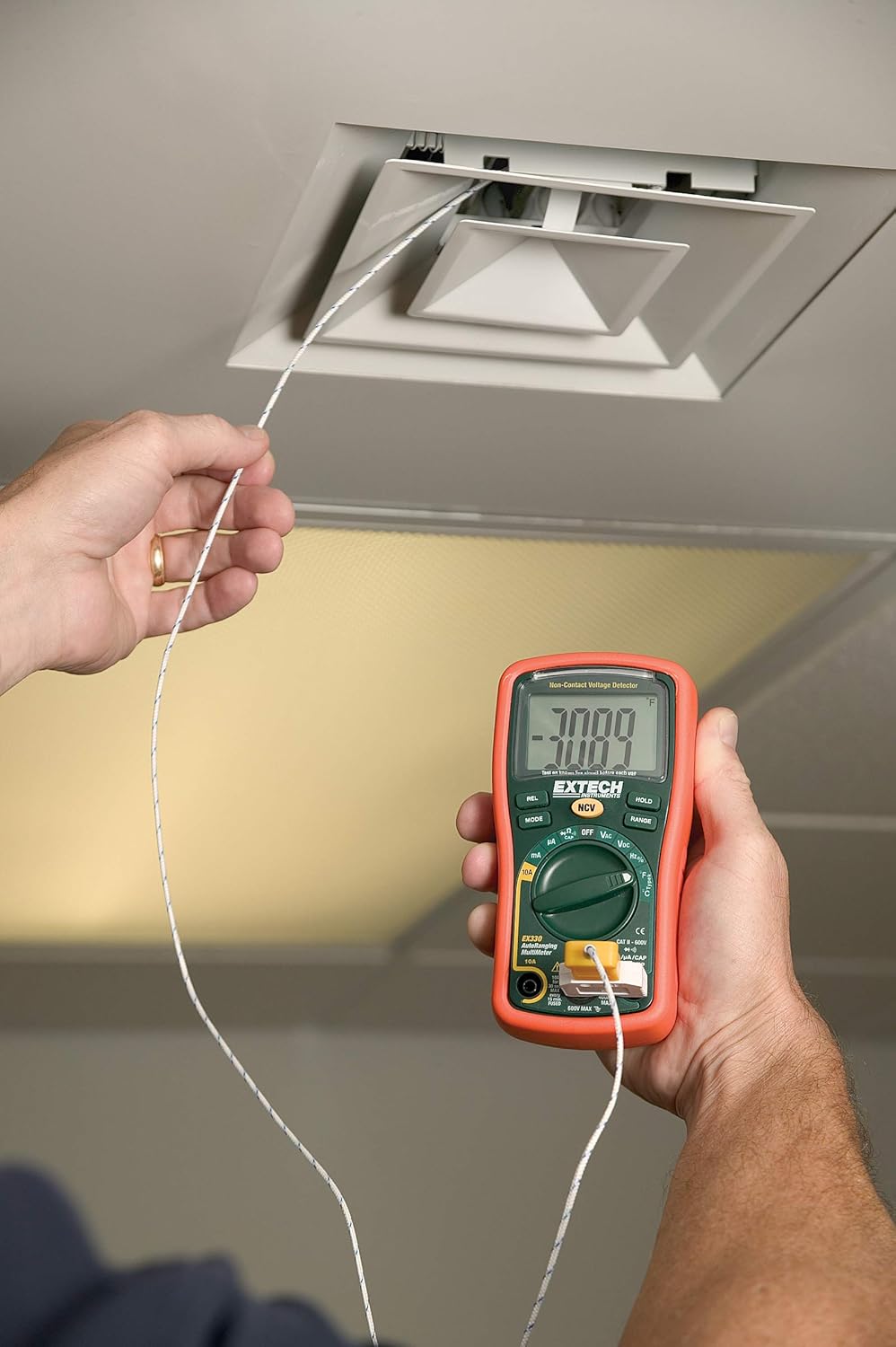
3.5. Temperature Measurement (Type K)
The EX330 includes a Type K temperature probe for accurate temperature readings.
- Állítsa a forgatógombot állásba °F or °C.
- Plug the Type K temperature probe into the V/Ω/µA/CAP/Hz/Temp és COM input jacks, observing polarity.
- Helyezze a hőmérséklet-érzékelő hegyét a mérni kívánt tárgyra vagy annak közelébe.
- Allow time for the reading to stabilize on the display.
3.6. Data Hold and Max Hold
- Nyomja meg a TART gombot az aktuális érték kijelzőn való rögzítéséhez. Nyomja meg ismét a feloldáshoz.
- Nyomja meg a MÓD button repeatedly while in certain functions to cycle through sub-functions or to activate MAX HOLD, which captures and displays the maximum measured value.
3.7. Termékjellemzőkview
Nézd meg ezt a videót egy gyors áttekintésértview of the Extech EX330's key features and applications.
3.1-es videó: Végeview of Extech EX330 Multimeter features, including AC/DC voltage measurement, 4000-count display, built-in non-contact voltage detector, and Type K temperature measurement.
3.8. Accuracy Demonstration
This video demonstrates the accuracy and reliability of Extech multimeters, showcasing two units providing consistent readings when measuring voltage egy tápegységről.
Video 3.2: Demonstration of two Extech multimeters measuring voltage from a power supply, highlighting their consistent and accurate readings over time.
4. Karbantartás és gondozás
4.1. Tisztítás
A multiméter tisztításához használjon puha, damp cloth. Do not use abrasives or solvents. Ensure the unit is off and disconnected from any circuits before cleaning.
4.2. Elemcsere
When the battery indicator appears on the display, replace the batteries as described in Section 2.1. Prompt battery replacement ensures continued accuracy and proper operation.
4.3. Biztosíték csere
If the multimeter fails to measure current, the fuse may need replacement. Refer to the specifications for the correct fuse type and rating. Fuse replacement should only be performed by qualified personnel.
5. Hibaelhárítás
This section addresses common issues you might encounter with your EX330 multimeter.
| Probléma | Lehetséges ok | Megoldás |
|---|---|---|
| Nincs kijelző vagy halvány kijelző | Lemerült vagy alacsony akkumulátor | Elemek cseréje (2.1. szakasz) |
| Helytelen leolvasások | Incorrect function selected, poor test lead connection, damaged test leads | Verify function, check connections, replace test leads if damaged |
| Nincs árammérés | Kiégett a biztosíték | Biztosíték cseréje (4.3. szakasz) |
| Az NCV nem érzékeli a térfogatottage | Voltage too low, interference, or incorrect usage | Biztosítsa a voltage is within detectable range, minimize interference, follow NCV instructions (Section 3.3) |
6. Műszaki előírások
| Specifikáció | Érték |
|---|---|
| Kijelző | 4000 darabos LCD kijelző |
| AC/DC voltage | 600V-ig |
| AC / DC áram | 10A-ig |
| Ellenállás | Akár 40MΩ |
| Kapacitancia | Akár 100µF |
| Frekvencia | Akár 10 MHz-ig |
| Hőmérséklet (K típus) | -4 és 1382 °F (-20 és 750 °C) között |
| Non-Contact Voltage (NCV) | 100-600 VAC |
| Áramforrás | 2 x AAA elemek (tartozék) |
| Méretek (H x Sz x Ma) | 5.7 x 2.9 x 1.6 hüvelyk |
| Súly | 9.9 uncia (0.28 kg) |
| Biztonsági minősítés | UL listed Cat III - 600V |
| Származási ország | Kína |

7. Garancia és támogatás
7.1. Jótállási információk
The Extech EX330 Autoranging Mini Multimeter is covered by a 1 év alkatrész- és munkagarancia from the date of purchase. This warranty covers defects in materials and workmanship under normal use. It does not cover damage resulting from misuse, unauthorized modifications, accidents, or neglect.
7.2. Ügyfélszolgálat
For technical assistance, troubleshooting, or warranty claims, please contact Extech customer support. Refer to the official Extech webA legfrissebb elérhetőségekért látogassa meg a weboldalt vagy a termék csomagolását.


