
1. Bevezetés
Thank you for choosing the ACEMAGIC LX16PRO Gaming Laptop. This manual provides essential information for setting up, operating, maintaining, and troubleshooting your new device. The LX16PRO is designed for performance and productivity, featuring an AMD Ryzen 7 7730U processor, a 16-inch IPS display, 16GB DDR4 RAM, and a 512GB NVMe SSD, running on Windows 11 Pro.

Kép: Felülview of the ACEMAGIC LX16PRO laptop, highlighting its AMD Ryzen 7 7730U processor, AMD Radeon Graphics, 16-inch FHD IPS display, up to 64GB DDR4 RAM, up to 4TB NVMe SSD, WiFi 6, and backlit keyboard.
2. Beállítás
2.1 Első bekapcsolás
- Kicsomagolás: Óvatosan vegye ki a laptopot és az összes tartozékot a csomagolásból.
- Csatlakoztassa az áramot: Plug the power adapter into the DC jack on the laptop and then into a power outlet.
- Bekapcsolás: Nyissa ki a laptop fedelét, és nyomja meg a bekapcsológombot, amely általában a billentyűzet tetején található.
- A Windows telepítése: Kövesse a képernyőn megjelenő utasításokat a Windows 11 Pro kezdeti beállításának befejezéséhez, beleértve a nyelv, a régió, a hálózati kapcsolat és a felhasználói fiók létrehozását.
2.2 Perifériák csatlakoztatása
The LX16PRO offers various ports for connecting external devices:
- USB 3.2: Csatlakoztasson USB-eszközöket, például egeret, billentyűzetet vagy külső adattároló meghajtót.
- Type-C (Full Function): Use for data transfer, video output, or charging compatible devices.
- HDMI: Csatlakoztasson külső monitorokat vagy tévéket a hosszabb megjelenítés érdekében.
- 3.5 mm-es fejhallgató csatlakozó: Csatlakoztassa a fejhallgatót vagy a külső hangszórókat.
- TF kártya foglalat: Insert a TF (microSD) card for additional storage or data transfer.

Kép: Jobb oldal view of the laptop, displaying the DC power input, a full-function Type-C port, an HDMI port, and a USB 3.2 port.
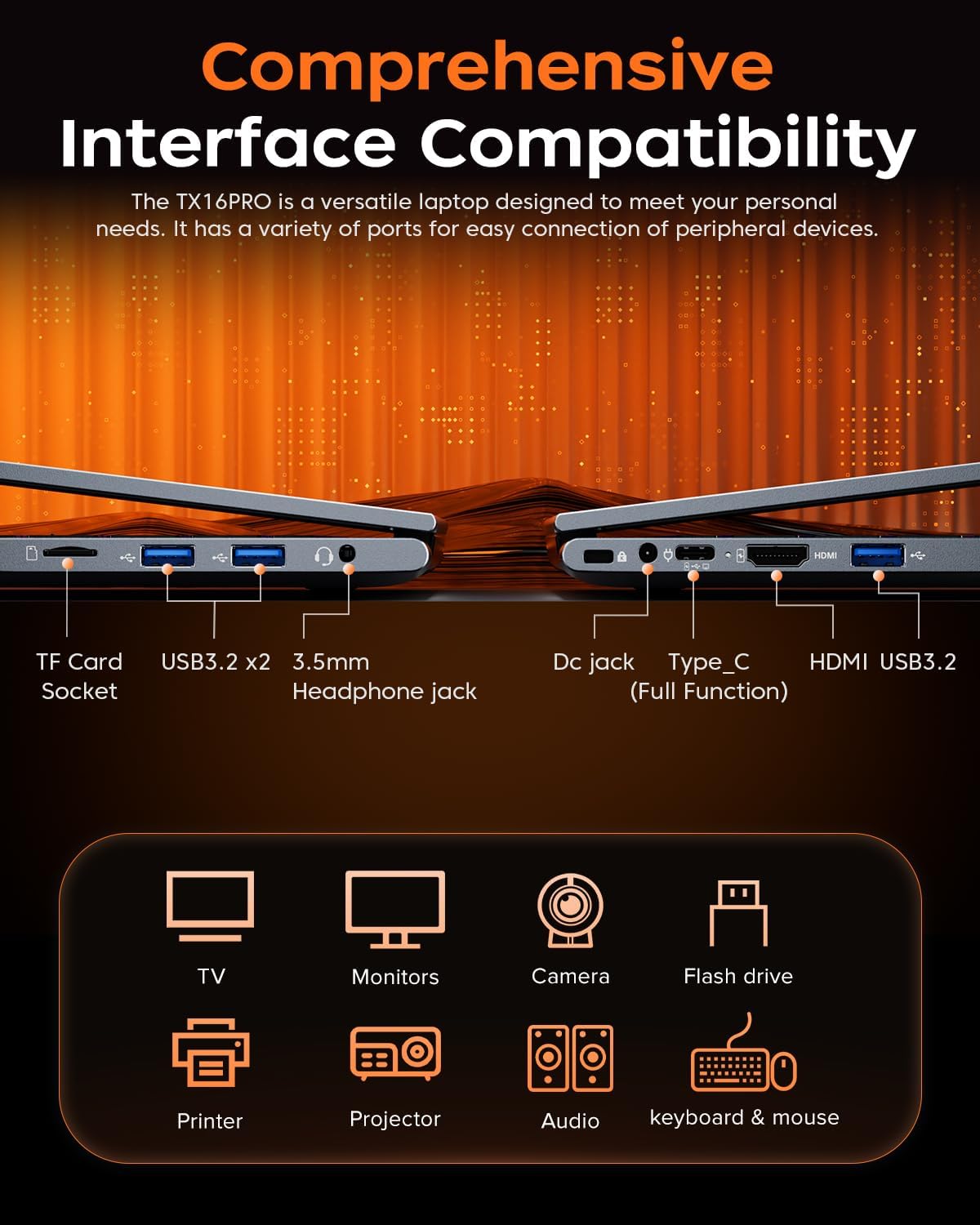
Kép: Bal oldal view of the laptop, showing the TF card socket, two USB 3.2 ports, and the 3.5mm headphone jack.
3. Használati útmutató
3.1 Billentyűzet és érintőpad
The laptop features a backlit keyboard and a responsive touchpad with multi-touch capabilities. The backlit keyboard enhances visibility in low-light conditions, and the numeric keypad provides convenience for data entry.
- Háttérvilágítás szabályozás: Use the dedicated function keys (e.g., Fn + Fx) to adjust keyboard backlight brightness or toggle it on/off.
- Az érintőpad mozdulatai: Utilize multi-touch gestures for navigation, zooming, and other functions within Windows 11 Pro.

Image: Close-up of the laptop's backlit keyboard and large touchpad, illustrating its design and functionality.
3.2 Kijelző
The 16-inch IPS display offers Full HD (1920x1200) resolution for clear and vibrant visuals. Adjust display settings through Windows settings for optimal viewtapasztalattal.

Image: The laptop screen showcasing vivid graphics, emphasizing the 16-inch display with Full HD (1920x1200) resolution and IPS technology.
3.3 Vezeték nélküli kapcsolat
The LX16PRO supports WiFi 6 and Bluetooth 5.2 for fast and reliable wireless connections.
- WiFi 6: Connect to high-speed wireless networks for internet access and online activities.
- Bluetooth 5.2: Pair with Bluetooth-enabled devices such as headphones, speakers, or other peripherals.

Image: A visual comparison demonstrating the improved transfer speeds and reduced latency of WiFi 6 over WiFi 5, beneficial for gaming and streaming.
3.4 Energia mód
Optimize performance and battery life by adjusting power modes in Windows settings (Settings > System > Power & battery).
- Legjobb teljesítmény: Maximizes system speed for demanding tasks like gaming.
- Kiegyensúlyozott: Offers a good compromise between performance and power efficiency for everyday use.
- Best Power Efficiency: Conserves battery life for extended usage, suitable for light tasks.

Image: The laptop displayed alongside three power modes, indicating their respective performance levels and recommended uses for gaming, work, and extended battery life.
4. Karbantartás
4.1 Az akkumulátor gondozása
- Kerülje az akkumulátor gyakori teljes lemerítését.
- Hosszabb használaton kívül a laptopot hűvös, száraz helyen tárolja.
- Az akkumulátor optimális élettartamának érdekében kerülje a laptop szélsőséges hőmérsékletnek való kitételét.

Kép: Egy belső view of the laptop highlighting the 54Wh battery, indicating its capacity for extended use.
4.2 Tároláskezelés
- Regularly clean up unnecessary files and applications to maintain optimal performance of the 512GB NVMe SSD.
- Consider external storage or cloud services for large files to free up internal drive space.

Image: A visual representation of the laptop's memory (16GB DDR4 RAM, upgradable to 64GB) and storage (512GB NVMe SSD, upgradable to 4TB) capabilities.
4.3 Tisztítás
- A képernyő és a külső felületek tisztításához puha, szöszmentes kendőt használjon.
- Kerülje az erős vegyszereket vagy dörzsölő anyagokat.
- Periodically clean the cooling vents to ensure proper airflow and prevent overheating.

Image: An illustration of the laptop's internal cooling system, featuring dual copper pipes and a dedicated fan designed to maintain low temperatures during operation.
5. Hibaelhárítás
If you encounter issues with your ACEMAGIC LX16PRO laptop, refer to the following common solutions:
- Nincs áram: Győződjön meg arról, hogy a hálózati adapter megfelelően csatlakozik mind a laptophoz, mind egy működő konnektorhoz. Ellenőrizze a tápellátásjelző lámpát.
- Megjelenítési problémák: If the screen is blank, try connecting an external monitor via HDMI to check if the issue is with the laptop's display or graphics output. Adjust display settings in Windows.
- Csatlakozási problémák: For WiFi issues, restart your router and the laptop. For Bluetooth, ensure the device is discoverable and within range.
- Lassú teljesítmény: Close unnecessary applications, check for background processes, and ensure your system is up to date. Consider running a disk cleanup.
- Rendszer lefagyása: Ha a rendszer nem reagál, nyomja meg és tartsa lenyomva a bekapcsológombot 10-15 másodpercig a kikapcsolás kényszerítéséhez. Indítsa újra a laptopot.
For further assistance, please contact ACEMAGIC customer support.
6. Műszaki adatok
Below are the detailed specifications for the ACEMAGIC LX16PRO Gaming Laptop:
| Funkció | Részlet |
|---|---|
| Modell neve | LX16PRO |
| Processzor | AMD Ryzen 7 7730U (8 mag, 16 szál, akár 4.5 GHz) |
| Grafika | AMD Radeon ™ grafika |
| RAM | 16GB DDR4 (2666 MHz), Max 64GB |
| Tárolás | 512GB NVMe SSD (PCIE x 4), Max 4TB |
| Kijelző | 16-inch IPS, 1920x1200 (FHD), 60 Hz |
| Operációs rendszer | Windows 11 Pro |
| Kapcsolódás | WiFi 6 (802.11ax), Bluetooth 5.2 |
| Portok | 1x HDMI, 1x Type-C (Full Function), 3x USB 3.2, 1x 3.5mm Audio Jack, 1x TF Card Socket, 1x DC Jack |
| Billentyűzet | Backlit Keypad, QWERTY Layout |
| Érintőpad | Multi-touch |
| Webbütyök | Igen (elülső) |
| Akkumulátor | 1 Lithium Ion, 55 Watt Hours (approx. 4 hours life) |
| Méretek | 35.73 x 22.86 x 1.67 cm |
| Súly | 1.78 kg |
7. Garancia és támogatás
ACEMAGIC provides customers with a one-year limited warranty and 30-day returns. Lifetime technical support and offline maintenance are also available. For any issues or inquiries, please feel free to contact ACEMAGIC customer support.
8. Termék végeview Videó
Videó: Rövid áttekintésview of the ACEMAGIC TX16PRO Laptop, showcasing its 16-inch FHD display, 180-degree hinge, backlit keyboard, and various connectivity ports including DC jack, Type-C, HDMI, USB 3.2, TF card socket, and 3.5mm headphone jack. This video highlights the physical features and design of the laptop.