
1. Bevezetés
This manual provides detailed instructions for the safe and efficient use of your Surfans F20 Pro Android Hi-Res Music Player. Please read this manual thoroughly before operating the device and retain it for future reference.
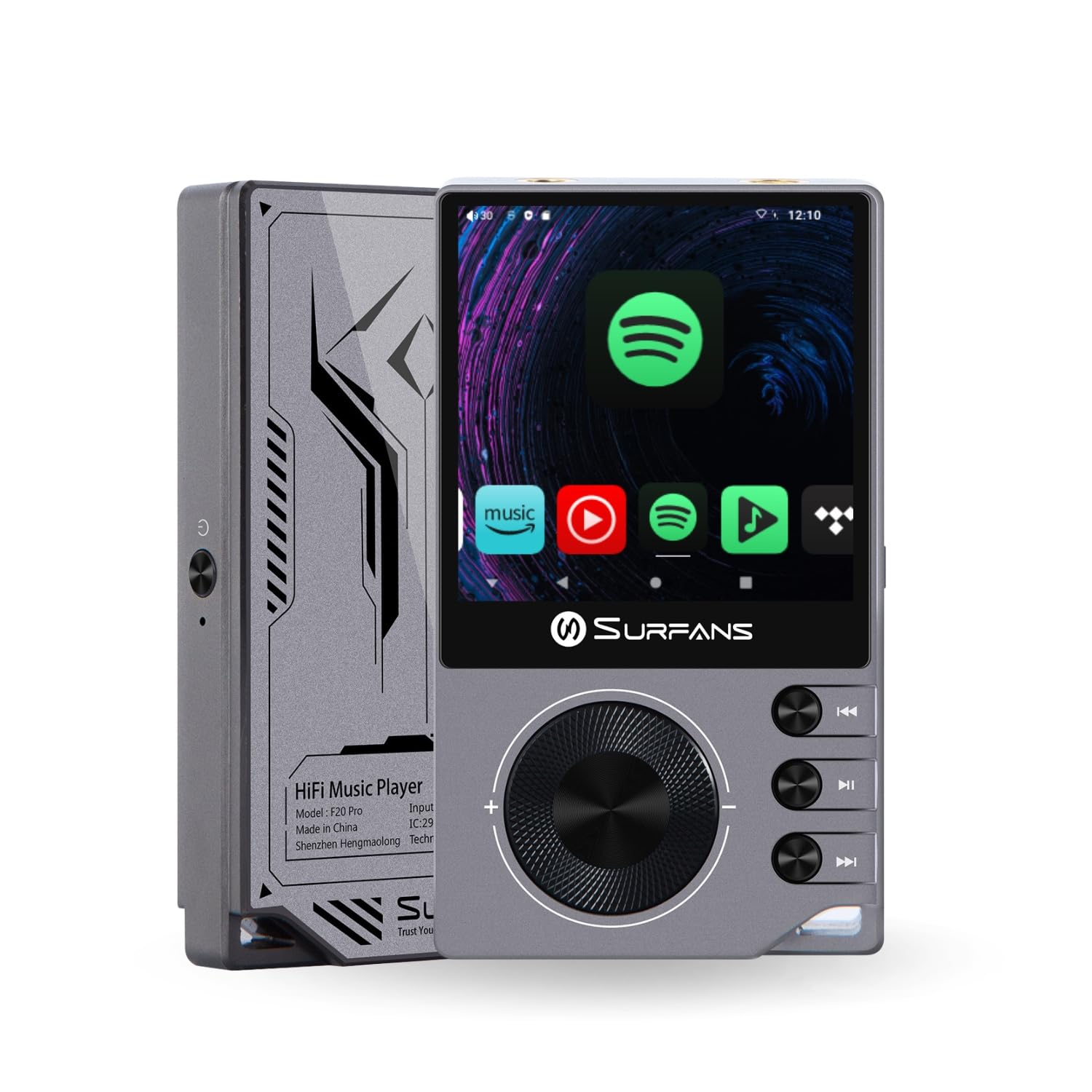
The Surfans F20 Pro Hi-Res Music Player, showcasinkompakt kialakításának és érintőképernyős kezelőfelületének köszönhetően.
2. A csomag tartalma
Ellenőrizze, hogy minden elem megvan-e a csomagban:
- Surfans F20 Pro Hi-Res Music Player
- C típusú USB kábel
- 32 GB MicroSD Memory Card (pre-installed or separate)
- Védőtok
- Felhasználói kézikönyv (ez a dokumentum)
3. Eszköz végeview
Familiarize yourself with the physical components and ports of your F20 Pro player.

Elöl és hátul view of the Surfans F20 Pro, highlighting its robust CNC metal chassis and button layout.
3.1. Főbb jellemzők
- Dual ESS9018Q2M DACs: For high-fidelity audio processing.
- Octa-Core Android 12 System: Enables streaming app compatibility and smooth operation.
- 3.5mm Single-Ended & 4.4mm Balanced Outputs: Versatile headphone connectivity.
- Bluetooth 5.0 LDAC-vel: High-quality wireless audio transmission.
- Dual-Band Wi-Fi (2.4GHz & 5GHz): For stable internet connectivity.
- Bővíthető tárhely: Supports up to 1TB via MicroSD card.
- 2.7 hüvelykes érintőképernyő: Intuitív felhasználói felület.
4. Beállítás
4.1. A készülék töltése
Before first use, fully charge the F20 Pro. Connect the included USB Type-C cable to the device's charging port and a compatible USB power adapter (not included) or computer USB port. The charging indicator will show the charging status.
4.2. MicroSD-kártya behelyezése
The F20 Pro supports MicroSD cards up to 1TB for expanded storage. Locate the MicroSD card slot on the side of the device. Gently insert the card until it clicks into place. To remove, push the card in again until it springs out.
4.3. Kezdeti bekapcsolás
Press and hold the power button until the screen illuminates. Follow the on-screen prompts to complete the initial setup, including language selection and Wi-Fi connection.
4.4. Csatlakozás Wi-Fi-hez
Navigáljon ide Beállítások > Hálózat és internet > Wi-Fi. Select your desired network and enter the password if prompted. The F20 Pro supports both 2.4GHz and 5GHz Wi-Fi bands.

The Surfans F20 Pro demonstrating its dual-band Wi-Fi capability for fast and stable connections.
4.5. Bluetooth párosítás
Bluetooth fejhallgató vagy hangszóró csatlakoztatásához:
- Győződjön meg róla, hogy a Bluetooth-eszköz párosítási módban van.
- On the F20 Pro, go to Beállítások > Csatlakoztatott eszközök > Új eszköz párosítása.
- Válassza ki az eszközét a listából, és erősítse meg a párosítást.

An illustration of the Bluetooth 5.0 chip, indicating support for high-resolution wireless audio codecs like LDAC.
5. A készülék kezelése
5.1. Alapvető navigáció
The F20 Pro features a 2.7-inch touchscreen for navigation. Swipe to scroll, tap to select, and use the physical buttons for quick controls:
- Bekapcsoló gomb: Power on/off, screen on/off.
- Hangerő kerék: Beállítja a hangkimenet hangerejét.
- Lejátszásvezérlő gombok: Play/Pause, Next Track, Previous Track.
5.2. Zene lejátszása
The F20 Pro supports various audio formats including DSD512, 192kHz/24bit, FLAC, WAV, WMA, M4A, MP3, MP2, and AAC.
5.2.1. Helyi Files
Zene átvitele files to the device's internal storage or MicroSD card via USB connection to a computer. Use the pre-installed music player application to browse and play your library.
5.2.2. Streaming alkalmazások
The Android 12 operating system allows installation of streaming apps like Spotify, Apple Music, Tidal, or YouTube. Connect to Wi-Fi and download apps from the Google Play Store or other compatible sources.

The Surfans F20 Pro's screen showing various streaming application icons, demonstrating its Android capabilities.
5.3. Headphone Connections
The device offers both single-ended and balanced audio outputs.
- 3.5 mm-es egyvégű kimenet: Standard headphone jack (125mW/32Ω).
- 4.4 mm-es kiegyensúlyozott kimenet: For enhanced audio performance with compatible headphones (500mW/32Ω).

Közelkép view of the 3.5mm single-ended and 4.4mm balanced audio output ports on the Surfans F20 Pro.
6. Karbantartás
6.1. Tisztítás
Use a soft, dry, lint-free cloth to clean the device. Avoid using abrasive cleaners or solvents, which may damage the surface.
6.2. Szoftverfrissítések
Periodically check for software updates to ensure optimal performance and access to new features. Updates can typically be found in Beállítások > Rendszer > Rendszerfrissítés.
6.3. Az akkumulátor gondozása
Az akkumulátor élettartamának meghosszabbítása érdekében kerülje a készülék gyakori teljes lemerítését. Ha hosszabb ideig nem használja, tárolja a készüléket hűvös, száraz helyen.

Egy belső view of battery cells, representing the long-lasting battery capacity of the F20 Pro.
7. Hibaelhárítás
If you encounter issues with your F20 Pro, refer to the following common problems and solutions:
| Probléma | Lehetséges ok | Megoldás |
|---|---|---|
| A készülék nem kapcsol be | Alacsony akkumulátorszint; Rendszerösszeomlás | Charge the device; Press and hold the power button for 10-15 seconds to force restart. |
| Nincs hangkimenet | Volume too low; Incorrect output selected; Faulty headphones | Increase volume; Check headphone connection; Test with different headphones. |
| Nem lehet csatlakozni a Wi-Fi-hez | Helytelen jelszó; Hatótávolságon kívül; Router probléma | Verify password; Move closer to router; Restart router. |
| Slow performance/App crashes | Too many apps running; Low storage; Outdated software | Close background apps; Free up storage; Check for system updates. |
8. Műszaki adatok
Detailed technical specifications for the Surfans F20 Pro:
| Funkció | Részlet |
|---|---|
| Márka | Surfans |
| Modell neve | F20 PRO |
| DAC chipek | Dual ESS9018Q2M |
| Op-Amps | Dual OPA1612 |
| Operációs rendszer | Android 12 |
| RAM | 3 GB |
| Belső tárhely | 32 GB |
| Bővíthető tárhely | Akár 1 TB MicroSD kártyával |
| Képernyőméret | 2.73 hüvelyk |
| Kapcsolódás | Aux, Bluetooth 5.0 (LDAC), USB Type-C, Wi-Fi (2.4GHz & 5GHz) |
| Audio kimenetek | 3.5mm Single-Ended (125mW/32Ω), 4.4mm Balanced (500mW/32Ω) |
| Támogatott hangformátumok | DSD512, 192kHz/24bit, FLAC, WAV, WMA, M4A, MP3, MP2, AAC |
| Szín | Szürke |

An illustration of the dual ESS9018K2M DAC chips, central to the F20 Pro's high-resolution audio capabilities.
9. Jótállási információk
The Surfans F20 Pro comes with a 1 év garancia a vásárlás dátumától számítva. Ez a garancia a gyártási hibákra és a gyártási hibákra vonatkozik rendeltetésszerű használat esetén. Nem terjed ki a nem rendeltetésszerű használat, balesetek, jogosulatlan módosítások vagy a normál kopás és elhasználódás okozta károkra. Kérjük, őrizze meg a vásárlást igazoló bizonylatot a garanciális igények benyújtása érdekében.
10. Ügyfélszolgálat
For further assistance, technical support, or warranty inquiries, please contact Surfans customer service through the official website or your retailer. You may also find additional resources and FAQs online.