
1. Bevezetés
This manual provides detailed instructions for the installation, operation, and maintenance of your VSTARCAM CS995 Pan/Tilt Smart Security Camera. This indoor camera is designed to provide comprehensive surveillance with features such as 2K QHD resolution, full-color night vision, motion detection, and two-way audio. Please read this manual thoroughly before using the product to ensure proper setup and functionality.
2. A csomag tartalma
Ellenőrizze, hogy az alább felsorolt tételek mindegyike megtalálható-e a csomagban. Ha bármelyik tétel hiányzik vagy sérült, kérjük, vegye fel a kapcsolatot az ügyfélszolgálattal.
- VSTARCAM CS995 Pan/Tilt Smart Security Camera
- Tápadapter
- Töltő kábel
- Szerelőcsavar készlet
- Állvány
- Használati utasítás (ez a dokumentum)
3. Termék végeview
The VSTARCAM CS995 camera offers advanced features for indoor monitoring.
3.1 Főbb jellemzők
- 360° PTZ Coverage: Pan 310° horizontally and tilt 115° vertically for complete room coverage.
- 2K QHD felbontás: Captures clear, detailed video footage.
- Teljes színű éjjellátó: Provides clear, colored images up to 15ft in low-light conditions using dual light sources.
- Motion & Human Detection: AI-powered detection sends real-time alerts to your mobile phone upon detecting motion or human figures.
- Kétirányú hang: Built-in microphone and speaker allow for clear communication with family or pets.
- Rugalmas tárolás: Supports local storage via Micro SD card (up to 256GB, not included) and cloud storage (7-day trial available).
- 2.4 GHz-es Wi-Fi csatlakozás: Connects to your home network for remote access and control.
3.2 Kameraalkatrészek
Familiarize yourself with the physical components of your camera.

Image: VSTARCAM CS995 camera illustrating its 310° pan and 115° tilt capabilities. The image shows the camera in a living room setting, monitoring a child playing.
- Lencse: Fő kameralencse videofelvételhez.
- Infravörös LED-ek/reflektorok: Éjjellátó és megvilágítási célokra.
- Mikrofon: Hangbemenethez kétirányú kommunikáció során.
- Hangszóró: For audio output during two-way communication and alerts.
- Micro SD kártyahely: Helyi videótároláshoz.
- Tápport: A hálózati adapter csatlakoztatásához.
- Reset gomb: Used for factory reset (usually a small pinhole).
4. Beállítási útmutató
4.1 A kamera bekapcsolása
- Connect the charging cable to the camera's power port.
- Csatlakoztassa a hálózati adaptert egy szabványos elektromos aljzathoz.
- The camera will power on and initiate its self-test, indicated by a rotating motion and status light.
4.2 Installing the O-KAM Pro App
- Download the "O-KAM Pro" app from your smartphone's app store (App Store for iOS, Google Play Store for Android).
- Regisztráljon egy új fiókot, vagy jelentkezzen be, ha már van.
4.3 A kamera csatlakoztatása Wi-Fi-hez
Győződjön meg róla, hogy okostelefonja 2.4 GHz-es Wi-Fi hálózathoz csatlakozik. A kamera nem támogatja az 5 GHz-es Wi-Fi-t.
- Open the O-KAM Pro app and tap the "+" icon to add a new device.
- Follow the on-screen instructions to select your camera model and begin the pairing process.
- You may be prompted to scan a QR code displayed on your phone with the camera, or to enter your Wi-Fi credentials.
- Wait for the camera to connect to your Wi-Fi network. A voice prompt or status light change will indicate a successful connection.
4.4 Micro SD-kártya behelyezése (opcionális)
For local storage, insert a Micro SD card (up to 256GB, not included) into the designated slot on the camera. Ensure the camera is powered off before inserting or removing the card.
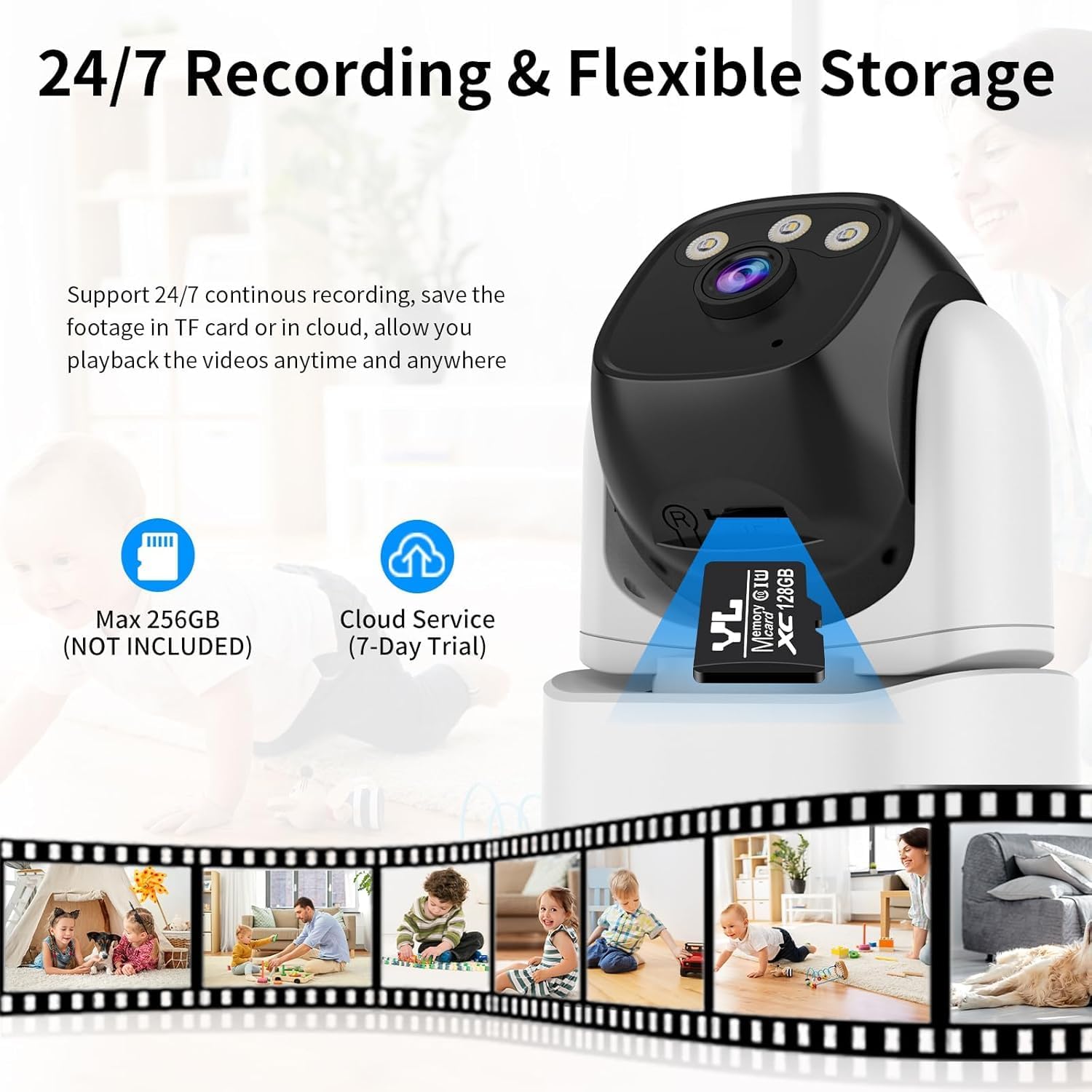
Image: VSTARCAM CS995 camera highlighting the Micro SD card slot and indicating support for both local (SD card) and cloud storage options.
5. Használati útmutató
5.1 Élőben View és PTZ vezérlés
Once connected, open the O-KAM Pro app to view az élő közvetítést a kamerádból.
- Pásztázás/döntés: Húzza az ujját az élő nézeten view screen to remotely adjust the camera's horizontal (pan) and vertical (tilt) angles.
- Zoomolás: Use pinch-to-zoom gestures on the live view to digitally zoom in or out.
Image: VSTARCAM CS995 camera illustrating its 310° pan and 115° tilt capabilities. The image shows the camera in a living room setting, monitoring a child playing.
5.2 Kétirányú hang
The camera supports two-way communication.

Image: VSTARCAM CS995 camera demonstrating its two-way audio function, showing a child communicating with an adult via the camera.
- Koppints a mikrofon ikonra az alkalmazás élő nézetében view hogy a kamera hangszóróján keresztül beszéljen.
- Tap the speaker icon to listen to audio from the camera's environment.
5.3 Mozgás- és emberi érzékelés
The camera can detect motion and human figures, sending alerts to your phone.

Image: VSTARCAM CS995 camera demonstrating AI-powered motion and human detection, showing the camera tracking a person in a living room.
- Figyelmeztetések engedélyezése: In the app settings, navigate to "Detection Settings" to enable motion and human detection.
- Customize Zones: Határozza meg a kamera adott területeit view mozgásérzékeléshez.
- Érzékenység: Állítsa be az érzékelési érzékenységet a téves riasztások minimalizálása érdekében.

Image: VSTARCAM CS995 camera illustrating real-time alert notifications, including spotlight activation, alarm alerts, and push notifications to a smartphone when motion is detected.
5.4 Éjjellátó módok
A kamera több éjjellátó funkciót kínál:

Image: VSTARCAM CS995 camera demonstrating its three night vision modes: Infrared (black and white), Full Color (using ambient light or spotlights), and Smart Light (activates spotlights upon detection for color vision).
- Infravörös mód: Standard fekete-fehér éjjellátó.
- Teljes szín mód: Utilizes built-in spotlights to provide color images in the dark.
- Smart Light Mode: The camera remains in infrared mode and switches to full color with spotlights upon detecting motion.
You can switch between these modes in the O-KAM Pro app settings.
5.5 Felvétel és lejátszás
The camera supports 24/7 continuous recording to a Micro SD card or cloud storage.
- SD-kártya felvétele: Ensure a Micro SD card is inserted and formatted via the app. Recordings will be saved locally.
- Felhőbeli tárhely: Activate the cloud storage service (7-day trial available) through the app for remote backup.
- Lejátszás: Hozzáférés rögzített footage through the "Playback" section in the O-KAM Pro app.
5.6 Többfelhasználós megosztás
You can share live views of your camera with other users through the O-KAM Pro app.
- In the app, go to the camera settings and find the "Share Device" option.
- Invite other users by entering their O-KAM Pro account details.
- Shared users will receive an invitation and can view the live feed and access certain features based on permissions granted.
6. Karbantartás
- Tisztítás: A kamera lencséjének és vázának tisztításához puha, száraz ruhát használjon. Kerülje a súrolószereket és oldószereket.
- Firmware frissítések: Regularly check the O-KAM Pro app for available firmware updates to ensure optimal performance and security.
- Elhelyezés: Ensure the camera is placed in a stable, dry indoor environment, away from direct sunlight or extreme temperatures.
7. Hibaelhárítás
7.1 A kamera nem csatlakozik Wi-Fi-hez
- Győződjön meg arról, hogy a Wi-Fi hálózata 2.4 GHz-es. A kamera nem támogatja az 5 GHz-es hálózatokat.
- Ellenőrizze, hogy az alkalmazásban megadott Wi-Fi jelszó helyes-e.
- A beállítás során helyezze közelebb a kamerát a Wi-Fi routerhez.
- Indítsd újra a routert és a kamerát, majd próbáld meg újra a csatlakozási folyamatot.
- Perform a factory reset on the camera by pressing and holding the reset button for several seconds until a voice prompt confirms.
7.2 Nincs mozgásérzékelési riasztás
- Check if motion detection is enabled in the O-KAM Pro app settings.
- Adjust the detection sensitivity. Higher sensitivity may be needed for subtle movements.
- Ensure notification permissions are enabled for the O-KAM Pro app on your smartphone.
- Ellenőrizze, hogy a kamera stabil internetkapcsolattal rendelkezik-e.
7.3 Issues with Two-Way Audio
- Ensure your phone's microphone and speaker are not muted or blocked.
- Check the volume settings within the O-KAM Pro app.
- Verify the camera's internet connection stability.
7.4 Unable to Share Camera with Family Members
- Ensure the family member has downloaded the O-KAM Pro app and created their own account.
- Double-check the account details (email/username) entered when sending the share invitation.
- The invited user must accept the sharing invitation within the app.
- Verify that both your device and the invited user's device have a stable internet connection.
8. Műszaki adatok
| Funkció | Részlet |
|---|---|
| Modell neve | CS995 |
| Beltéri/Kültéri használat | Beltéri |
| Videórögzítési felbontás | 1440p (2K QHD) |
| Csatlakozási technológia | Vezetékes (tápellátás), Wi-Fi (adatátvitel) |
| Vezeték nélküli kommunikációs technológia | Wi-Fi (csak 2.4 GHz) |
| Áramforrás | Vezetékes elektromos |
| Éjjellátó tartomány | 15 méter (kb. 49 láb) |
| Képkockasebesség | 20 képkocka másodpercenként |
| Tárolási lehetőségek | Micro SD Card (max 256GB), Cloud Storage |
| Ellenőrzési módszer | App (O-KAM Pro) |
| Pan/Döntés tartomány | Pan 310 °, dönthető 115 ° |
| A tétel méretei (H x Sz x Ma) | 5 x 3 x 3 hüvelyk |
| Tétel súlya | 11.2 uncia |
| Anyag | Műanyag |
9. Garancia és támogatás
VSTARCAM provides professional customer service. If you encounter any issues or have questions regarding your CS995 camera, please contact our support team.
- Elérhetőségek: Refer to the contact details provided on the product packaging or the official VSTARCAM webtelek.
- Garancia: Information regarding product warranty can be found on the official VSTARCAM weboldalon vagy az ügyfélszolgálaton keresztül.