
Bevezetés
This manual provides detailed instructions for the setup, operation, and maintenance of your LIGE EF19-A Smartwatch. This device features a 1.85-inch HD display, Bluetooth calling capabilities, extensive health monitoring, and over 100 sports modes. It is designed for durability with IP68 waterproofing and a robust build. Please read this manual thoroughly to ensure proper use and to maximize the functionality of your smartwatch.
1. Beállítás
1.1 A csomag tartalma
- 1 x LIGE EF19-A Smartwatch
- 2 x Watch Straps (1 steel, 1 silicone)
- 1x USB töltőkábel
- 1 x Type-C töltőkábel
- 1 x Strap Adjuster (Regulator)
- 1 x Felhasználói kézikönyv
1.2 Az okosóra töltése
Before initial use, fully charge your smartwatch.
- Csatlakoztasd a mágneses töltőkábelt az okosóra hátulján található töltőérintkezőkhöz.
- Connect the other end of the charging cable (USB or Type-C) to a compatible power source (e.g., USB wall adapter, computer USB port, power bank, car charger).
- Az óra kijelzője mutatja a töltés állapotát. A teljes feltöltés általában körülbelül 2 órát vesz igénybe.

Image: The smartwatch connected to a charging cable, illustrating its 1000 mAh battery capacity and charging process.
A fully charged battery provides up to 7-15 days of normal use and up to 50 days in standby mode.
1.3 Alkalmazás telepítése és párosítása
To access all features, download the companion app on your smartphone. The smartwatch is compatible with Android 5.1 and higher, and iOS 9.0 and higher.
- Scan the QR code provided in the manual or on the watch packaging, or search for the app name (usually specified in the quick start guide) in your phone's app store (Google Play Store for Android, Apple App Store for iOS).
- Telepítse az alkalmazást, és hozzon létre egy fiókot, ha a rendszer kéri.
- Győződjön meg arról, hogy a Bluetooth engedélyezve van az okostelefonon.
- Open the app and follow the on-screen instructions to add your device. The app will search for your smartwatch.
- Select your smartwatch (e.g., "EF19-A" or similar Bluetooth name) from the list of available devices to pair.
- Confirm the pairing request on both your smartphone and smartwatch if a prompt appears.
1.4 Strap Installation/Adjustment
The smartwatch comes with two interchangeable straps: a steel strap and a silicone strap.
- A heveder rögzítéséhez: Align the spring bar with the lug holes on the watch body and slide the pin into place.
- A heveder eltávolítása: Locate the small lever on the spring bar, pull it inwards, and gently detach the strap from the watch body.
- For the steel strap: Use the provided strap adjuster (regulator) to remove or add links for a comfortable fit. Refer to the specific instructions for the strap adjuster if needed.
2. Használati útmutató
2.1 Alapvető navigáció
- Érintőképernyő: Pöccintsen balra/jobbra, fel/le a menük és funkciók közötti navigáláshoz. Koppintson a kiválasztáshoz.
- Oldalsó gomb(ok): Typically, one button serves as a power on/off, back, or home button. Long press for power options, short press to return to the watch face or previous screen.
2.2 Bluetooth hívások és értesítések
Once paired with your smartphone, the smartwatch allows you to manage calls and receive notifications.
- Hívások kezdeményezése/fogadása: When a call comes in, the watch will display the caller ID. You can answer or reject calls directly from the watch. You can also dial numbers or select contacts from the watch interface.
- Üzenetértesítések: Receive notifications for SMS, Facebook, WhatsApp, Twitter, TikTok, and other apps directly on your watch. Swipe down from the watch face to view legutóbbi értesítések.

Image: The smartwatch showing an incoming call, message notifications, and the voice assistant interface.
2.3 Egészségügyi monitorozás
The smartwatch continuously monitors various health metrics.
- Pulzusszám: Access the heart rate monitoring function to view az aktuális pulzusszámod és a korábbi adatok.
- Vér oxigénszintje (SpO2): Mérje meg a vér oxigénszintjét.
- Alvásminőség: The watch automatically tracks your sleep patterns, including deep sleep, light sleep, and wake times. View részletes alvásjelentések a társalkalmazásban.
- Stresszszint: Figyeld a stressz-szintedet a nap folyamán.
- Légzési tréning: Engage in guided breathing exercises to help manage stress.

Image: A user wearing the smartwatch, with the display showing real-time heart rate, blood oxygen saturation, and breathing exercise prompts.
Jegyzet: This device is not a medical device. Health monitoring data is for reference only and should not be used for medical diagnosis or treatment.
2.4 sportmód
The smartwatch supports over 100 sports modes for tracking your physical activity.
- Navigate to the "Workout" or "Sports" menu on your watch.
- Select your desired activity (e.g., running, cycling, swimming, hiking, yoga, badminton, basketball, golf).
- The watch will begin tracking metrics such as steps, distance, calories burned, and heart rate.
- End the workout by following the on-screen prompts. Detailed summaries are available on the watch and in the companion app.

Image: A person cycling while wearing the smartwatch, with the display showing steps, distance, calories, and heart rate for different sports activities.
2.5 Zseblámpa funkció
The smartwatch includes a built-in torch function for instant illumination.
- Access the torch function from the quick settings menu or app list.
- It offers different modes such as constant light, warning mode, and SOS mode.
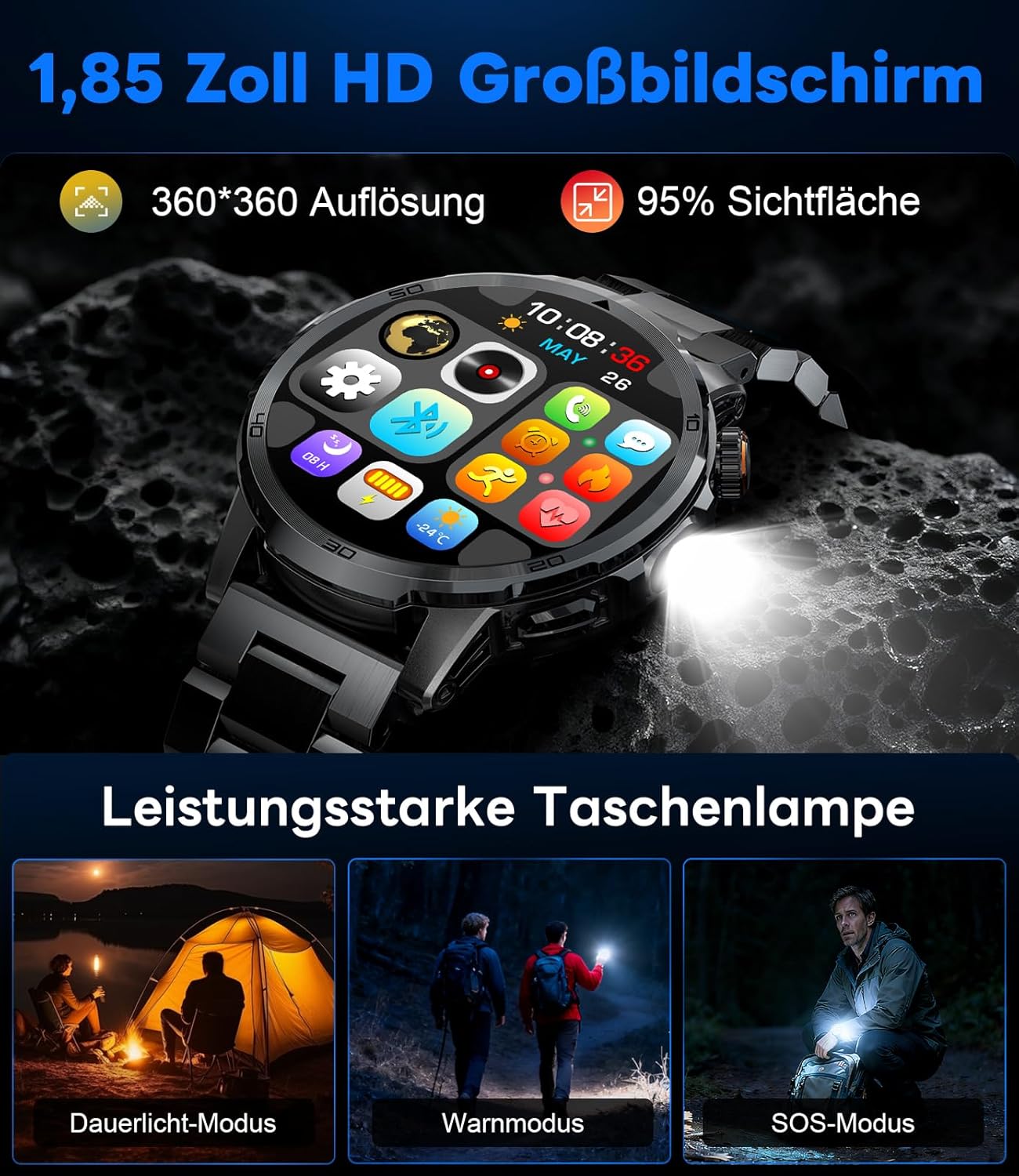
Image: The smartwatch displaying its 1.85-inch HD screen and demonstrating its powerful flashlight feature with different modes.
2.6 Egyéb funkciók
- Hangsegéd: Activate the voice assistant to control your phone or get information (e.g., "What's the weather?").
- Zenevezérlés: Control music playback on your smartphone (play, pause, skip tracks, adjust volume) directly from your watch.
- Kamera vezérlés: Használd az órádat okostelefonod kamerájának távirányítójaként.
- Időjárás előrejelzés: View aktuális időjárási körülmények és előrejelzések.
- Ébresztők és időzítők: Set alarms and use stopwatch/timer functions.
- Ital emlékeztető: Set reminders to drink water.
- Óralapok: Customize your watch face from over 100 options or upload your own photos via the app.

Image: The smartwatch interface displaying icons for music control, flashlight, camera control, weather, alarm, and drink reminders.

Image: A selection of diverse watch faces available for customization on the LIGE EF19-A Smartwatch.
3. Karbantartás
3.1 Tisztítás
- Regularly clean your smartwatch and straps with a soft, dry, lint-free cloth.
- Ha szükséges, használjon enyhén damp ronggyal, enyhe szappannal, majd törölje szárazra.
- Kerülje az erős vegyszerek, súrolószerek vagy oldószerek használatát, mivel ezek károsíthatják az óra felületét és tömítéseit.
- Töltés előtt győződjön meg arról, hogy a töltőérintkezők tiszták és szárazak.
3.2 Vízállóság (IP68)
The LIGE EF19-A Smartwatch is IP68 waterproof, meaning it is resistant to dust and can withstand immersion in water up to 1.5 meters for up to 30 minutes.
- It is suitable for daily use, such as hand washing, rain, and shallow water swimming.
- Avoid using the watch in hot water, saunas, or steam rooms, as steam can penetrate the seals and cause damage.
- Ne nyomkodja a gombokat víz alatt.
- After exposure to water, wipe the watch dry before charging or using.

Image: The smartwatch highlighting its robust military-grade design, including resistance to temperature extremes, shock, dust, and IP68 water resistance.
4. Hibaelhárítás
4.1 Az óra nem kapcsol be
- Győződjön meg róla, hogy az óra teljesen fel van töltve. Csatlakoztassa a töltőhöz legalább 30 percre.
- Try long-pressing the side button for 10-15 seconds to force a restart.
4.2 Nem lehet párosítani az okostelefonnal
- Győződjön meg arról, hogy a Bluetooth engedélyezve van az okostelefonon.
- Ensure the smartwatch is within Bluetooth range (typically 10 meters).
- Indítsd újra az okostelefonodat és az okosórádat is.
- Check if the app has the necessary permissions (location, Bluetooth, etc.).
- If previously paired, try "forgetting" the device in your phone's Bluetooth settings and re-pairing through the app.
4.3 Pontatlan egészségügyi adatok
- Győződjön meg róla, hogy az óra szorosan illeszkedik a csuklójára, körülbelül egy ujjnyival a csuklócsont felett.
- Kerülje a túlzott mozgást a mérések során.
- Tisztítsa meg az óra hátulján található érzékelőt.
- A környezeti tényezők és az egyéni fiziológia befolyásolhatják a leolvasott értékeket.
4.4 Nem jelennek meg az értesítések
- Ellenőrizze, hogy az óra sikeresen párosítva van-e az okostelefonjával.
- Check notification settings within the companion app to ensure desired apps are enabled for notifications.
- Győződjön meg arról, hogy a telefon értesítési beállításai engedélyezik a társalkalmazás számára az értesítések megjelenítését.
- Make sure your phone is not in "Do Not Disturb" mode.
5. Műszaki adatok
| Funkció | Specifikáció |
|---|---|
| Modellszám | EF19-A |
| Kijelző | 1.85-inch IPS HD Touch Screen, 360x360 pixels |
| Akkumulátor kapacitása | 1000 mAh lítium polimer |
| Akkumulátor élettartama (normál használat) | 7-15 nap |
| Az akkumulátor élettartama (készenléti állapot) | Akár 50 napig |
| Töltési idő | kb. 2 óra |
| Kapcsolódás | Bluetooth 5.2 |
| Vízállóság | IP68 (vízálló) |
| Memória tárolási kapacitása | 128 MB |
| Kompatibilis eszközök | Android 5.1+ / iOS 9.0+ Smartphones |
| Egészségügyi Monitoring | Heart Rate, Blood Oxygen, Sleep Quality, Stress Level |
| Sport módok | 100+ (e.g., Running, Cycling, Swimming, Hiking, Yoga) |
| További funkciók | Bluetooth Calls, Message Notifications, Torch, Voice Assistant, Music Control, Camera Control, Weather, Alarms, Timers, Drink Reminder, Customizable Watch Faces |
| GPS | Okostelefonon keresztül |
| Célközönség | Férfiak |
6. Jótállási információk
The LIGE EF19-A Smartwatch comes with a 2 év garancia a vásárlás dátumától számítva. Ez a garancia a gyártási hibákra és a rendeltetésszerű használat melletti meghibásodásokra vonatkozik.
A garancia nem terjed ki:
- Nem rendeltetésszerű használat, baleset, visszaélés, hanyagság vagy jogosulatlan módosítás okozta károk.
- Normal wear and tear, including scratches, dents, or cosmetic damage.
- Damage caused by exposure to extreme temperatures, liquids (beyond IP68 rating), or corrosive environments.
- Damage to accessories (straps, charging cables) unless defective upon receipt.
To claim warranty service, please retain your proof of purchase and contact customer support.
7. Ügyfélszolgálat
If you encounter any issues or have questions regarding your LIGE EF19-A Smartwatch that are not covered in this manual, please contact our customer support team.
- Refer to the contact information provided on the product packaging or the official LIGE webtelek.
- When contacting support, please provide your product model number (EF19-A) and a detailed description of the issue.