
Bevezetés
This manual provides detailed instructions for the setup, operation, and maintenance of your SPYPOINT FORCE-PRO 30 Megapixel 4K Trail Camera. Designed for outdoor monitoring, this camera captures high-resolution photos and videos, making it ideal for wildlife observation and security. Please read this manual thoroughly to ensure proper use and optimal performance of your device.
A csomag tartalma
Verify that all items listed below are present in your package. If any items are missing or damaged, please contact SPYPOINT customer support.
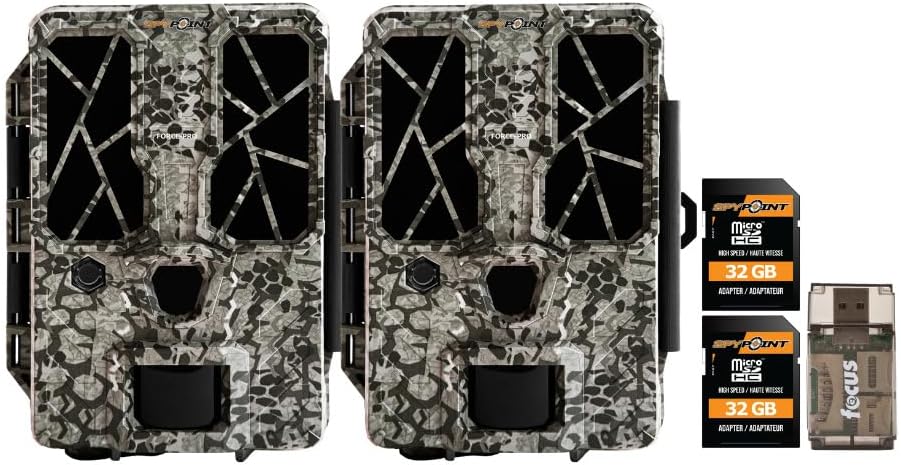
- 2 x SPYPOINT FORCE-PRO 30 Megapixel Trail Camera
- 2 x SPYPOINT MicroSD 32GB Ultra High Speed Class 10 Memory Card
- 1 x Focus All-In-One High Speed Card Reader

Termék végeview
The SPYPOINT FORCE-PRO is a robust trail camera designed for reliable performance in outdoor environments. It features advanced imaging capabilities and user-friendly controls.
Főbb jellemzők
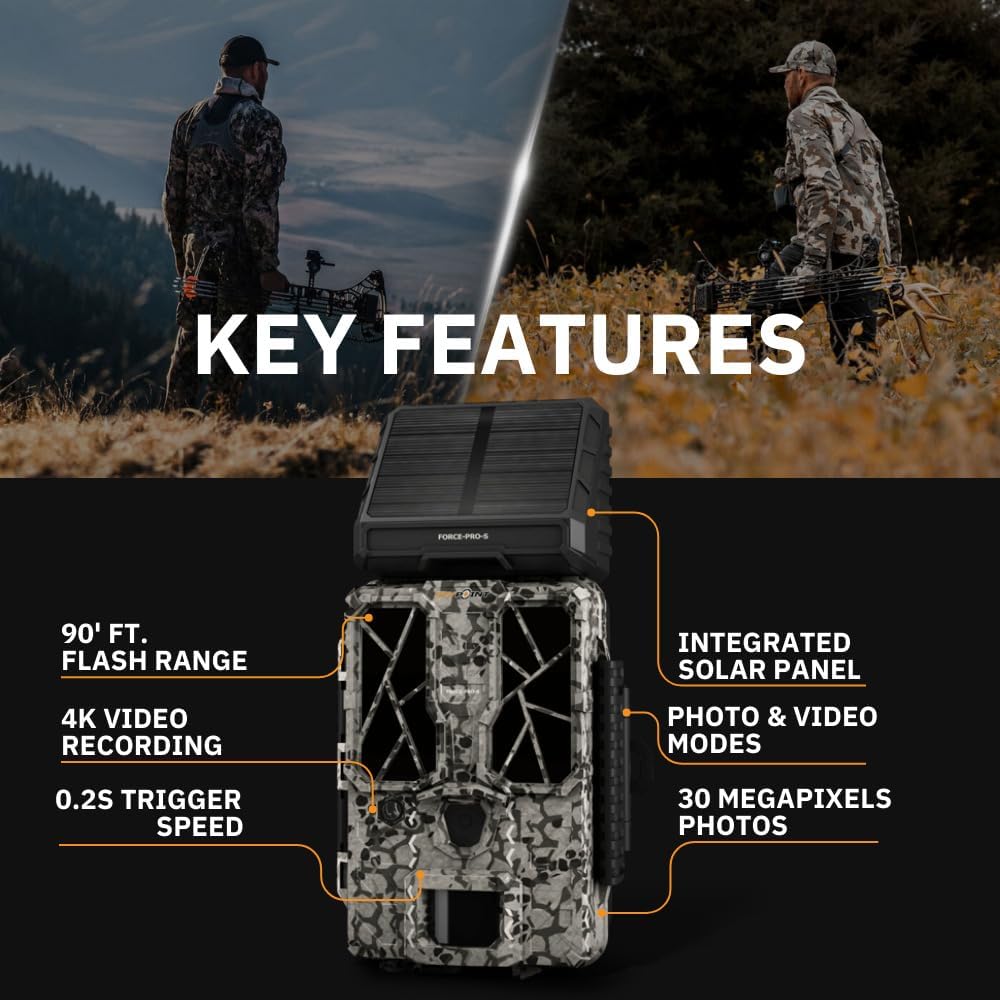
- Nagy felbontás: 30 Megapixel photos and 4K video recording with sound.
- Gyors indítási sebesség: Ultra-fast 0.2-second trigger speed to capture quick movements.
- Széles érzékelési tartomány: 110-foot detection range.
- Powerful Flash: 90-foot flash range with 54 LEDs for clear night images.
- Integrált napelem: For extended battery life and reduced maintenance.
- Dual-SIM Cellular: Automatically connects to the best available network for reliable transmission (if cellular model).



Beállítás
1. Power Source Installation
The FORCE-PRO camera is equipped with an integrated solar panel for charging its internal battery. For initial setup or extended use without sufficient sunlight, an external power source can be used.
- Belső akkumulátor: Ensure the camera's internal battery is charged. The integrated solar panel will charge it during daylight hours.
- Külső tápellátás (opcionális): If using an external 12V power source (not included), connect it to the camera's 12V jack.
2. MicroSD-kártya behelyezése
A MicroSD card is required to store photos and videos. Two 32GB MicroSD cards are included in this bundle.
- Keresd meg a MicroSD kártya foglalatát a kamerán.
- Helyezze be a MicroSD-kártyát az aranyozott érintkezőkkel a kamera hátulja felé, amíg a helyére nem kattan.
- Az eltávolításhoz finoman nyomja meg a kártyát, amíg ki nem pattan.
3. Kezdeti bekapcsolás és alapvető konfiguráció
- Turn the camera ON using the power switch.
- Follow the on-screen prompts (if available) or refer to the camera's menu for initial settings such as date, time, and language.
- Format the MicroSD card through the camera's menu for optimal performance.
4. A kamera felszerelése
The camera can be mounted using a strap, tripod, or other compatible mounting accessories. While specifications mention 'Tabletop Mount', for outdoor use, secure mounting is crucial.
- Válasszon olyan helyet, amely tiszta látást biztosít view a kívánt megfigyelési területről.
- Ensure the camera is securely fastened to prevent movement from wind or animals.
- Position the camera to avoid direct sunlight into the lens, which can cause overexposure.
Kezelési útmutató
Kamera módok
- Fotó mód: Kikapcsoláskor állóképeket rögzít.
- Videó mód: Videoklipeket rögzít, amikor aktiválódik.
- Fotó + videó mód: Captures a photo followed by a video clip.
Beállítások módosítása
Access the camera's menu using the built-in screen and navigation buttons to customize settings:
- Felbontás: Select desired photo (up to 30MP) and video (up to 4K) resolution. Higher resolutions consume more storage.
- Indítási késleltetés: Állítsa be az egymást követő triggerek közötti késleltetést.
- Érzékenység: Adjust the motion sensor sensitivity to suit the environment and avoid false triggers.
- Üzemidő: Define specific times the camera should be active.
- Dátum/Idő Stamp: Enable or disable the date and time overlay on images/videos.
Adatvisszakeresés
- MicroSD kártya: Remove the MicroSD card from the camera and insert it into the included Focus All-In-One High Speed Card Reader. Connect the card reader to a computer to access files.
- SPYPOINT App: For cellular models, use the SPYPOINT mobile application to view and manage captured media remotely. The app also allows for camera settings adjustments and firmware updates.
Karbantartás
- Tisztítás: Regularly clean the camera lens and housing with a soft, dry cloth. Avoid abrasive materials or harsh chemicals.
- Akkumulátor ellenőrzés: Monitor battery levels, especially during periods of low sunlight. The integrated solar panel helps maintain charge, but supplemental charging may be needed.
- Firmware frissítések: Periodically check for and install firmware updates via the SPYPOINT app or webwebhely az optimális teljesítmény és az új funkciókhoz való hozzáférés biztosítása érdekében.
- Tárolás: When not in use, store the camera in a cool, dry place away from direct sunlight.
Hibaelhárítás
- Camera Not Triggering: Check motion sensor sensitivity, ensure no obstructions, and verify battery level.
- Gyenge kép-/videóminőség: Clean the lens, check resolution settings, and ensure proper lighting conditions.
- Áramellátási problémák: Ensure the internal battery is charged or an external power source is properly connected. Check for any damage to power cables.
- MicroSD kártya hibák: Reformat the MicroSD card (backing up data first) or try a different card. Ensure the card is properly inserted.
- Connectivity Problems (Cellular Models): Verify cellular signal strength in the camera's location. Check your SPYPOINT app for data plan status.
Műszaki adatok
| Funkció | Specifikáció |
|---|---|
| Modell | FORCE-PRO |
| Fotó felbontás | 30 megapixel |
| Videó felbontás | 4K |
| Indító sebesség | 0.2 másodperc |
| Észlelési tartomány | 110 láb |
| Vaku hatótávolsága | 90 láb |
| LED-ek | 54 |
| Áramforrás | Integrated Solar Panel, Corded Electric (external 12V option) |
| Kapcsolódás | USB, Wired (for data transfer), Cellular (for remote management) |
| Anyag | Műanyag |
| Vízállóság | Vízálló |
| Fókusz típusa | Autofókusz |
| UPC | 196271434986 |
Garancia és támogatás
For warranty information, technical support, or service inquiries, please refer to the official SPYPOINT webweboldalukon, vagy vegye fel a kapcsolatot közvetlenül az ügyfélszolgálattal. Őrizze meg a vásárlást igazoló bizonylatot garanciális igények esetén.
SPYPOINT Webtelek: www.spypoint.com