
1. Bevezetés
The FIREBAT X3 Wired RGB Gaming Mouse is designed for precision and comfort, suitable for various computing tasks including gaming, office work, and general use. This manual provides detailed instructions for setting up, operating, and maintaining your mouse.

Felettview of the FIREBAT X3 Wired RGB Gaming Mouse highlighting its main features.
2. Beállítás
2.1 Az egér csatlakoztatása
The FIREBAT X3 Gaming Mouse features a simple plug-and-play design for easy setup.
- Locate an available USB-A port on your computer or laptop.
- Insert the USB connector of the mouse into the USB-A port.
- Your operating system will automatically detect and install the necessary drivers. No additional software installation is required for basic functionality.

The FIREBAT X3 mouse connects via a standard USB-A port for immediate use.
3. Működés
3.1 Gombfunkciók
The FIREBAT X3 Gaming Mouse is equipped with 6 programmable buttons for enhanced control.
- Bal gomb: Standard kattintási funkció.
- Jobb gomb: Normál jobb kattintás funkció.
- Görgő: Scrolls up and down. Can also be pressed for a middle-click function.
- DPI beállító kulcs: Changes the mouse sensitivity (DPI).
- Tovább gomb: Előre navigál a következőben: web böngészők ill file felfedezők.
- Vissza gomb: Visszafelé navigál web böngészők ill file felfedezők.

Illustration of the 6-button layout on the FIREBAT X3 Gaming Mouse.
3.2 DPI (érzékenység) beállítása
The mouse features 4 adjustable DPI levels to suit different tasks and preferences.
- Nyomja meg a DPI beállító kulcs (located behind the scroll wheel) to cycle through the preset DPI settings.
- The default DPI levels are 1200, 1800, 2400, and 3600.
- Each press will switch to the next DPI level, allowing you to find the optimal sensitivity for your current activity.

The DPI adjustment key allows for quick changes in mouse sensitivity.
3.3 RGB világítási mód
The FIREBAT X3 mouse features 7 dynamic RGB backlit modes to enhance your setup.
- The RGB lighting automatically cycles through its 7 distinct modes.
- There is no manual button to change the RGB mode; the mouse will continuously display various lighting effects.
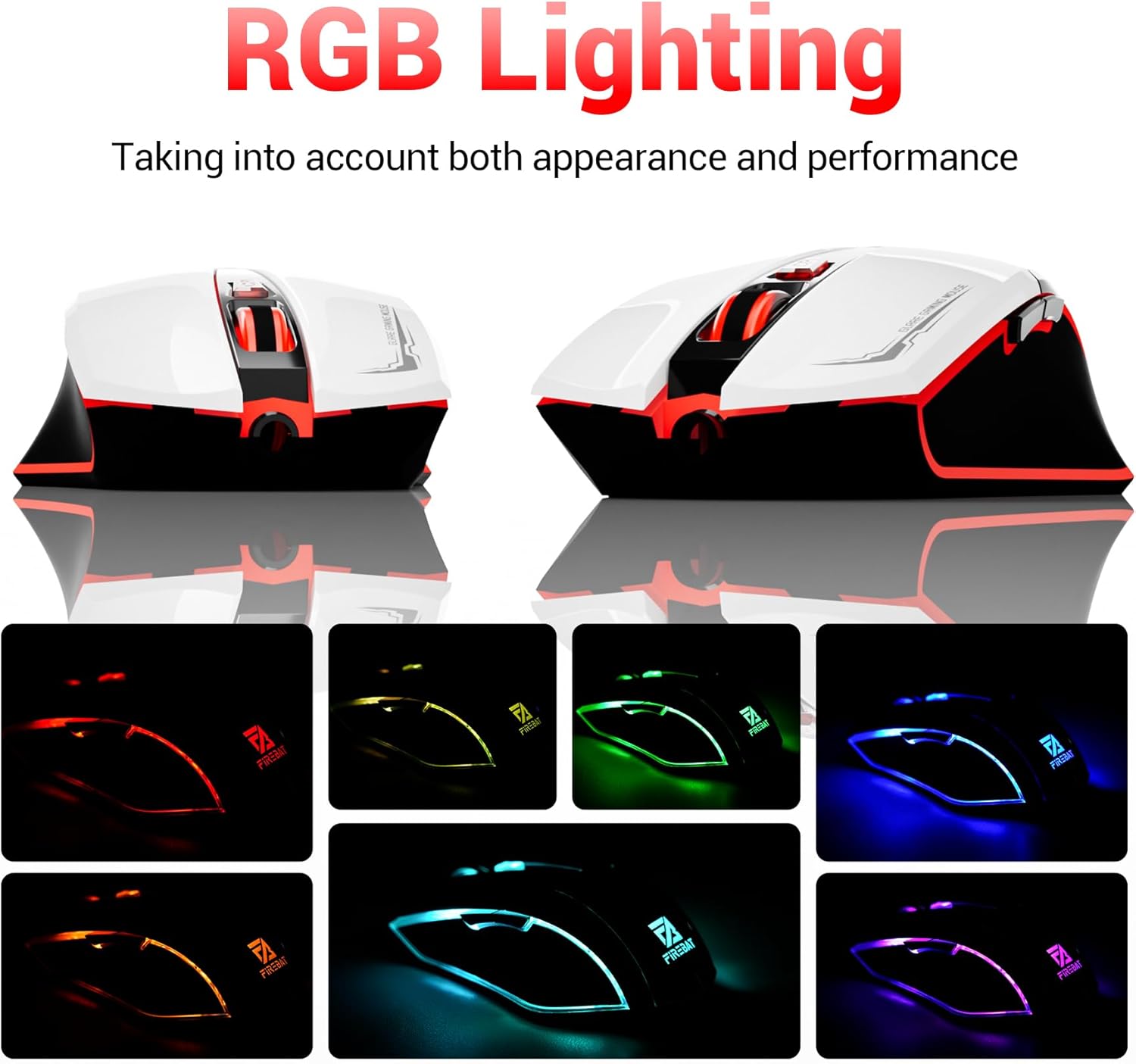
The mouse features vibrant RGB lighting with multiple dynamic modes.
3.4 Ergonomic Design and Comfort
The mouse is designed with an ergonomic shape to provide a comfortable grip and reduce hand fatigue during extended use, suitable for both right and left-hand users.

The ergonomic design ensures comfort during prolonged use.
3.5 Quiet Click Feature
The mouse incorporates a 'Heavy Bass Design' for its key sounds, ensuring soft clicks without excessive noise, which is beneficial in quiet environments.

The mouse features quiet clicks, minimizing noise during use.
4. Karbantartás
4.1 Tisztítás
To ensure optimal performance and longevity, keep your mouse clean.
- Tisztítás előtt húzza ki az egeret a számítógépből.
- Használjon puha, szöszmentes kendőt enyhén dampvízzel vagy enyhe tisztítószerrel törölje át az egér felületét.
- Kerülje az erős vegyszerek, súrolószerek vagy a túlzott nedvesség használatát, mivel ezek károsíthatják az egeret.
- For the optical sensor, use a cotton swab to gently remove any dust or debris.
4.2 Tárolás
Használaton kívül az egeret tiszta, száraz helyen, szélsőséges hőmérsékletektől és közvetlen napfénytől védve tárolja.
5. Hibaelhárítás
5.1 Az egér nem reagál
- Ellenőrizze az USB csatlakozást: Győződjön meg arról, hogy az USB-kábel megfelelően van csatlakoztatva a számítógép egy működő USB-portjához. Próbáljon ki egy másik USB-portot.
- Számítógép újraindítása: Néha egy egyszerű újraindítás is megoldhatja a kapcsolódási problémákat.
- Teszt egy másik számítógépen: If possible, test the mouse on another computer to determine if the issue is with the mouse or your computer's setup.
5.2 A kurzor mozgása szabálytalan vagy ugráló
- Tiszta optikai érzékelő: Dust or debris on the optical sensor can cause erratic movement. Refer to the cleaning instructions in the Maintenance section.
- Use a Mouse Pad: Ensure you are using the mouse on a suitable surface. Reflective, transparent, or uneven surfaces can interfere with the optical sensor.
5.3 Az RGB világítás nem működik
- Check USB Power: Ensure the mouse is receiving sufficient power through the USB connection.
- Nincs kézi vezérlés: Remember that the RGB lighting cycles automatically and does not have a manual control button. If the mouse is functioning otherwise, the lighting should be active.
6. Műszaki adatok
| Funkció | Részlet |
|---|---|
| Modellszám | X3 Gaming Mouse |
| Márka | FIREBAT |
| Csatlakozási technológia | USB vezetékes |
| Mozgásérzékelés | Optikai |
| DPI szintek | 1200 / 1800 / 2400 / 3600 |
| Gombok száma | 6 (Programozható) |
| Háttérvilágítás | 7 RGB mód |
| Termék méretei | 5 x 3 x 0.1 hüvelyk (12.7 x 7.6 x 0.25 cm) |
| Tétel súlya | 5.1 uncia (144.6 gramm) |
| Ergonómia | Right or Left Hand Use |
| Gyártó | FIREBAT |

Physical dimensions and weight of the FIREBAT X3 Gaming Mouse.
7. Garancia és támogatás
7.1 Jótállási információk
FIREBAT products are manufactured to high-quality standards. For specific warranty details, please refer to the warranty card included with your product or visit the official FIREBAT webwebhely. A termékekre jellemzően korlátozott garancia vonatkozik, amely a gyártási hibákra vonatkozik.
7.2 Ügyfélszolgálat
If you encounter any issues or have questions regarding your FIREBAT X3 Gaming Mouse, please contact our customer support team:
- Email: support@firebatpc.com
- Webtelek: www.firebatpc.com
Please provide your product model number (X3 Gaming Mouse) and a detailed description of your issue when contacting support for faster assistance.