
Pinmoco G700412K-RST
Pinmoco TV Stand User Manual
Model: G700412K-RST
1. Bevezetés
Thank you for choosing the Pinmoco TV Stand. This entertainment center is designed to accommodate TVs up to 47 inches, offering a stylish and functional solution for your living room or bedroom. Its open-shelf design promotes air circulation for electronics and provides ample storage for media devices and accessories. This manual provides essential information for assembly, usage, and maintenance to ensure safe and optimal performance of your TV stand.
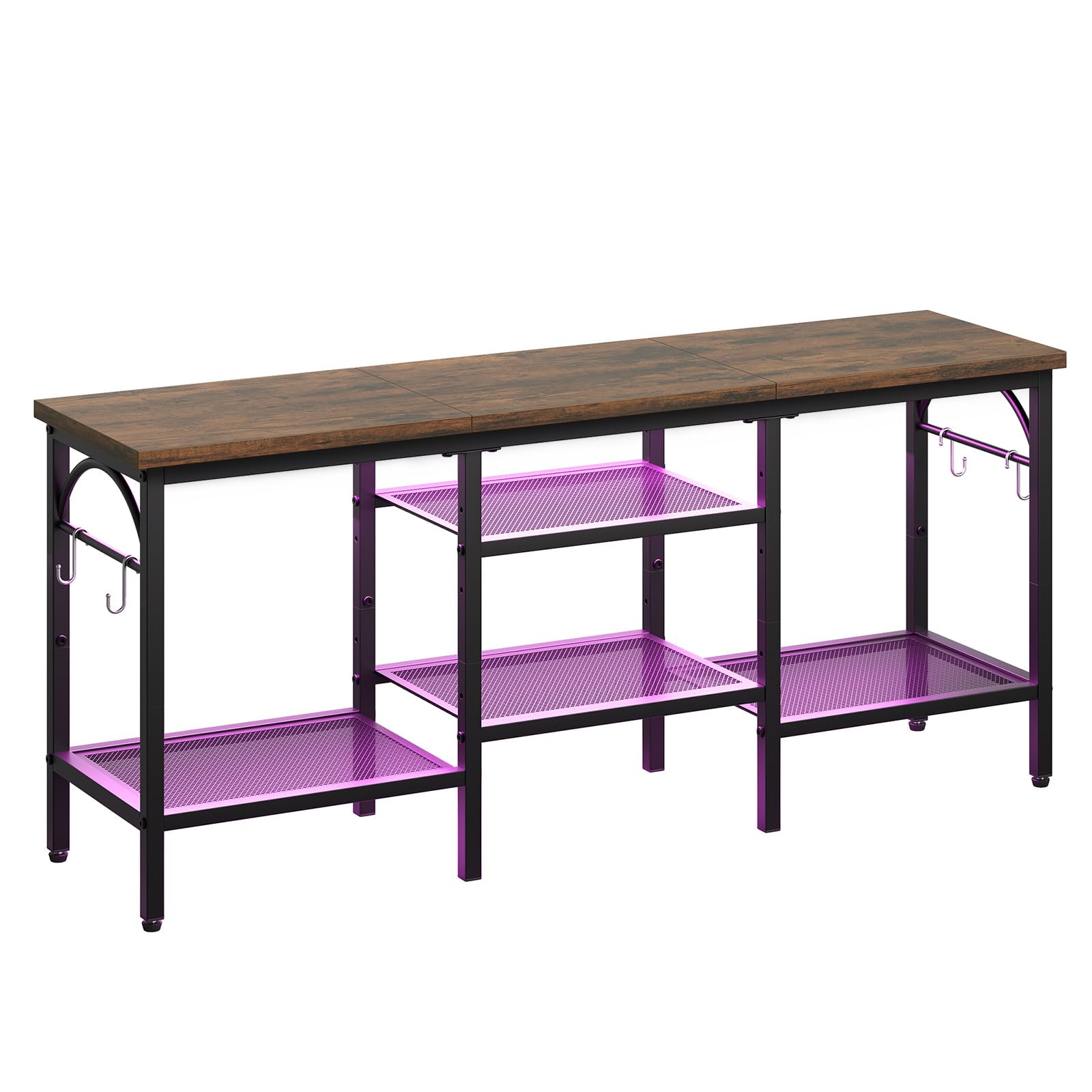
Figure 1: Pinmoco TV Stand (Rustic Brown)
2. Biztonsági információk
Kérjük, a termék összeszerelése és használata előtt olvassa el és értse meg az összes utasítást. Az utasítások be nem tartása sérülést vagy a termék károsodását okozhatja.
- Tartsa távol a gyermekektől az összes apró alkatrészt és csomagolóanyagot.
- Ensure all connections are secure before placing any items on the stand.
- Do not overload the shelves. Refer to the Specifications section for weight limits.
- Place the TV stand on a flat, stable, and level surface to prevent tipping.
- Avoid exposing the stand to direct sunlight or extreme humidity to prolong its lifespan.
- Ne álljon vagy másszon fel a TV-állványra.
- Csak a mellékelt szerelvényeket használja az összeszereléshez.
3. A csomag tartalma
Összeszerelés előtt ellenőrizze, hogy az alább felsorolt összes alkatrész megvan-e és sértetlen-e. Ha bármelyik alkatrész hiányzik vagy sérült, kérjük, vegye fel a kapcsolatot az ügyfélszolgálattal.
- Felső panel (fa)
- Fém vázalkatrészek
- Mesh Shelves (2 large, 2 small)
- Állítható lábak
- Akasztók (4 darab)
- Összeszerelési hardver (csavarok, imbuszkulcs)
- Használati útmutató
4. Beállítás és összeszerelés
Assembly typically takes 30-45 minutes and requires an Allen wrench (provided). Follow these general steps:
- Kicsomagolás és alkatrészek azonosítása: Carefully remove all components from the packaging. Lay them out on a clean, soft surface to prevent scratches. Refer to the parts list to ensure all pieces are present.
- A fő keret összeszerelése: Connect the vertical metal frame components using the provided screws and Allen wrench. Ensure all connections are finger-tight at this stage.
- Polcok rögzítése: Insert the mesh shelves into their designated slots within the frame. Secure them with screws. The two larger shelves typically form the bottom tier, and the two smaller shelves form the middle tier.
- Felső panel telepítése: Place the wooden top panel onto the assembled frame. Secure it using the appropriate screws.
- Horgok rögzítése: Secure the four hooks to the side frames as desired for additional storage.
- Húzza meg az összes csavart: Once all components are in place, systematically tighten all screws to ensure the stand is stable and secure. Do not overtighten.
- Állítsa be a lábakat: Install the adjustable feet on the bottom of the stand. Adjust them as needed to level the stand on uneven surfaces.
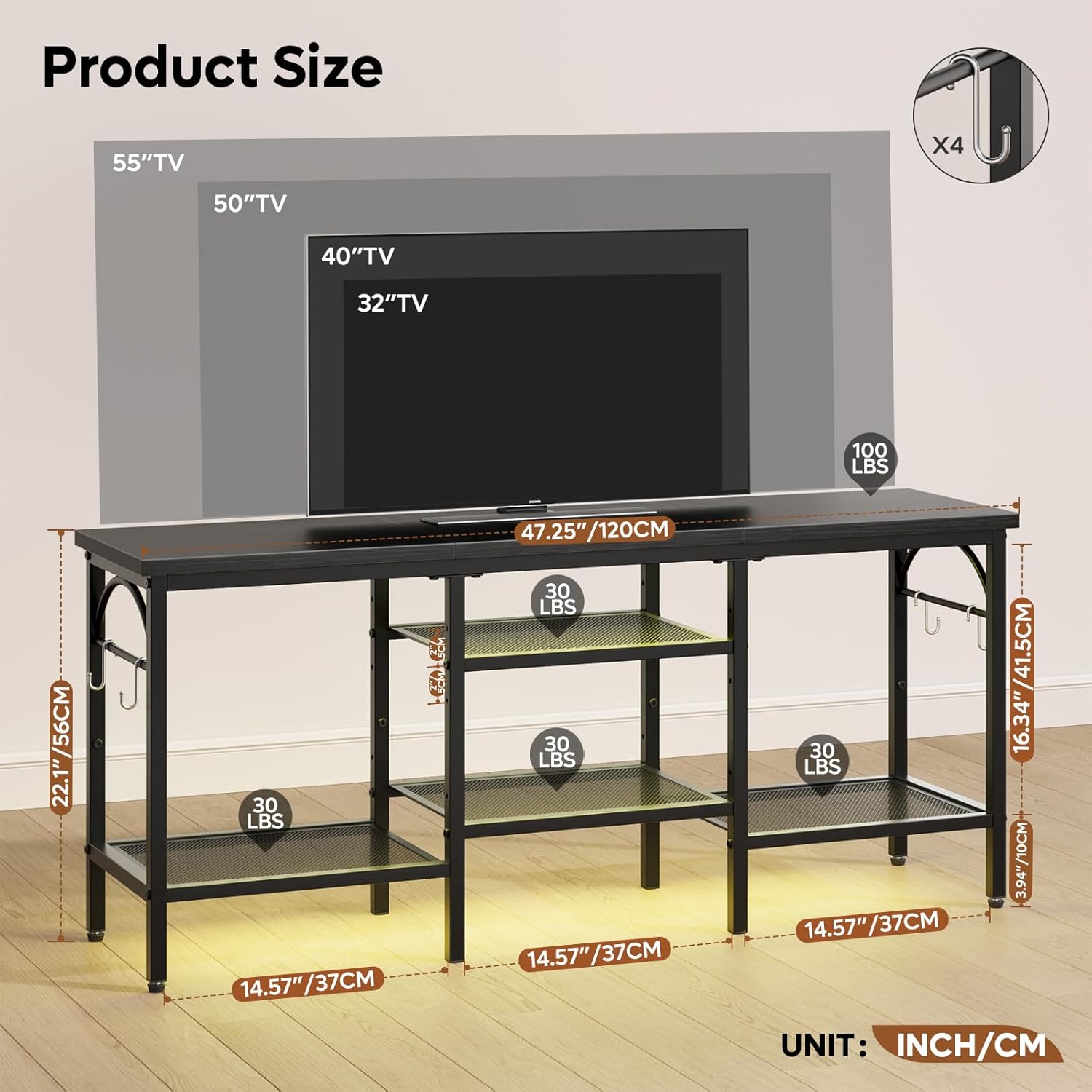
Figure 2: Product Dimensions and Weight Capacities
5. Használat
This TV stand is designed for versatile use in various rooms. Follow these guidelines for optimal use:
- TV elhelyezés: Carefully place your TV on the top panel. Ensure the TV's base fits securely within the stand's dimensions. This stand is suitable for TVs up to 47 inches.
- Media Device Organization: Utilize the open mesh shelves to store game consoles (e.g., Xbox, PlayStation), media players, soundbars, and other electronic devices. The open design helps prevent overheating.
- Kábelkezelés: The open structure allows for easy routing and management of cables, helping to keep your entertainment area tidy.
- Tartozékok tárolása: Use the side hooks for hanging headphones, remote controls, or other small accessories. The lower shelves can also store books, DVDs, or decorative items.

Figure 3: TV Stand in use with various media devices
6. Karbantartás
A rendszeres karbantartás segít megőrizni a TV-állvány megjelenését és funkcionalitását.
- Tisztítás: Törölje le a felületeket puha, damp ruhával. Kerülje az erős vegyszereket vagy súrolószereket, amelyek károsíthatják a felületet.
- Portörlés: Rendszeresen portalanítsa a polcokat és a keretet a lerakódások megelőzése érdekében.
- Hardver ellenőrzés: Rendszeresen ellenőrizze az összes csavart és csatlakozást, hogy meghúzva legyenek. Szükség esetén húzza meg újra.
- Környezetvédelem: While designed for durability, avoid prolonged exposure to extreme temperatures or moisture.
7. Hibaelhárítás
| Probléma | Lehetséges ok | Megoldás |
|---|---|---|
| Az állvány billeg/instabil. | A csavarok lazák; egyenetlen a felület. | Ensure all screws are tightened. Adjust the leveling feet on the bottom of the stand. Move to a flat surface. |
| Összeszerelés közben hiányzó alkatrészek. | Csomagolási hiba. | Double-check all packaging materials. Contact customer support with your model number and a description of the missing part. |
| TV does not fit on the stand. | TV size exceeds stand capacity. | This stand is designed for TVs up to 47 inches. Verify your TV's dimensions against the stand's top panel dimensions. |
8. Műszaki adatok
| Funkció | Részlet |
|---|---|
| Márka | Pinmoco |
| Modellszám | G700412K-RST |
| Anyag | Wood (top panel), Metal (frame, shelves) |
| Szín | Rustic Brown (wood), Black (metal) |
| Termék méretei | 47 x 12 x 22 hüvelyk (hosszúság x szélesség x magasság) |
| Tétel súlya | 18.5 font |
| TV méret kompatibilitás | 47 hüvelykig |
| Különleges jellemzők | Open storage shelves, Soundbar shelf, 4 hooks, Adjustable feet |
| Összeszerelés szükséges | Igen |
9. Garancia és támogatás
Specific warranty information for the Pinmoco TV Stand G700412K-RST is not provided in this manual. For warranty details, product support, or to inquire about replacement parts, please refer to the product packaging or contact Pinmoco customer service directly through their official weba weboldalon vagy annál a kereskedőnél, ahol a terméket vásárolta.