
Bevezetés
This manual provides essential information for setting up, operating, and maintaining your NIMO 15.6" FHD Laptop Computer (Model NIMO N157). Please read this manual thoroughly before using your device to ensure optimal performance and longevity.
Mi van a dobozban
- 1 x NIMO N157 Laptop
- 1 x Type-C 65W PD Fast Charger
- 1 x Felhasználói kézikönyv (ez a dokumentum)
- Windows 11 Home (pre-installed)
- 2 Years Warranty, 90 Days Return information
Beállítási útmutató
1. Kezdeti bekapcsolás és töltés
Before first use, ensure your NIMO laptop is fully charged. Connect the provided Type-C 65W PD Fast Charger to the laptop's Type-C charging port and a power outlet. The charge LED indicator will illuminate. A full charge is recommended for optimal battery calibration.

Image: NIMO laptop connected to its Type-C 65W GaN II PD charger. This charger provides fast charging capabilities.
2. Operating System Setup (Windows 11 Home)
Upon first power-on, the laptop will guide you through the Windows 11 Home setup process. Follow the on-screen instructions to configure language, region, network settings, and create a user account. An internet connection (Wi-Fi 6 supported) is recommended for the initial setup to download necessary updates.

Image: The NIMO laptop screen showing the Windows 11 desktop interface.
3. Ujjlenyomat-olvasó beállítása
For enhanced security and quick login, set up the integrated fingerprint reader. Navigate to Windows Settings > Accounts > Sign-in options and follow the prompts to register your fingerprint. This allows for secure one-touch login.

Kép: Közeli kép view of the fingerprint reader on the NIMO laptop, illustrating its use for secure login.
Kezelési útmutató
1. Keyboard and Backlight
The NIMO laptop features a full-size keyboard with a numeric keypad and a backlit function. To activate or adjust the keyboard backlight, use the dedicated function keys (Fn + Fx, refer to your keyboard layout for specific key). This feature allows for comfortable typing in low-light environments.
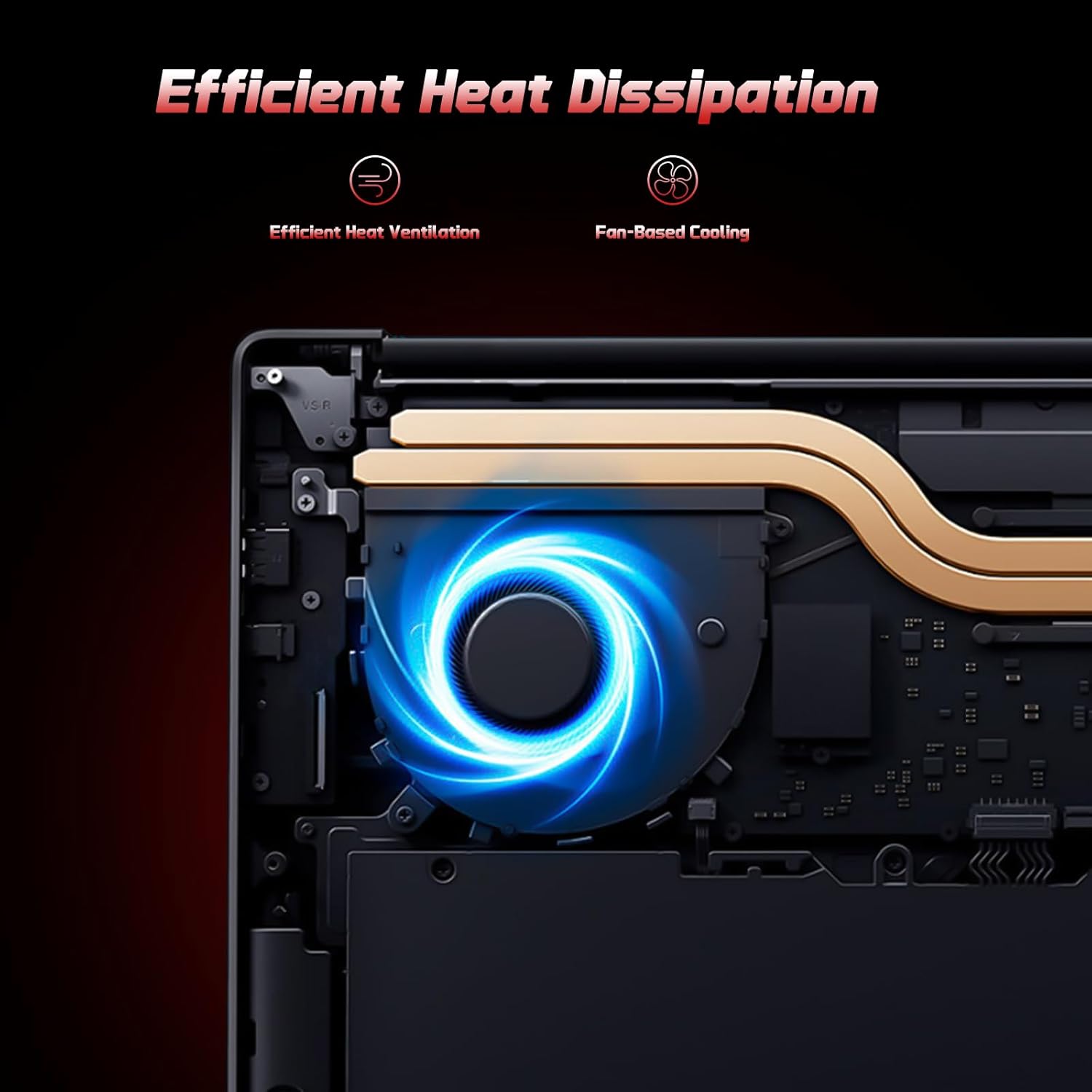
Image: A user typing on the NIMO laptop's backlit keyboard in a dim environment.
2. Perifériák csatlakoztatása
The laptop is equipped with multiple ports for various peripherals:
- USB portok: Csatlakoztasson USB-eszközöket, például külső meghajtókat, egereket vagy billentyűzeteket.
- HDMI port: Csatlakoztasson külső monitort vagy TV-t a hosszabb megjelenítéshez.
- C típusú portok: One port supports 65W PD fast charging, and another is a multifunction port for data transfer and display output.
- Micro SD foglalat: Helyezzen be egy Micro SD kártyát a bővíthető tárhely érdekében.
- Fejhallgató-csatlakozó: Csatlakoztassa a fejhallgatót vagy a külső hangszórókat.
- Kensington zár nyílás: A fizikai biztonság érdekében.
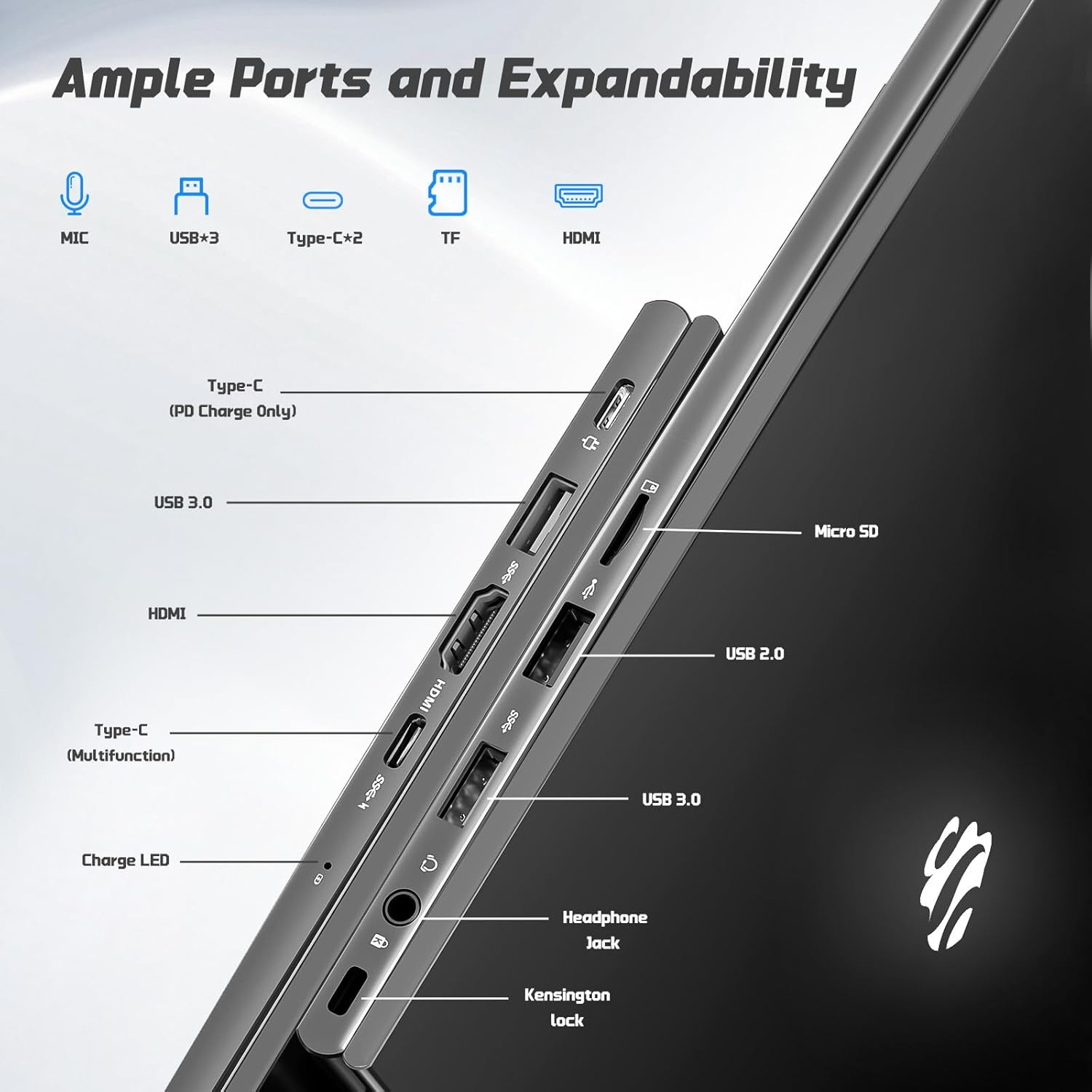
Kép: Oldal view of the NIMO laptop highlighting the available ports including USB, HDMI, Type-C, Micro SD, and headphone jack.
3. Webcam and Privacy
Az integrált 2MP-es kamera webcam is suitable for video calls and online meetings. For privacy, ensure the camera is covered or disabled when not in use, if a physical privacy shutter is present (refer to product images for confirmation).
Video: This video demonstrates the NIMO laptop's features, including the webcam and various ports. It shows the laptop being used for work, school, and play, highlighting the backlit keyboard and fingerprint unlock feature.
Video: This video showcases the NIMO laptop's versatility for different users, including students and professionals. It highlights the 15.6" FHD display, backlit keyboard, and multiple connectivity options.
Video: A comprehensive introduction to the NIMO 15.6" laptop, detailing its design, performance, and user experience for various tasks.
Video: This video emphasizes the efficiency and convenience of the NIMO laptop, showcasing its features that contribute to productivity and ease of use.
Video: This video highlights the NIMO 15.6" FHD laptop's suitability for students, home use, and work, demonstrating its performance in various daily scenarios.
Karbantartás
1. A laptop tisztítása
To clean the screen, use a soft, lint-free cloth specifically designed for electronics. For the keyboard and chassis, a slightly damp cloth with mild cleaning solution can be used. Avoid excessive moisture and abrasive materials. Ensure the laptop is powered off before cleaning.
2. Az akkumulátor gondozása
The NIMO laptop features a 53.58 Watt Hours Lithium Polymer battery. To prolong battery life, avoid fully discharging the battery frequently. It is recommended to keep the battery charge between 20% and 80% when possible. Store the laptop in a cool, dry place when not in use for extended periods.
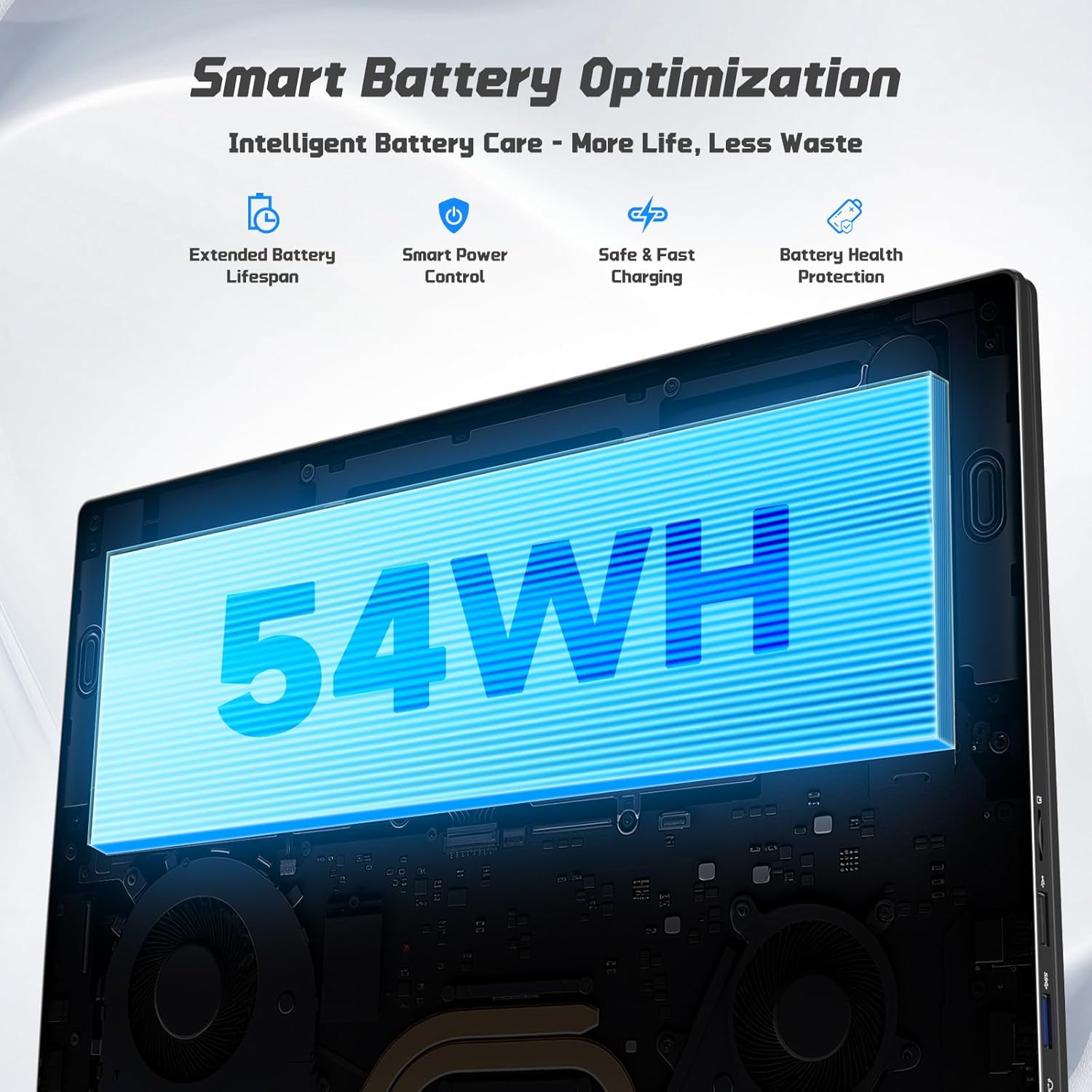
Image: Diagram illustrating the NIMO laptop's smart battery optimization features, including extended lifespan, smart power control, safe and fast charging, and battery health protection.
3. Szoftverfrissítések
Regularly check for and install Windows updates to ensure your system has the latest security patches and performance improvements. Go to Settings > Windows Update to manage updates.
4. Hőleadás
The laptop is designed with efficient heat ventilation and fan-based cooling. To prevent overheating, ensure that the ventilation openings are not blocked during use. Avoid placing the laptop on soft surfaces like beds or couches that can obstruct airflow.
Kép: Egy belső view of the NIMO laptop showing its efficient heat dissipation system with fan-based cooling.
Hibaelhárítás
1. A laptop nem kapcsol be
- Győződjön meg arról, hogy a töltő megfelelően csatlakozik mind a laptophoz, mind egy működő konnektorhoz.
- Check the charge LED indicator. If it's not lit, try a different outlet or charger.
- Nyomja meg és tartsa lenyomva a bekapcsológombot 10-15 másodpercig a hardveres újraindítás végrehajtásához.
2. Screen Issues (No Display, Flickering)
- Connect an external monitor via the HDMI port to check if the issue is with the laptop's display or graphics output.
- Indítsa újra a laptopot.
- Ensure display drivers are up to date via Windows Update or NIMO's support webtelek.
3. Lassú teljesítmény
- Zárja be a háttérben futó felesleges alkalmazásokat.
- Ellenőrizze és telepítse a függőben lévő Windows-frissítéseket.
- Ensure sufficient free space on the 128GB SSD. Consider expanding storage using the Micro SD slot or upgrading the SSD if needed.
- Futtasson víruskeresést.
4. Wi-Fi or Bluetooth Connectivity Issues
- Ensure Wi-Fi and Bluetooth are enabled in Windows Settings.
- Wi-Fi problémák esetén indítsd újra a routert/modemet.
- Update network drivers via Windows Update or NIMO's support webtelek.
Műszaki adatok
| Funkció | Részlet |
|---|---|
| Márka | NIMO |
| Modell neve | NIMO N157G |
| Képernyőméret | 15.6 hüvelyk |
| Kijelző felbontása | 1920x1080 pixel (FHD) |
| Kijelző típusa | IPS LCD, Anti-glare |
| Processzor | Intel Pentium N150 (4-Core, up to 3.6 GHz) |
| RAM | 4 GB DDR4 (16 GB-ig bővíthető) |
| Tárolás | 128 GB SSD (Expandable via Micro SD) |
| Operációs rendszer | Windows 11 Home |
| Grafika | Integrált Intel Graphics |
| Webbütyök | 2 MP elülső kamera |
| Kapcsolódás | Wi-Fi 6, Bluetooth 5.3 |
| Portok | 2x USB 3.0, 1x USB 2.0, 2x Type-C (1x PD Charge Only, 1x Multifunction), 1x HDMI, 1x Micro SD Slot, 1x Headphone Jack, 1x Kensington Lock |
| Akkumulátor | 53.58 Wh Lithium Polymer (Up to 12.75 hours life) |
| Töltő | 65W Type-C PD Fast Charger |
| Különleges jellemzők | Backlit Keyboard, Fingerprint Reader, HD Audio, Numeric Keypad |
| Méretek | 14.07 cm H x 8.98 cm SZ x 0.76 cm V |
| Súly | 3.75 font |
Garancia és támogatás
Your NIMO laptop comes with a 2 év garancia from NIMO Direct Inc. Additionally, a 90-Day Hassle-Free Return Policy is provided. For any product-related questions, technical assistance, or warranty claims, please contact NIMO customer support.
Elérhetőségek:
- Email: service@nimopc.com
- Online segítség: Refer to the official NIMO webweboldal további támogatási forrásokért.
Please have your model number (NIMO N157) and purchase details ready when contacting support.