
1. Bevezetés
1.1 Termék végeview
The Rraycom 5MP Wireless Security Camera is a battery-powered, outdoor-ready surveillance device designed for home security. It features 5MP ultra-HD video, a 130° wide field of view, and dual light source night vision for both full-color and infrared options. Equipped with AI motion detection, two-way audio, a siren alarm, and spotlight, it provides comprehensive monitoring and deterrence. The camera supports both cloud and local SD card storage and is compatible with Amazon Alexa.
1.2 Főbb jellemzők
- 2.5K (5MP) Ultra-HD Video: Világos és részletes megfigyelési információkat nyújttage.
- 130° széles mező View: Minimizes blind spots for broader coverage.
- Full-Color & Infrared Night Vision: Offers versatile night monitoring options.
- Újratölthető akkumulátor: Ensures wire-free operation and flexible placement.
- IP65 Vízálló: Kültéri használatra tervezve, hogy ellenálljon a különféle időjárási viszonyoknak.
- PIR Motion Detection with AI Analysis: Accurately detects human movement and sends real-time notifications.
- Kétirányú hang: Allows for remote communication with visitors or intruders.
- Siren Alarm & Spotlight: Deters unwanted visitors with audible and visual alerts.
- Cloud/SD Card Storage: Offers flexible options for video recording storage.
- Alexa integráció: Enables voice control for live view hozzáférés.

Kép: Felülview of the Rraycom 5MP Wireless Security Camera and its main features.
1.3 Mi van a dobozban?
Kérjük, ellenőrizze a csomag tartalmát. Ha bármilyen tétel hiányzik vagy sérült, vegye fel a kapcsolatot az ügyfélszolgálattal.
- Rraycom 5MP Wireless Security Camera (x1)
- Rögzítő konzol (x1)
- Mounting Screws and Wall Anchors (x1 set)
- USB töltőkábel (x1)
- Felhasználói kézikönyv (1x)
2. Első lépések: Beállítás
2.1 A kamera töltése
Before initial use, fully charge the camera battery. Connect the provided USB charging cable to the camera's charging port and to a standard 5V USB power adapter (not included). The indicator light will show charging status and turn solid when fully charged.
2.2 Az alkalmazás telepítése
Download the companion app, VistaFlow, from your mobile device's app store.
- iOS-eszközök esetén: Keressen rá "VistaFlow" in the Apple App Store.
- Android készülékekhez: Keressen rá "VistaFlow" in the Google Play Store.
Follow the on-screen instructions to create an account and log in.
2.3 Eszközpárosítás (Wi-Fi kapcsolat)
- Győződjön meg arról, hogy mobileszköze csatlakozik egy 2.4 GHz-es Wi-Fi hálózatA kamera nem támogatja az 5 GHz-es Wi-Fi-t.
- Open the VistaFlow app and tap the "Add Device" or "+" icon.
- Válassza ki a kamera modelljét a listából.
- Follow the in-app instructions to power on the camera and put it into pairing mode (usually indicated by a flashing LED).
- Scan the QR code displayed on your phone screen with the camera lens, or follow alternative pairing methods if prompted.
- Csatlakoztatás után nevezze el a kamerát, és fejezze be a beállítási folyamatot.
2.4 A kamera felszerelése
Choose a suitable location for your camera, considering Wi-Fi signal strength, desired viewing angle, and power access for occasional recharging. The camera is IP65 waterproof, making it suitable for outdoor installation.
- Jelölje meg a furatok helyét a rögzítőkonzol sablonként való használatával.
- Fúrjon lyukakat és helyezzen be fali tipliket, ha falazatra vagy gipszkartonra szereli.
- Secure the mounting bracket to the wall or ceiling with screws.
- Csatlakoztassa a kamerát a rögzítőkonzolhoz, és állítsa be a szöget az optimális lefedettség érdekében.
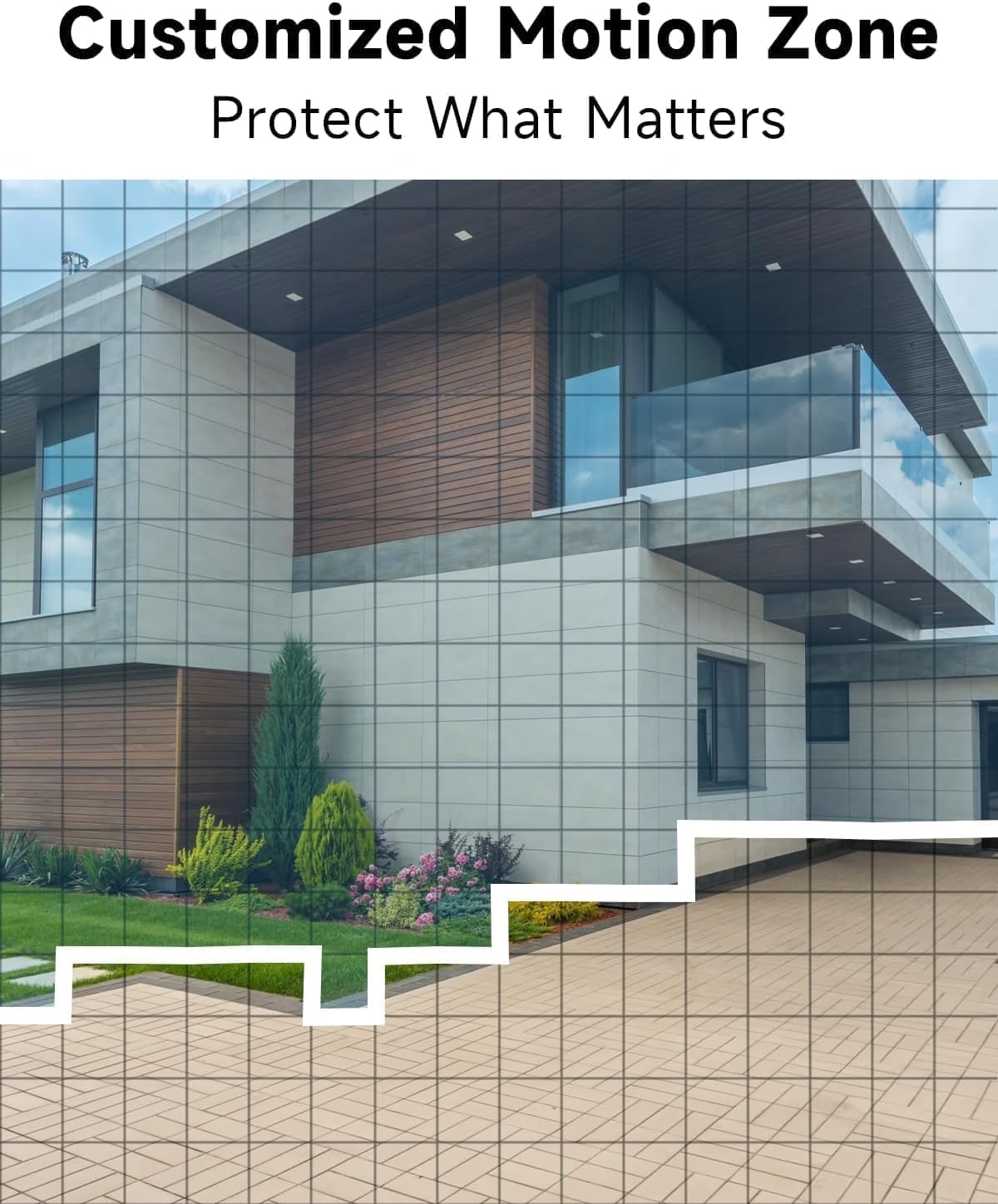
Kép: Plample of camera placement and customized motion zone setup.
3. Használati útmutató
3.1 Élőben View
Access the VistaFlow app and select your camera to view the live feed. You can pinch to zoom and pan across the 130° wide-angle view. The 5MP resolution provides clear details.

Image: Visual comparison of 5MP versus 1080P video resolution.
3.2 Motion Detection & AI Analysis
The camera uses a PIR sensor and AI analysis to detect motion, specifically identifying persons to reduce false alarms. When motion is detected, you will receive a notification on your phone.
- Customized Activity Zones: In the app settings, you can define specific areas within the camera's view where motion detection should be active, ignoring other areas.
- Érzékenység beállítása: Adjust the motion detection sensitivity to suit your environment and reduce unwanted alerts.

Image: AI Motion Detection in action, highlighting alert options.
3.3 Kétirányú hang
The built-in microphone and speaker allow for real-time two-way communication. Tap the microphone icon in the live view to speak through the camera, and listen to audio from the camera's location.

Image: Demonstrating two-way audio communication.
3.4 Éjszakai látás
A kamera két éjjellátó módot kínál:
- Teljes színű éjjellátó: Utilizes the built-in spotlight to provide color images in low-light conditions.
- Infravörös éjszakai látás: Infravörös LED-eket használ fekete-fehér képek készítéséhez teljes sötétségben.
You can switch between these modes or set them to automatic in the app settings.

Image: Comparison of color and infrared night vision modes.
3.5 Siren Alarm & Spotlight
In response to motion detection, or manually activated via the app, the camera can trigger a siren alarm and turn on its spotlight to deter intruders. You can customize the siren sound with pre-recorded messages.
3.6 Tárolási lehetőségek
The camera supports two storage methods for recorded video:
- Felhőbeli tárhely: A free rolling 3-day cycled cloud storage service is provided. Optional subscription plans may be available for extended cloud storage.
- Micro SD kártya: Insert a micro SD card (up to 256GB, not included) into the camera's SD card slot for local storage.
3.7 Alexa integráció
The Rraycom camera is compatible with Amazon Alexa. To enable this feature:
- Nyisd meg az Alexa alkalmazást a mobileszközödön.
- Go to "Skills & Games" and search for "VistaFlow".
- Enable the skill and link your VistaFlow account.
- Fedezze fel az eszközöket.
You can then use voice commands such as: "Alexa, show me the [camera name]" to view the live feed on compatible Alexa devices (e.g., Echo Show).
4. Karbantartás
4.1 Akkumulátorkezelés
The camera is powered by a rechargeable battery. Battery life varies based on usage, motion detection frequency, and environmental factors.
- Újratöltés: When the battery level is low, you will receive a notification via the app. Disconnect the camera from its mount and charge it using the provided USB cable.
- Az akkumulátor élettartamának optimalizálása: Reduce motion detection sensitivity, shorten recording duration, and minimize live view access to extend battery life.
4.2 Tisztítás
Periodically clean the camera lens and body to ensure optimal performance.
- Use a soft, dry, lint-free cloth to wipe the lens. For stubborn smudges, a slightly damp ronggyal, majd egy szárazon.
- Törölje át a kamera vázát hirdetésselamp szövet. Kerülje az erős vegyszerek vagy súroló hatású tisztítószerek használatát.
5. Hibaelhárítás
5.1 Gyakori problémák és megoldások
| probléma | Lehetséges megoldás |
|---|---|
| A fényképezőgép nem csatlakozik a Wi-Fi-hez | Ensure your Wi-Fi is 2.4GHz. Check Wi-Fi signal strength at the camera's location. Restart your router and the camera. Re-attempt pairing in the app. |
| A mozgásérzékelés nem működik, vagy túl sok a téves riasztás | Check motion detection settings in the app. Adjust sensitivity. Define activity zones to exclude irrelevant areas. Ensure camera lens is clean. |
| Gyenge képminőség | Ensure the camera lens is clean. Check Wi-Fi signal strength. Ensure the camera is set to 5MP resolution in app settings if available. |
| Az akkumulátor nem töltődik | Ensure the USB cable is securely connected. Try a different USB power adapter. Check if the charging port is clean and free of debris. |
| Cannot hear or speak through two-way audio | Ellenőrizd a hangerőbeállításokat a telefonodon és az alkalmazásban. Győződj meg róla, hogy az alkalmazás rendelkezik mikrofon- és hangszóróengedélyekkel. |
6. Műszaki előírások
| Funkció | Specifikáció |
|---|---|
| Felbontás | 5MP (2.5K QHD) |
| Field of View | 130° |
| Kapcsolódás | Wi-Fi (csak 2.4 GHz) |
| Áramforrás | Elemről működik |
| Időjárásállóság | IP65 Vízálló |
| Éjszakai látás | Full-Color, Infrared |
| Hang | 2-utas audio |
| Mozgásérzékelés | PIR with AI Analysis (Person Detection) |
| Tárolási lehetőségek | Cloud (3-day free rolling), Micro SD Card (up to 256GB) |
| Intelligens otthon integráció | Amazon Alexa |
| Kompatibilis eszközök | iOS, Android |
| Beltéri/Kültéri használat | Szabadtéri |
7. Garancia és ügyfélszolgálat
7.1 Jótállási információk
Rraycom products come with a limited warranty. Please refer to the warranty card included in your package or visit the official Rraycom webweboldalán részletes jótállási feltételeket talál.
7.2 Ügyfélszolgálat
If you encounter any issues or have questions regarding your Rraycom 5MP Wireless Security Camera, please contact our customer support team. Contact information can be found on the Rraycom weboldalon vagy a termék csomagolásán.