
Aroeally T01
Aroeally Hidden Camera Detector User Manual
Modell: T01
Bevezetés
This Aroeally Hidden Camera Detector (Model T01) is a versatile 4-in-1 device designed to enhance your privacy and security in various environments. It combines RF signal detection, camera lens finding, magnetic field detection, and a flashlight function to help you identify and locate hidden cameras, GPS trackers, and eavesdropping devices. Its compact and portable design makes it an essential tool for travel, office, and personal security.

Figure 1: Aroeally T01 Hidden Camera Detector and its retail packaging.
Főbb jellemzők
- 4-in-1 Detection Capabilities:
- RF jel észlelése: Detects active RF bug transmitters such as transmitting cameras and GPS trackers.
- Camera Lens Finder & Camera Detector: Utilizes infrared laser scanning for visual inspection to spot hidden pinhole cameras.
- Mágneses mező érzékelése: Identifies widely used magnetized GPS trackers.
- Zseblámpa funkció: Provides illumination for use in dark environments.
- Super Signal Detection Range: Capable of detecting radio waves, 2G, 3G, and 4G mobile signals, and SIM card bugs. Frequency detection range spans from 1Mhz to 6.5Ghz.
- Fokozott adatvédelem: Employs passive and infrared scanning techniques to accurately detect eavesdropping devices, telephone eavesdropping, meeting eavesdropping, GPS location trackers, car eavesdropping, pinhole cameras, cable cameras, and electrical radiation sources.
- Felhasználóbarát kialakítás: Features a rechargeable lithium-ion battery with approximately one hour fast charging, providing up to 25 hours of continuous use and 25 days of standby time. Constructed from high-quality PC material, it is portable and lightweight (only 30g), making it ideal for travel and daily use.
- Ultra Sensitivity with 5 Levels: Equipped with upgraded ultra-sensitive chips, offering 5 adjustable sensitivity levels to accurately pinpoint signal sources. Effective detection range covers an area of 30 square meters.
Beállítási útmutató
- A készülék töltése: Connect the included USB cable to the device's Type-C port and a compatible USB power adapter. The device features a built-in rechargeable lithium-ion battery. A full charge takes approximately one hour.
- Be-/kikapcsolás: Press and hold the power button (usually marked with a power symbol) for three seconds to turn the device on or off.
- Érzékenység beállítása: Short press the power button to cycle through the 5 levels of sensitivity. Higher sensitivity allows for a wider detection range, while lower sensitivity helps narrow down the source.
- Antenna meghosszabbítása: For increased RF signal detection range, extend the retractable antenna located at the top of the device.

Figure 2: Basic operation steps including power, mode, and sensitivity adjustment.

3. Ábra: Végeview of detector components and their functions.
Kezelési útmutató
1. RF Signal Detection (Red Indicator Light)
This mode detects wireless signals from hidden cameras, GPS trackers, and eavesdropping devices. Before using this mode, it is recommended to switch off or disconnect any known network equipment (like Wi-Fi routers, Bluetooth devices) in the immediate area to prevent continuous false alarms and ensure accurate detection.
- Kapcsolja be a készüléket a bekapcsológomb 3 másodpercig tartó lenyomásával.
- Press the "MODE" button until the red indicator light illuminates, indicating RF signal detection mode.
- Adjust sensitivity using short presses of the power button. Start with a higher sensitivity and decrease it as you get closer to a signal source to pinpoint its exact location.
- Slowly scan the area. The signal strength indicator lights will illuminate, and the device may beep, indicating the presence of an RF signal. More lights and faster beeping signify a stronger signal.
2. Camera Lens Finder (Infrared Scanning)
This mode helps locate hidden pinhole cameras by reflecting light off their lenses.
- Push to open the detection window for infrared scanning.
- Ensure the infrared light is switched on. You can adjust the flash frequency of the infrared light by clicking the on/off button.
- Look through the red light filter on the device. Slowly scan the room, paying close attention to common hiding spots like smoke detectors, air vents, power outlets, and decorative items.
- Hidden camera lenses will appear as bright red reflective spots when viewed through the filter.

Figure 4: Detailed steps for using the infrared camera lens finder.

Figure 5: Principle of Camera Infrared Scanner operation.
3. Magnetic Field Detection (Green Indicator Light)
This mode is specifically designed to detect magnetic GPS trackers, often found attached to vehicles.
- Press the "MODE" button until the green indicator light illuminates, signifying magnetic field detection mode.
- Slowly move the device close to surfaces where a magnetic tracker might be hidden, such as under a car, inside car wheel wells, or behind furniture.
- The device will indicate the presence of a magnetic field with lights and/or sound.

Figure 6: Using the detector for GPS locator detection in a vehicle.
4. Zseblámpa funkció
The device includes a built-in flashlight for convenience in low-light conditions.
- Press the dedicated flashlight button (usually marked with a light bulb icon) to turn the flashlight on or off.
Official Product Video: Operation Guidance
Video 1: Official operation guidance for the Hidden Camera Detector, demonstrating various functions.
Karbantartás
- Tisztítás: A készülék tisztításához puha, száraz ruhát használjon. Ne használjon súrolószereket vagy oldószereket.
- Tárolás: A készüléket hűvös, száraz helyen tárolja, távol a közvetlen napfénytől és a szélsőséges hőmérsékletektől.
- Az akkumulátor gondozása: To prolong battery life, avoid fully discharging the device frequently. Recharge the battery when the low battery indicator appears. If storing for extended periods, charge the device every 3-6 months.
Hibaelhárítás
| Probléma | Lehetséges ok | Megoldás |
|---|---|---|
| Az eszköz nem kapcsol be. | Az akkumulátor lemerült. | Charge the device for at least one hour using the provided USB cable. |
| Constant alarms or false positives in RF detection mode. | Interference from nearby Wi-Fi routers, Bluetooth devices, or mobile phones. | Temporarily switch off or disconnect known network equipment in the area. Reduce the sensitivity level to narrow down the detection range. |
| Cannot detect hidden cameras using infrared scanning. | Improper scanning technique or camera is well-hidden. | Ensure the infrared light is on and you are looking through the red filter. Scan slowly and thoroughly, especially in dark environments. Check common hiding spots. |
| Sensor sound is too loud or annoying. | Audio alert is enabled. | Press and hold the "MODE" button for a few seconds to turn off the annoying beep. The device will still provide visual alerts via LED indicators. |
| Limited detection range for specific signals (e.g., 2.4Ghz). | Sensitivity setting is too low. | Increase the sensitivity level by short pressing the power button. Extend the retractable antenna for better reception. |
Műszaki adatok
| Funkció | Részlet |
|---|---|
| Modellszám | T01 |
| Márka | Aroeally |
| Észlelési módok | RF Signal Detection, Camera Lens Finder, Magnetic Field Detection, Flashlight |
| Frekvencia érzékelési tartomány | 1Mhz - 6.5Ghz |
| Effective Detection Area | 30 négyzetméterig |
| Érzékenységi szintek | 5 levels, adjustable |
| Áramforrás | Beépített újratölthető lítium-ion akkumulátor |
| Töltési idő | Kb. 1 óra (gyorstöltés) |
| Működési idő | Akár 25 óra (folyamatos használat) |
| Készenléti idő | Akár 25 napig |
| Anyag | High-quality PC |
| Tétel súlya | 3.84 uncia (kb. 109 g) |
| Termék méretei (H x Sz x Ma) | 5.51 x 1.18 x 1.18 hüvelyk (14 x 3 x 3 cm) |
| Javasolt felhasználás | Indoor Security, Travel, Office, Hotels, Fitting Rooms, Cars |
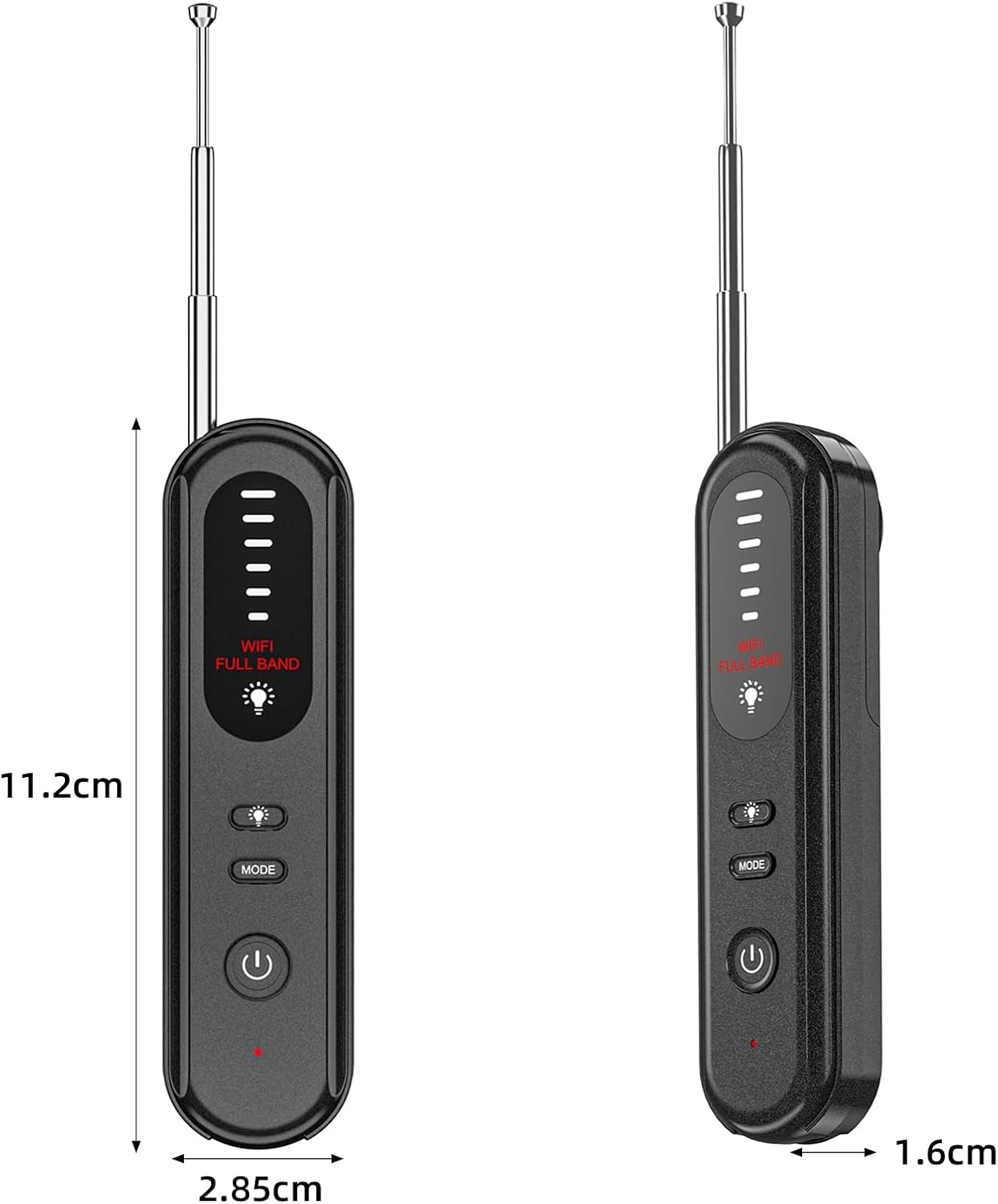
Figure 7: Product dimensions of the Aroeally T01 Detector.
Garancia és támogatás
Specific warranty details for the Aroeally T01 Hidden Camera Detector are not provided in this manual. For warranty claims, technical support, or further assistance, please contact the manufacturer, Aroeally, or the seller, KAPOLAND TRADING CO., LIMITED, through their official channels or the platform where the product was purchased.
Kérjük, őrizze meg a vásárlást igazoló bizonylatot a garanciával kapcsolatos esetleges kérdések esetére.
Ask a question about this manual
Ask about setup, troubleshooting, compatibility, parts, safety, or missing instructions. Manuals+ will review the question and use this page’s manual context to help answer it.