
Bevezetés
This manual provides essential instructions for the setup, operation, and maintenance of your BLOW Portable Internet Radio RI 1. Please read this manual thoroughly before using the device to ensure proper functionality and to prevent damage.
Fontos biztonsági tudnivalók
- Ne tegye ki a készüléket esőnek vagy nedvességnek.
- Ne szerelje szét a készüléket. Minden szervizelési munkát bízzon szakképzett személyzetre.
- Csak a mellékelt hálózati adaptert használja.
- Kerülje a szélsőséges hőmérsékletet és a közvetlen napfényt.
- Tartsa távol a készüléket erős mágneses mezőktől.
A csomag tartalma
Győződjön meg róla, hogy minden elem megvan a csomagban:
- BLOW Internet Radio RI 1
- Tápadapter
- User Manual (in Polish and English)

Image: The BLOW Internet Radio RI 1 packaging, showing the radio unit, power adapter, and user manual.
Termék végeview
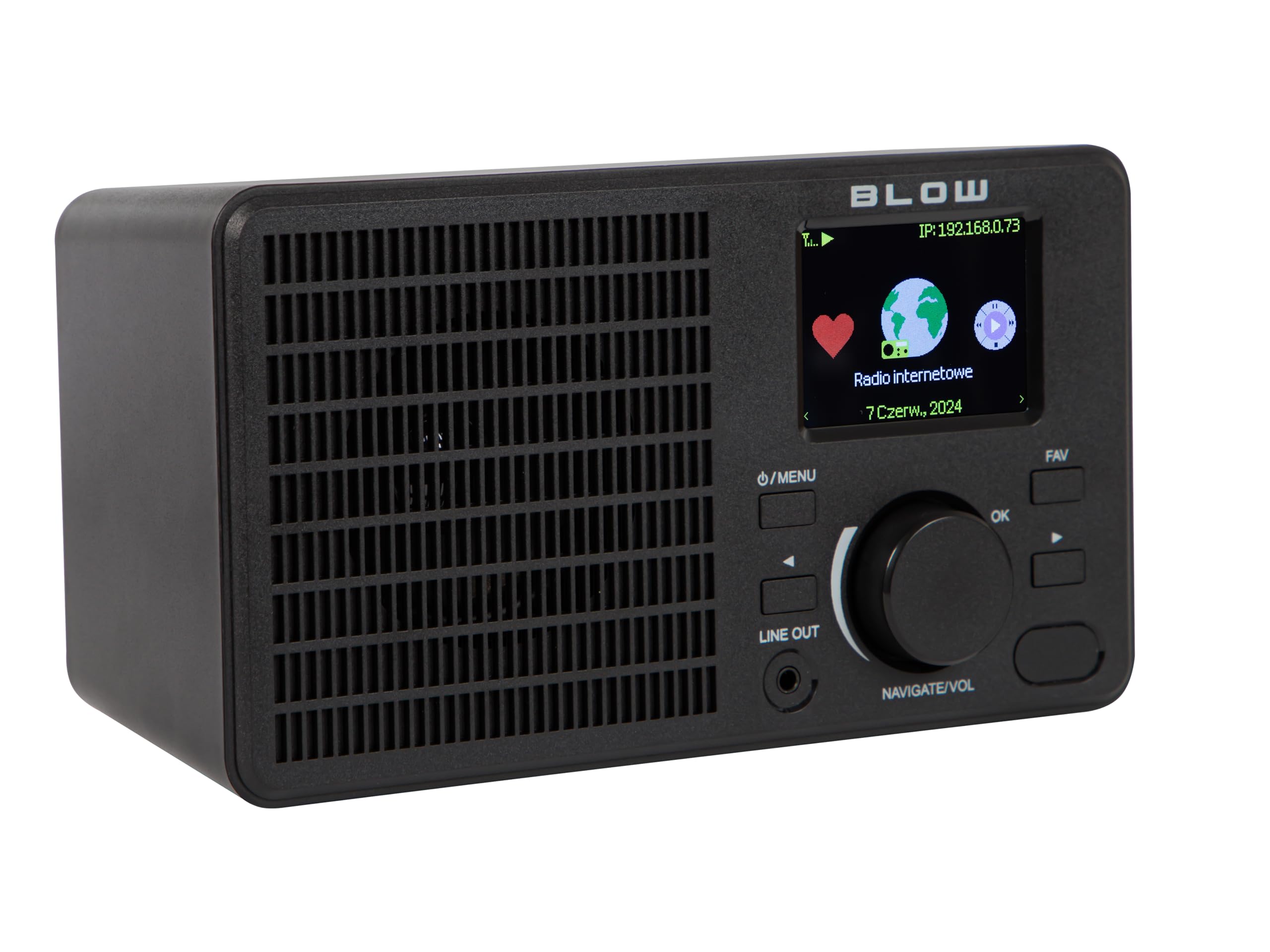
The BLOW Portable Internet Radio RI 1 offers a wide range of features for an enhanced audio experience. It includes internet radio access, FM tuner, Bluetooth connectivity, and a clear LCD display.

Kép: elöl view of the BLOW Internet Radio RI 1, showcasing the display, speaker grille, and control buttons.
Főbb jellemzők:
- Internetes rádió: Access thousands of stations worldwide via Wi-Fi.
- Wi-Fi csatlakozás: Wireless access to internet radio and network features.
- Bluetooth: Stream music from mobile devices.
- 2.4 hüvelykes TFT színes kijelző: Shows station information and track details.
- Dual Alarm with Snooze: Wake up to music or news.
- Vonal kimenet: Csatlakozzon egy amplifier or external audio system.
- Kompakt kialakítás: Elegant black design suitable for various interiors.
- FM tuner: For local radio broadcasts.
Kép: Hátulról view of the BLOW Internet Radio RI 1, showing the DC 5V power input and product information label.
Beállítás
1. Tápfeszültség csatlakozás
- Csatlakoztassa a mellékelt hálózati adaptert a rádió hátulján található DC 5V bemeneti porthoz.
- Csatlakoztassa a hálózati adaptert egy szabványos elektromos aljzathoz.
- A rádió automatikusan bekapcsol, vagy készenléti üzemmódba lép.

Image: The power adapter included with the BLOW Internet Radio RI 1, showing the plug and DC connector.
2. Initial Wi-Fi Setup
- Első bekapcsoláskor a rádió végigvezeti Önt a kezdeti beállítási folyamaton.
- Use the navigation dial and OK button to select your preferred language.
- A rádió elérhető Wi-Fi hálózatokat fog keresni. Válassza ki a hálózatát a listából.
- Enter your Wi-Fi password using the navigation controls. Confirm with the OK button.
- A csatlakozás után a rádió egy megerősítő üzenetet jelenít meg.

Image: The BLOW Internet Radio RI 1 display showing the internet radio interface with network status.
Kezelési útmutató
Alapvető vezérlők
- Power/Menu Button: Press to turn on/off or access the main menu.
- Navigate/Volume Dial: Rotate to navigate menus or adjust volume. Press to confirm selection.
- OK gomb: Megerősíti a kijelöléseket.
- FAV gomb: Accesses favorite stations.
- Vonal kimenet: 3.5mm jack for connecting to external audio systems.

Kép: Közeli kép view of the BLOW Internet Radio RI 1's control panel, highlighting the display and buttons.
Internet rádió mód
- A főmenüből válaszd az „Internetes rádió” lehetőséget.
- Böngésszen az állomások között helyszín, műfaj vagy név szerinti keresés szerint.
- Select a station and press OK to start playback.
- To save a station as a favorite, navigate to the station and press the FAV button.
FM rádió mód
- A főmenüből válassza az „FM rádió” lehetőséget.
- Use the navigation dial to tune to a frequency or perform an auto-scan for stations.
- Press OK to select a station.
Bluetooth mód
- A főmenüből válaszd a „Bluetooth” lehetőséget. A rádió párosítási módba lép.
- On your mobile device (smartphone, laptop), enable Bluetooth and search for "BLOW RI 1".
- Select the radio to pair. Once connected, you can stream audio from your device to the radio.

Image: The BLOW Internet Radio RI 1 shown alongside a smartphone, illustrating Bluetooth connectivity for music streaming.
Ébresztőóra funkció
- A főmenüből érheti el az „Ébresztés” beállításait.
- Akár két független ébresztőóra is beállítható.
- Configure alarm time, source (buzzer, internet radio, FM), and snooze duration.
- Ensure the radio is connected to power for the alarm to function reliably.
Karbantartás
- Tisztítás: Use a soft, dry cloth to clean the radio's surface. Do not use liquid cleaners or abrasive materials.
- Tárolás: Ha hosszabb ideig nem használja a rádiót, tárolja hűvös, száraz helyen.
- Szoftverfrissítések: Periodically check for firmware updates through the radio's system settings to ensure optimal performance and access to new features.
Hibaelhárítás
| Probléma | Lehetséges megoldás |
|---|---|
| Nincs erő | Check if the power adapter is securely connected to the radio and the electrical outlet. Try a different outlet. |
| Nem lehet csatlakozni a Wi-Fi-hez | Ensure your Wi-Fi password is correct. Check if your router is working. Try restarting the radio and your router. Ensure the radio is within range of your Wi-Fi signal. |
| Internet radio stations not playing | Verify your internet connection is active. Some stations may be temporarily offline. Try other stations. |
| A Bluetooth párosítás sikertelen | Ensure the radio is in Bluetooth pairing mode. Make sure Bluetooth is enabled on your mobile device and it's within range. Try unpairing and re-pairing. |
| Gyenge FM vétel | Adjust the radio's position. Ensure there are no strong interference sources nearby. |
Műszaki adatok
| Funkció | Részlet |
|---|---|
| Márka | Fúj |
| Modell | 5900804137467 |
| Csatlakozási technológia | Wi-Fi, Bluetooth, Aux, Line Out |
| Tuner technológia | FM |
| Kijelző típusa | LCD (2.4-inch TFT Color Display) |
| Áramforrás | Corded Electric (AC: 100-240V, 50/60Hz; DC: 5V/1A) |
| Kompatibilis eszközök | Smartphone, Laptop, Headphones |
| Különleges jellemzők | Lightweight, Portable, Dustproof, Built-in Clock, Dual Alarm with Snooze |
| Termék méretei | 19.4 cm (H) x 8.8 cm (Sz) x 11 cm (M) |
| Szín | Fekete |
Garancia és támogatás
For warranty information and technical support, please refer to the contact details provided in the separate warranty card included with your product or visit the official BLOW webtelek.
Gyártó: FÚJ
Webtelek: www.blow.pl