
LEVOIT 5ddce951-f1e5-4fc2-b790-0e25bd06f240
LEVOIT 36"-os lapát nélküli toronyventilátor és légtisztító felhasználói kézikönyv
Model: 5ddce951-f1e5-4fc2-b790-0e25bd06f240
Márka: LEVOIT
Bevezetés
This manual provides detailed instructions for the safe and efficient operation, maintenance, and troubleshooting of your LEVOIT 36" Bladeless Tower Fan and LEVOIT Core Mini-P Air Purifier. Please read this manual thoroughly before use and retain it for future reference.
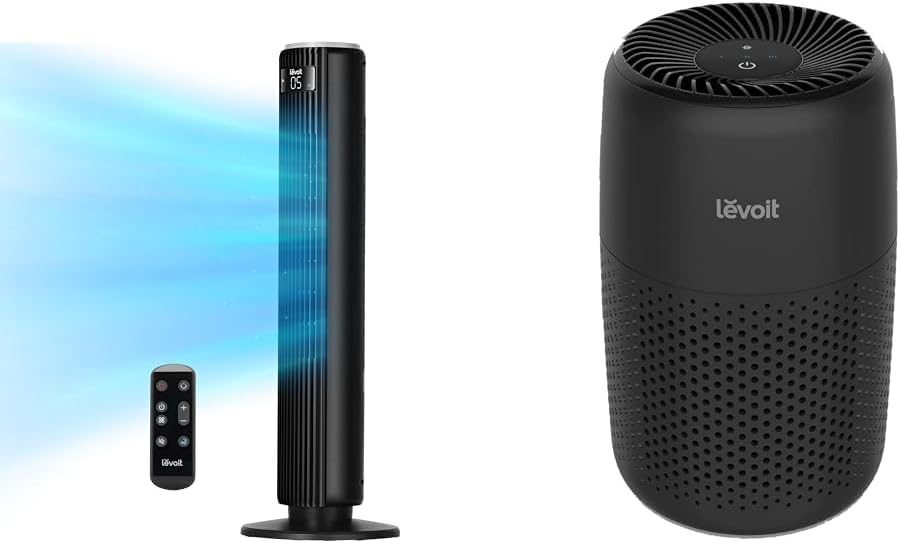
Image: The LEVOIT 36-inch Bladeless Tower Fan and the LEVOIT Core Mini-P Air Purifier shown together, highlighting their compact and modern design.
Fontos biztonsági tudnivalók
A tűz, áramütés vagy sérülés kockázatának csökkentése érdekében kérjük, tartsa be a következő biztonsági óvintézkedéseket:
- Tisztítás vagy bármilyen karbantartás előtt mindig húzza ki a készüléket a konnektorból.
- Ne működtesse a ventilátort sérült kábellel vagy csatlakozóval. Dobja ki a ventilátort, vagy vigye vissza egy hivatalos szervizbe vizsgálat és/vagy javítás céljából.
- Ne vezesse a kábelt szőnyeg alá. Ne takarja le a vezetéket szőnyegekkel, futószalagokkal vagy hasonló burkolatokkal. A vezetéket a forgalmi területtől távol helyezze el, és olyan helyen, ahol nem botlik meg.
- Do not insert or allow fingers or foreign objects to enter any ventilation or exhaust opening as this may cause an electric shock or damage the appliance.
- Soha ne akadályozza a légbeszívást vagy a kipufogást.
- A készüléket csak a kézikönyvben leírtak szerint használja. A gyártó által nem javasolt bármely más használat tüzet, áramütést vagy személyi sérülést okozhat.
- Ne használja a szabadban.
- Ez a készülék polarizált csatlakozóval rendelkezik (az egyik penge szélesebb, mint a másik). Az áramütés kockázatának csökkentése érdekében ez a csatlakozó csak egyféleképpen illeszkedik polarizált aljzatba. Ha a dugó nem illeszkedik teljesen a konnektorba, fordítsa meg a dugót. Ha továbbra sem illeszkedik, forduljon szakképzett villanyszerelőhöz. Ne próbálja meg legyőzni ezt a biztonsági funkciót.
A csomag tartalma
- LEVOIT 36" Bladeless Tower Fan
- Távirányító a toronyventilátorhoz
- LEVOIT Core Mini-P Air Purifier
- 3-in-1 Filtration Filter (Pre-installed in Air Purifier)
- Aroma Pad (Pre-installed in Air Purifier)
- Power Adapter for Air Purifier
- Felhasználói kézikönyv
Termék végeview
LEVOIT 36" Bladeless Tower Fan

Image: The LEVOIT 36-inch Bladeless Tower Fan standing upright with its remote control. Blue lines illustrate the powerful airflow emanating from the fan's vertical vent.
The tower fan features a sleek, bladeless design for safety and easy cleaning. It includes a digital display on top, indicating settings such as speed and timer. The base provides stability, and the unit comes with a remote control for convenient operation.
LEVOIT Core Mini-P Air Purifier

Kép: Közeli kép view of the LEVOIT Core Mini-P Air Purifier. It is a compact, cylindrical device with a matte black finish and perforated sides for air intake, featuring control buttons on its top surface.
The Core Mini-P Air Purifier is a compact, cylindrical device designed for small to medium-sized rooms. It features a 3-stage filtration system and a fragrance sponge for aromatherapy. Control buttons are located on the top panel.
Beállítás
Setting up the Tower Fan
- Carefully remove the tower fan from its packaging.
- Ensure the base is securely attached. If not, align the base with the fan body and twist clockwise until it locks into place.
- Helyezze a ventilátort szilárd, vízszintes felületre.
- Dugja be a tápkábelt egy szabványos elektromos aljzatba.
A légtisztító beállítása
- Vegye ki a légtisztítót a csomagolásából.
- Turn the air purifier upside down and twist the base cover counter-clockwise to unlock and remove it.
- Remove the plastic packaging from the 3-in-1 filtration filter.
- Place the filter back into the air purifier, ensuring it is seated correctly.
- Helyezze vissza az alaplapot, és csavarja el az óramutató járásával megegyező irányba a rögzítéshez.
- Connect the power adapter to the air purifier and then plug it into a standard electrical outlet.
- To use the aromatherapy feature, add 2-3 drops of essential oil (not included) onto the aroma pad located at the bottom of the air purifier.
Kezelési útmutató
A toronyventilátor működtetése
The tower fan can be operated using the control panel on top of the unit or the included remote control.
- Bekapcsoló gomb: Nyomja meg a ventilátor be- vagy kikapcsolásához.
- Mód gomb: Cycle through 4 modes: Normal, Turbo, Sleep, and Auto.
- Normál mód: Állandó légáramlás a kiválasztott sebességen.
- Turbó üzemmód: Maximális légáramlás a gyors hűtés érdekében.
- Alvó mód: Gradually decreases fan speed for quiet operation.
- Automatikus mód: Adjusts fan speed based on ambient room temperature (detected by smart sensors).
- Sebesség beállítása: Use the '+' and '-' buttons to select from 5 speed settings.
- Oszcillációs gomb: Press to activate or deactivate 90° oscillation, allowing the fan to sweep air across a wider area.
- Időzítő gomb: Set the fan to automatically turn off after a specified period (up to 12 hours). Each press adds 1 hour.
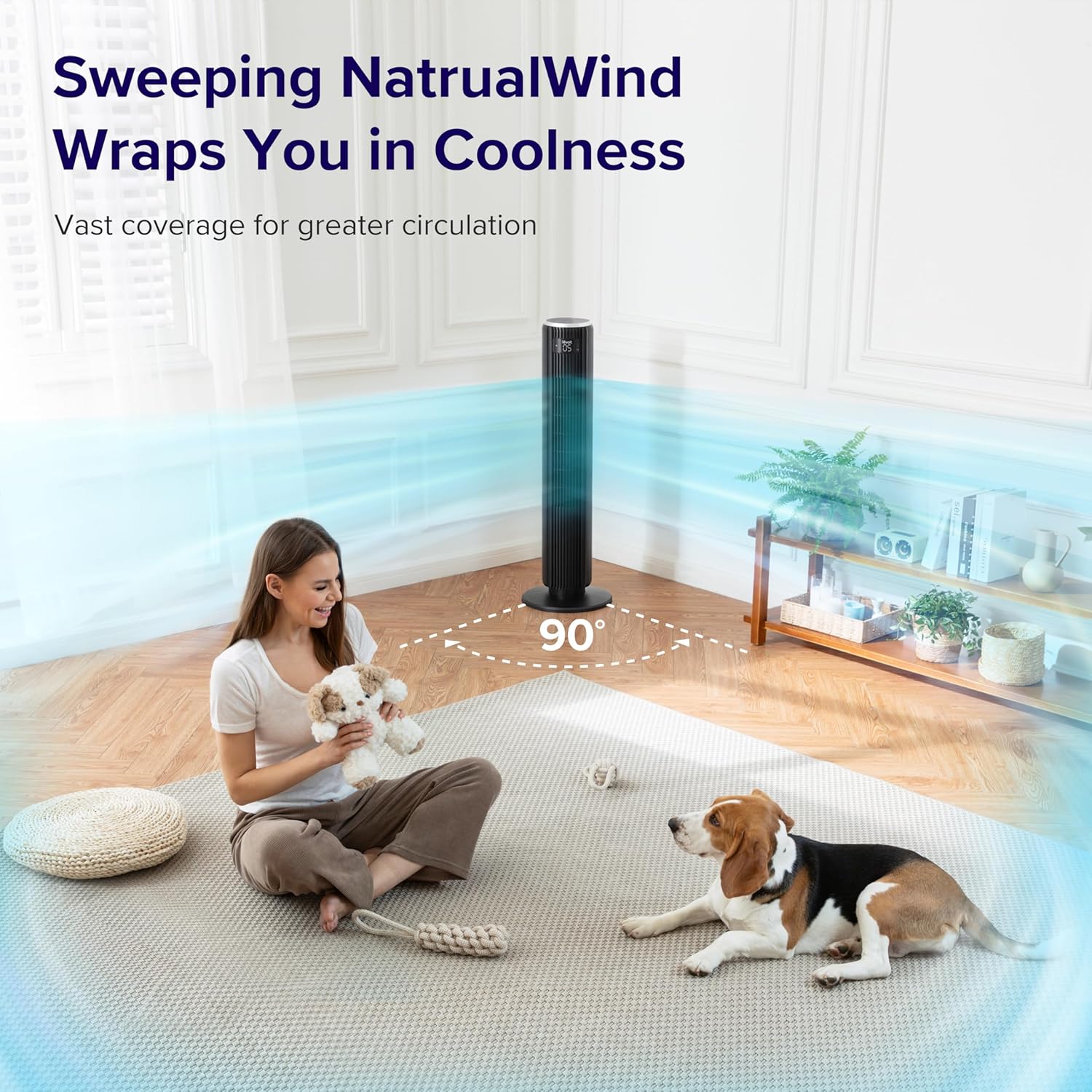
Image: The LEVOIT 36-inch Bladeless Tower Fan is shown oscillating 90 degrees, indicated by blue airflow lines covering a wide area in a living room setting. A person and a dog are comfortably within the fan's cooling range.

Image: The LEVOIT 36-inch Bladeless Tower Fan is positioned in a bedroom, emitting a gentle, natural-feeling breeze, illustrated by light blue airflow lines. A person is meditating peacefully in the background, emphasizing the fan's quiet operation and comfortable airflow.
A légtisztító működtetése
The air purifier is controlled via the touch buttons on its top panel.
- Bekapcsoló gomb: Press to turn the air purifier on or off.
- Ventilátor sebesség gomb: Cycle through 3 quiet fan speeds (Low, Medium, High).
- Aroma Feature: The aroma pad allows for the diffusion of essential oils. Add 2-3 drops of essential oil to the pad located at the bottom of the unit. The fan will then circulate the scent.

Image: The LEVOIT Core Mini-P Air Purifier is shown on a nightstand in a bedroom, with a mother and child in the background. Text overlays emphasize "Multi-Layered Protection" including Pre-Filter, Efficient Filter, and Activated Carbon Filter, illustrating its air purification capabilities.

Image: The LEVOIT Core Mini-P Air Purifier is placed on a table in a living room. A hand is shown adding essential oil drops to the aroma pad, demonstrating the "Refresh With Fragrance" feature for destressing and staying focused.
Karbantartás
A toronyventilátor tisztítása
- Tisztítás előtt mindig húzza ki a ventilátort.
- Használjon puha, damp ruhával törölje át a ventilátor külső felületeit.
- Ne használjon súroló hatású tisztítószereket vagy oldószereket.
- For dust accumulation in the air inlet/outlet, use a vacuum cleaner with a brush attachment to gently remove dust.
Cleaning and Filter Replacement for Air Purifier
- Unplug the air purifier before cleaning or replacing the filter.
- Puha, száraz ruhával törölje le a külsejét.
- The 3-in-1 filtration filter should be replaced every 6-8 months, or sooner depending on air quality and usage.
- A szűrő cseréje:
- Turn the air purifier upside down and twist the base cover counter-clockwise to unlock.
- Távolítsa el a régi szűrőt, és ártalmatlanítsa megfelelően.
- Insert a new LEVOIT Core Mini-P replacement filter (ensure plastic packaging is removed).
- Replace the base cover and twist clockwise to lock.
- Clean the aroma pad as needed with a damp cloth and allow it to dry completely before reapplying essential oils.
Hibaelhárítás
| Probléma | Lehetséges ok | Megoldás |
|---|---|---|
| Fan/Purifier does not turn on. | Nincs bedugva; a konnektor nem működik; a bekapcsológomb nincs megnyomva. | Ensure unit is securely plugged in. Test outlet with another device. Press the power button firmly. |
| Weak airflow from fan. | Fan speed too low; air inlet/outlet blocked. | Increase fan speed. Check for obstructions and clean air inlets/outlets. |
| Air purifier not effectively cleaning air. | Filter is dirty or expired; plastic packaging not removed from filter. | Replace the filter. Ensure all plastic packaging is removed from the new filter before installation. |
| A ventilátor zajos. | Unit not on a level surface; internal obstruction. | Place the fan on a flat, stable surface. Check for any foreign objects inside the fan. |
| A távirányító nem működik. | Batteries are dead or incorrectly inserted; remote too far from fan. | Replace batteries. Ensure correct polarity. Use remote within range and point towards the fan's receiver. |
Műszaki adatok
LEVOIT 36" Bladeless Tower Fan
- Modell: 5ddce951-f1e5-4fc2-b790-0e25bd06f240
- Áramforrás: Vezetékes elektromos
- Légáramlási kapacitás: 1062 köbláb percenként (CFM)
- Levegő sebesség: Akár 25 méter/s
- Rezgés: 90°
- Zajszint: Akár 28 dB-ig is
- Módok: Normal, Turbo, Sleep, Auto
- Sebesség: 5
- Időzítő: 1-12 óra
- Ellenőrzési módszer: Távirányító, Érintőpanel
- Különleges jellemzők: Bladeless, Temperature Sensor
LEVOIT Core Mini-P Air Purifier
- Modell: Core Mini-P (part of bundle)
- Szűrés: 3-in-1 (Pre-Filter, Efficient Filter, Activated Carbon Filter)
- Lefedettségi terület: Akár 129 ft²
- Zajszint: 25-44dB
- Sebesség: 3
- Különleges jellemzők: Fragrance Sponge for Aromatherapy, Portable
Garancia és támogatás
LEVOIT provides a limited warranty for this product. For detailed warranty information, including duration and coverage, please refer to the warranty card included in your product packaging or visit the official LEVOIT webtelek.
For technical support, troubleshooting assistance, or to inquire about replacement parts (such as air purifier filters), please contact LEVOIT Customer Support:
- Webtelek: www.levoit.com
- Email: support@levoit.com
- Telefon: (Refer to LEVOIT web(a regionális telefonszámokat tartalmazó weboldal)
Please have your model number (5ddce951-f1e5-4fc2-b790-0e25bd06f240) and purchase information ready when contacting support.
Ask a question about this manual
Ask about setup, troubleshooting, compatibility, parts, safety, or missing instructions. Manuals+ will review the question and use this page’s manual context to help answer it.