
HP 7KW55A#BGJ
HP Color LaserJet Pro M182nw többfunkciós nyomtató
Wireless All-in-One Color Laser Printer User Manual
Model: 7KW55A#BGJ
1. Bevezetés
The HP Color LaserJet Pro MFP M182nw is a versatile all-in-one color laser printer designed for efficient printing, scanning, and copying. This manual provides essential information to help you set up, operate, and maintain your device, ensuring optimal performance and longevity.
2. A doboz tartalma
Upon unboxing your HP Color LaserJet Pro MFP M182nw, verify that all the following items are included:
- HP Color LaserJet Pro MFP M182nw Printer
- Starter Black Toner Cartridge (800 pages)
- Kezdő ciánkék tonerkazetta (700 oldal)
- Kezdő bíbor tonerkazetta (700 oldal)
- Starter Yellow Toner Cartridge (700 pages)
- USB kábel
- Tápkábel
- Cat5e Ethernet Cable
- 6 Assorted Color Cable Ties
- Tisztítókészlet
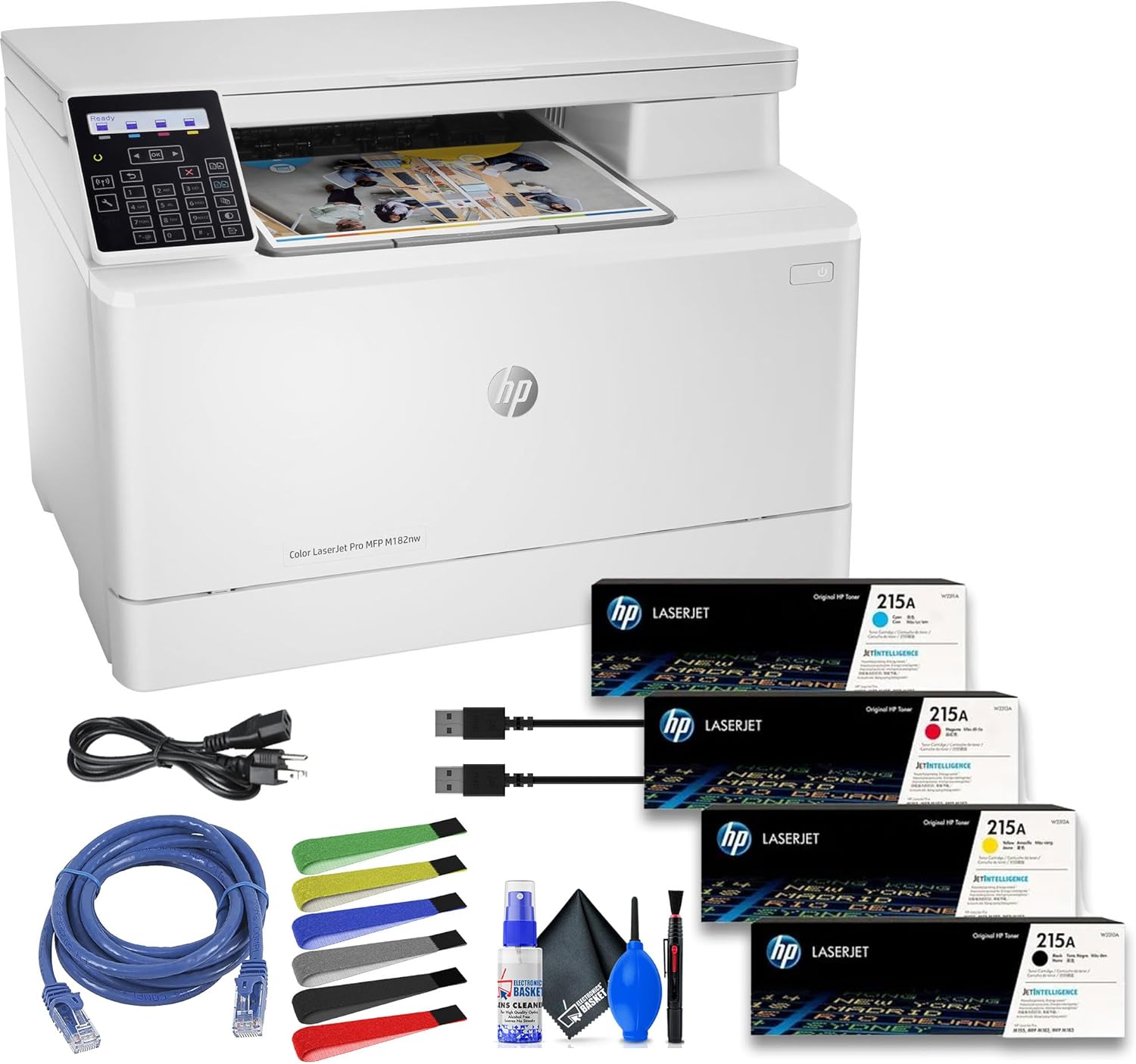
This image displays the HP Color LaserJet Pro MFP M182nw printer alongside its bundled accessories, including power and network cables, assorted cable ties, and a cleaning kit, as well as the starter toner cartridges.
3. Beállítási útmutató
Follow these steps to set up your HP Color LaserJet Pro MFP M182nw printer:
- A nyomtató kicsomagolása: Óvatosan vegye ki a nyomtatót a csomagolásból. Távolítson el minden csomagolóanyagot, ragasztószalagot és védőfóliát a nyomtató külsejéről és belsejéből.
- Install Toner Cartridges: Open the toner access door and insert the provided starter toner cartridges into their corresponding slots. Ensure they click into place.
- A papir behelyezése: Open the paper tray and load plain paper. Adjust the paper guides to fit the paper size.
- Csatlakoztassa az áramot: Csatlakoztassa a tápkábelt a nyomtatóhoz, majd egy földelt elektromos aljzathoz.
- Bekapcsolás: Nyomja meg a bekapcsoló gombot a nyomtató bekapcsolásához.
- Válasszon csatlakozási módot:
- USB csatlakozás: Csatlakoztassa az USB-kábelt a nyomtatóhoz a számítógéphez.
- Ethernet (Wired Network): Csatlakoztasson egy Ethernet-kábelt a nyomtatóból a hálózati routerhez vagy switchhez.
- Wi-Fi (Wireless Network): Follow the on-screen prompts on the printer's control panel to connect to your wireless network. You may need your Wi-Fi network name (SSID) and password.
- Szoftverek/illesztőprogramok telepítése: Insert the installation CD (if provided) or visit the official HP support website to download and install the latest drivers and software for your operating system. Follow the on-screen instructions to complete the installation.

The rear panel of the HP Color LaserJet Pro MFP M182nw printer, clearly showing the USB 2.0 and Ethernet ports for wired connections.
4. Használati útmutató
The HP Color LaserJet Pro MFP M182nw offers print, scan, and copy functionalities. Use the two-Line LCD with numeric keypad on the control panel to navigate settings and initiate tasks.

A detailed close-up of the printer's two-line LCD control panel and numeric keypad, used for navigating menus and adjusting settings.
4.1. Nyomtatás
- Számítógépről: Select 'Print' from your application, choose the HP Color LaserJet Pro MFP M182nw, and adjust settings as needed (e.g., color, paper size, number of copies). The printer delivers crisp text and vibrant color prints at speeds of up to 17 pages per minute (ppm).
- Mobil nyomtatás: The printer supports various mobile printing solutions:
- Apple AirPrint: iOS-eszközökhöz.
- Mopria: Androidos eszközökhöz.
- HP ePrint: Print from anywhere by sending an email to your printer's unique email address.
- HP Smart alkalmazás: Download the HP Smart App for guided setup, mobile printing, scanning, and monitoring printer status.
4.2. Szkennelés
The flatbed scanner offers an optical scan resolution of 1200 dpi, enabling high-quality digital captures. Supported file formats include JPG, RAW (BMP), PNG, TIFF, and PDF.
- A nyomtatóról: Place your document on the scanner glass. Use the control panel to select 'Scan' and choose your destination (e.g., computer, email, network folder).
- Számítógépről: Open the HP scanning software on your computer, select the HP Color LaserJet Pro MFP M182nw, and initiate the scan.
4.3. Másolás
Copy speeds match printing speeds at 17 ppm for both black and color documents. You can make up to 99 copies at a time.
- Place the document on the scanner glass or in the automatic document feeder (if available).
- A kezelőpanelen válassza a „Másolás” lehetőséget.
- A kívánt példányszám megadásához használja a numerikus billentyűzetet.
- Press the 'Start' button (usually a green button or 'OK') to begin copying.
5. Karbantartás
A rendszeres karbantartás biztosítja a nyomtató hosszú élettartamát és optimális teljesítményét.
- Tisztítás: Rendszeresen törölje át a nyomtató külsejét puha, száraz kendővel.amp cloth. Clean the scanner glass with a lint-free cloth and glass cleaner.
- Toner Replacement: Replace toner cartridges when the printer indicates low toner levels. Refer to the printer's display for specific instructions on replacing cartridges.
- Papírkezelés: Use recommended paper types and sizes. Ensure paper is loaded correctly to prevent jams.
- Firmware frissítések: Rendszeresen ellenőrizze a HP támogatási oldalát website for firmware updates to ensure your printer has the latest features and bug fixes.
The printer boasts a maximum monthly duty cycle of 30,000 pages, with a recommended volume ranging between 150 and 1500 pages for consistent reliability.
6. Hibaelhárítás
Ez a szakasz a nyomtatóval kapcsolatos gyakori problémákkal foglalkozik.
| Probléma | Lehetséges ok/megoldás |
|---|---|
| A nyomtató nem válaszol | Check power connection. Ensure USB/Ethernet cable is securely connected or Wi-Fi is active. Restart printer and computer. |
| Gyenge nyomtatási minőség | Check toner levels. Ensure correct paper type is used. Clean print heads (if applicable, though less common for laser). |
| Papírelakadások | Remove jammed paper carefully following printer instructions. Ensure paper is loaded correctly and not overfilled. |
| Nem lehet csatlakozni a Wi-Fi-hez | Verify Wi-Fi password. Ensure printer is within range of the router. Restart router and printer. |
| A szkenner nem működik | Ensure printer drivers are installed correctly. Check USB/network connection. Restart printer. |
Részletesebb hibaelhárításért tekintse meg a HP támogatási oldalát. website or the HP Smart App.
7. Műszaki adatok
Key technical specifications for the HP Color LaserJet Pro MFP M182nw printer:
| Funkció | Részlet |
|---|---|
| Funkciók | Nyomtatás, szkennelés, másolás |
| Nyomtatási technológia | Laser (Color) |
| Nyomtatási sebesség (fekete-fehér és színes) | Akár 17 ppm |
| Nyomtatási felbontás | 600 x 600 dpi |
| Szkennelési felbontás (optikai) | 1200 dpi |
| Copy Speed (Black & Color) | Akár 17 ppm |
| Maximális másolatszám | 99 példányban |
| Kapcsolódás | USB 2.0, Ethernet, Wi-Fi |
| Mobil nyomtatási támogatás | Apple AirPrint, Mopria, HP ePrint, HP Smart App |
| Papírtálca kapacitása | 150 lap |
| Kimeneti tálca kapacitása | 100 lap |
| Támogatott médiaméretek | Akár 8.5 x 14 hüvelyk |
| Maximális havi üzemi ciklus | 30,000 oldal |
| Ajánlott havi mennyiség | 150–1500 oldal |
| A termék méretei (Szé x Mé x Ma) | 16.5 x 17.1 x 11.6 hüvelyk |
| Tétel súlya | 42.6 font |

This image illustrates the physical dimensions of the HP Color LaserJet Pro MFP M182nw printer, showing its height (11.5 inches), depth (15 inches), and width (16.5 inches).
8. Garancia és támogatás
A jótállási információkért és a technikai támogatásért tekintse meg a nyomtatóhoz mellékelt dokumentációt, vagy látogassa meg a hivatalos HP támogatási weboldalt. website. HP provides resources for driver downloads, troubleshooting guides, and contact options for customer service.
Meglátogathatja a HP áruház az Amazonon további termékinformációkért és tartozékokért.