
1. Bevezetés
Thank you for choosing the Xigmatek Lux M Micro-ATX Mini Tower PC Case. This manual provides detailed instructions for the installation, operation, and maintenance of your new PC chassis. Please read this manual carefully before beginning the assembly process to ensure proper installation and to maximize the performance and longevity of your system.
The Lux M case is designed to offer a robust and aesthetically pleasing housing for your computer components, featuring a tempered glass side panel, a metallic front panel with a unique cut-out pattern, and pre-installed fixed RGB fans for optimal cooling and visual appeal. It supports Micro-ATX and Mini-ITX motherboards and is compatible with various cooling solutions, including water cooling.
2. Biztonsági információk
A telepítés és üzemeltetés során kérjük, tartsa be a következő biztonsági előírásokat:
- Always disconnect the power supply from the wall outlet before installing or removing any components to prevent electric shock.
- Handle all components with care. Avoid touching circuit boards directly; hold them by their edges.
- Érzékeny elektronikus alkatrészek kezelésekor viseljen antisztatikus csuklópántot az elektrosztatikus kisülés (ESD) okozta károsodások elkerülése érdekében.
- Keep the case and components away from liquids, excessive heat, and direct sunlight.
- A túlmelegedés elkerülése érdekében biztosítsa a számítógép házának megfelelő szellőzését.
- A kis alkatrészeket és csavarokat tartsa gyermekektől elzárva.
3. A csomag tartalma
Verify that all items are present in your package. If any items are missing or damaged, please contact your retailer.
- Xigmatek Lux M Micro-ATX Mini Tower PC Case
- Tartozékdoboz (csavarokat, távtartókat, kábelkötegelőket stb. tartalmaz)
- Felhasználói kézikönyv (ez a dokumentum)
4. Termék végeview
Familiarize yourself with the various parts of your Xigmatek Lux M PC case.
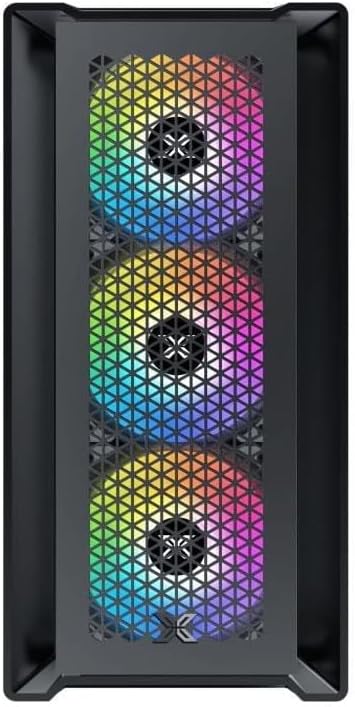
4.1. ábra: Elöl View. This image displays the front of the Xigmatek Lux M case, highlighting the metallic mesh panel with a triangular design and the three pre-installed 120mm fixed RGB fans.

Figure 4.2: Angled Top-Front View. This perspective shows the tempered glass side panel, offering a clear view of the interior, and the top panel with its I/O ports (USB, audio) and power button.
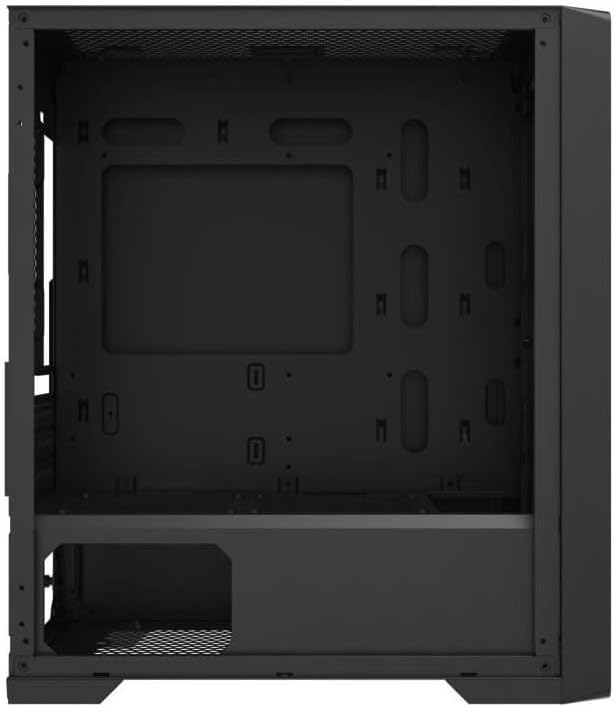
4.3. ábra: Belső elrendezés. The internal structure of the case, featuring the motherboard mounting tray, cutouts for cable management, and the power supply shroud at the bottom.
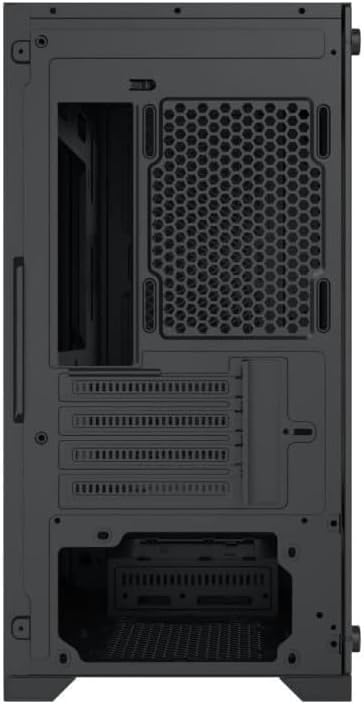
4.4. ábra: Hátsó View. This image illustrates the rear of the case, including the expansion slots for graphics cards and other add-in cards, the rear fan mounting area, and the power supply mounting bracket.
5. Beállítás és telepítés
Follow these steps to install your computer components into the Xigmatek Lux M case.
5.1. Az ügy előkészítése
- Helyezze a tokot sík, stabil felületre.
- Remove the tempered glass side panel by unscrewing the thumb screws and carefully lifting it off. Set it aside on a soft, non-abrasive surface.
- Remove the opposite steel side panel by unscrewing the thumb screws and sliding it backward.
5.2. Alaplap beszerelés
The Lux M supports Micro-ATX and Mini-ITX motherboards.
- Install the I/O shield (if not pre-installed on your motherboard) into the rear opening of the case.
- Align the motherboard with the pre-installed standoffs. Ensure all screw holes on the motherboard match the standoffs.
- Rögzítse az alaplapot a mellékelt alaplapcsavarokkal. Ne húzza túl őket.
5.3. Tápegység (PSU) telepítése
The PSU mounts at the rear bottom of the case.
- Csúsztassa be a tápegységet a kijelölt rekeszbe a ház hátulja felől.
- Align the PSU's screw holes with the holes on the case's rear panel.
- Secure the PSU with the provided screws.
5.4. Storage Drive Installation (2.5"/3.5" Drives)
The case supports 2x 2.5"/3.5" storage drives.
- Locate the drive cage beneath the PSU shroud or dedicated 2.5" mounting points behind the motherboard tray.
- For 3.5" HDDs, slide the drive into a drive tray (if applicable) and secure it with screws.
- For 2.5" SSDs, secure them directly to the mounting points using the provided screws.
5.5. Grafikus kártya (VGA) és bővítőkártya telepítése
A ház akár 320 mm hosszú grafikus kártyákat is támogat.
- Távolítsa el a szükséges bővítőhely-fedeleket a ház hátuljáról.
- Insert your graphics card or other expansion card into the appropriate PCIe slot on your motherboard.
- Secure the card to the case using the expansion slot screws.
5.6. Hűtőrendszer telepítése (opcionális)
The Lux M comes with 4x 120mm X24F fixed RGB fans. It supports additional cooling options.
- CPU hűtő: Max height of 160mm. Install your CPU cooler according to its manufacturer's instructions.
- Radiátor támogatás: The case supports radiators of 360mm, 240mm, or 120mm. Refer to your radiator's manual for installation. Common mounting locations include the front and top panels.
5.7. Kábelkezelés
Használd ki az alaplap tálca mögötti kábelvezető kivágásokat és rögzítési pontokat a kábelek rendszerezéséhez. Ez javítja a légáramlást és az esztétikát.
5.8. Végső összeállítás
- Once all components are installed and cables are managed, reattach the steel side panel and secure it with thumb screws.
- Carefully reattach the tempered glass side panel and secure it with thumb screws.
6. Használati útmutató
After completing the installation, connect your peripherals (monitor, keyboard, mouse) and power cable to the PC. Press the power button located on the top panel of the case to start your system.
The pre-installed X24F RGB fans feature fixed RGB lighting, which will illuminate automatically upon system power-on. No additional software or controller is required for their basic operation.
Ensure that the case's ventilation is not obstructed to maintain optimal airflow and cooling performance.
7. Karbantartás
Regular maintenance helps ensure the longevity and optimal performance of your PC components.
- Portalanítás: Periodically clean dust filters (if present) and the interior of the case using compressed air or a soft brush. Dust accumulation can hinder airflow and lead to overheating.
- Külső tisztítás: Törölje le a külső felületeket puha, damp cloth. Avoid harsh chemicals that may damage the finish or tempered glass.
- Edzett üveg: Clean the tempered glass panel with a glass cleaner and a microfiber cloth to avoid scratches and streaks.
8. Hibaelhárítás
Ha a telepítés során vagy után problémákba ütközik, vegye figyelembe az alábbi gyakori hibaelhárítási lépéseket:
- Nincs áram:
- Győződjön meg arról, hogy a tápkábel megfelelően csatlakozik mind a tápegységhez, mind a fali aljzathoz.
- Check that the PSU switch is in the 'ON' position.
- Ellenőrizze, hogy az előlapi tápkapcsoló kábele megfelelően csatlakozik-e az alaplap előlapi csatlakozójához.
- Fans Not Spinning / RGB Not Lighting:
- Ensure all fan power cables are securely connected to the motherboard or a fan controller.
- For RGB, confirm that any necessary RGB headers are connected to the motherboard (though the included fans are fixed RGB and should light up with power).
- Nincs kijelző kimenet:
- Verify that your monitor cable is connected to the graphics card (if installed) and not the motherboard's integrated graphics port.
- Helyezze vissza a grafikus kártyát a PCIe foglalatába.
- Túlmelegedés:
- Győződjön meg arról, hogy az összes házventilátor forog és megfelelően van-e beállítva az optimális légáramlás (beömlő/kipufogó) érdekében.
- Tisztítsa meg az összes porszűrőt és a belső alkatrészeket.
- Verify that the CPU cooler is properly seated and making good contact with the CPU.
For more complex issues, consult your component manuals or seek assistance from Xigmatek support or a qualified technician.
9. Műszaki adatok
| Funkció | Specifikáció |
|---|---|
| Márka | Xigmatek |
| Modell neve | Lux M |
| Modellszám | EN48540 |
| Ügytípus | Mini torony |
| Alaplap kompatibilitás | Micro-ATX, Mini-ITX |
| Anyag | Tempered Glass (side panel), Metal (front panel) |
| Szín | Fekete |
| Előre telepített ventilátorok | 4 x 120mm X24F Fixed RGB Fans |
| Radiátor támogatás | 360mm, 240mm, 120mm |
| Max CPU hűtő magasság | 160 mm |
| Max. VGA hossz | 320 mm |
| Maximális tápegység hossza | 165 mm |
| Tárolórekeszek | 2x 2.5"/3.5" |
| Különleges jellemzők | RGB Lighting, Triangular Mesh Front Design |
10. Garancia és támogatás
Xigmatek products are manufactured to the highest quality standards. For warranty information and technical support, please refer to the warranty card included with your product or visit the official Xigmatek webKérjük, őrizze meg a vásárlást igazoló bizonylatot garanciális igények esetén.
For further assistance, you may contact Xigmatek customer support through their official channels.