
TOUCARE T9S
TOUCARE T9S motorkerékpár Bluetooth intercom használati útmutató
Model: T9S | Brand: TOUCARE
Bevezetés
The TOUCARE T9S is a high-performance Bluetooth intercom system designed for motorcycle riders. It enables clear communication between up to four riders, offers music sharing, and integrates with your mobile phone for calls and GPS navigation. With advanced noise cancellation and a robust waterproof design, the T9S ensures a reliable and enjoyable riding experience in various conditions.
Főbb jellemzők
- 1200M Maximum Distance: Equipped with Bluetooth 5.0 for high compatibility and stability, allowing group communication within a 1200m intercom range.
- Support 4-Riders Intercom: Full-duplex communication for up to 4 riders simultaneously. Universal pairing function ensures compatibility with most Bluetooth headsets and mobile phones.
- Zene megosztás: Share music with another rider, enjoy Hi-Fi stereo music, FM radio, or GPS voice guidance.
- Noise Reduction and IP67 Waterproof: DSP and CVC advanced noise reduction technology for clear communication up to 120km/h. IP67 waterproof rating for all-weather use.
- Ultra-Long Standby Battery: 800mAh rechargeable battery provides up to a week of standby time and 15 hours of working time.

Image: The T9S system supports communication for up to four riders over a distance of 1200 meters.

Image: CVC & DSP Noise Cancellation Technology ensures clear and smooth communication even at high speeds.

Image: The IP67 waterproof rating makes the T9S suitable for use in all weather conditions, including water sports.

Image: The T9S offers extended endurance times for talking, music playback, and standby, supporting long-distance travel.
A csomag tartalma
Each TOUCARE T9S package includes the following components:
- 1 x Bluetooth Intercom Unit
- 1 x Hi-Fi Speaker Set
- 1 x gémes mikrofon
- 1 x gombos mikrofon
- 1x USB kábel
- 1 x tartó tartó
- 1 x Clamp Lemez
- 1 x csavarkulcs

Image: All components included in the TOUCARE T9S package, ensuring you have everything needed for installation and use.
Termék végeview és gombfunkciók
Familiarize yourself with the buttons and indicators on your T9S intercom unit:
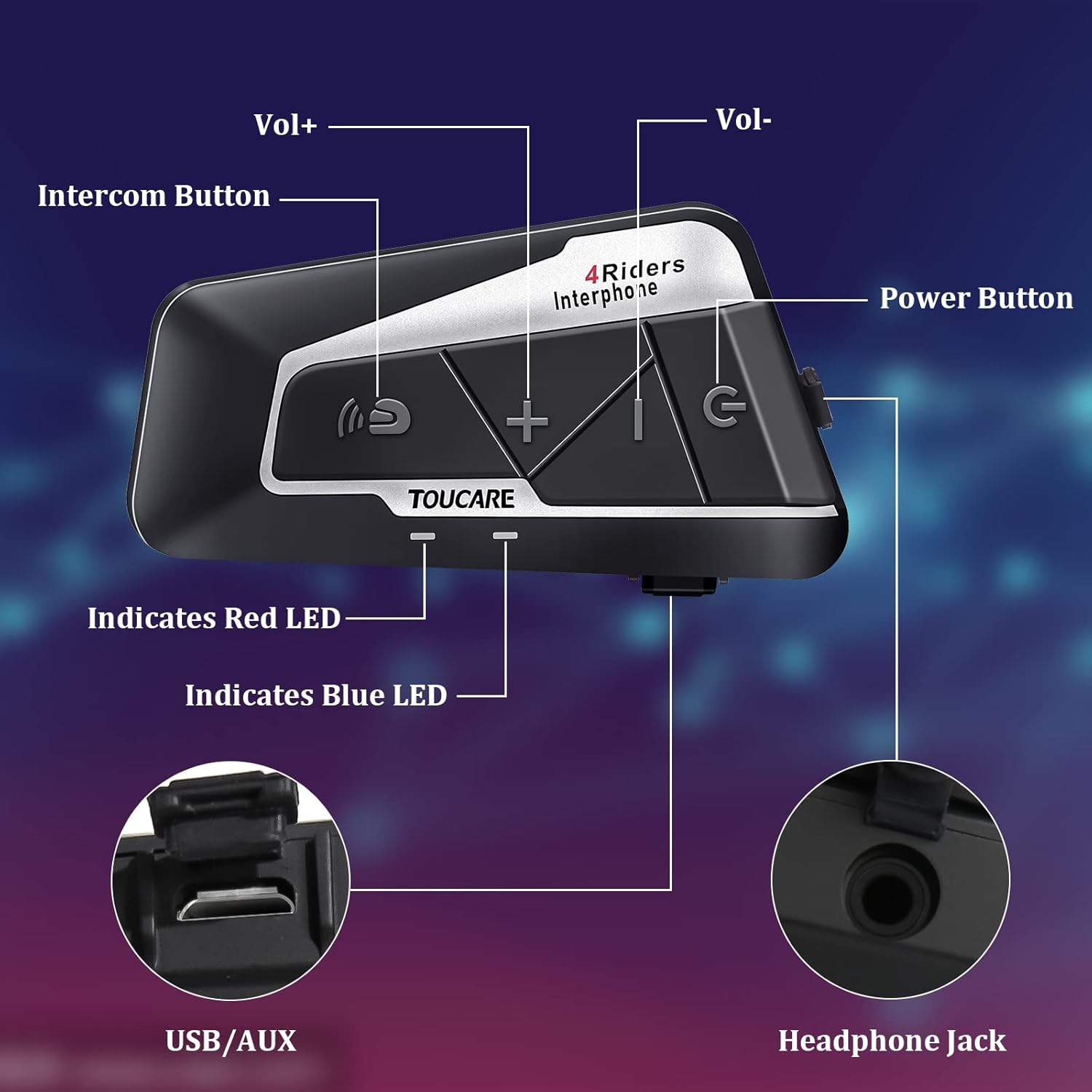
Image: Detailed diagram of the T9S unit, highlighting the location and labels of each button and port.
Power On/Off Button (G)
- Be-/kikapcsolás: Nyomja meg és tartsa lenyomva a készülék be- vagy kikapcsolásához.
- Paired Mobile Phone: Short press to connect/disconnect with a paired mobile phone.
- Bekapcsolási kérdés: Short press to hear battery level prompt.
- Hang up Bluetooth Intercom: Short press during an intercom call to end it.
- Zene lejátszása/szüneteltetése: Röviden nyomja meg a zene lejátszásához vagy szüneteltetéséhez.
- Call Answering/Third Party Answer/End/Reject: Telefonhívások kezelése.
Bluetooth Intercom Button (Intercom Icon)
- Hangerő +: Röviden nyomja meg a hangerő növeléséhez.
- Utolsó ének: Hosszan nyomva tartva az előző zeneszámra ugorhat.
- FM Turn Up: Short press during FM mode to tune up.
- FM Turn On/Off: Long press to turn FM radio on or off.
- Utolsó szám újratárcsázása: Double press to redial the last dialed number.
Volume - Button (-)
- Hangerő -: Röviden nyomja meg a hangerő csökkentéséhez.
- Következő dal: Nyomja meg hosszan a következő dalra lépéshez.
- FM Turn Down: Short press during FM mode to tune down.
- FM Turn On/Off: Long press to turn FM radio on or off.
- Hangtárcsázás: Double press to activate voice dialing (if supported by your phone).

Image: The T9S features ultra-large buttons, designed for easy operation even while wearing gloves.
Telepítési útmutató
Rögzített telepítési mód
Follow these steps to securely install the T9S intercom unit on your helmet:
- Locate and Clean: Identify a suitable flat area on the left side of your helmet for mounting. Ensure the surface is clean and dry.
- Ragasztó előkészítése: Peel off the protective film from the 3M adhesive on the back of the mounting bracket.
- Nyomás alkalmazása: Firmly press the mounting bracket onto the chosen location on your helmet. Apply consistent pressure for several seconds to ensure a strong bond.
- Biztonságos egység: Slide the T9S intercom unit onto the mounted bracket until it clicks securely into place.
- Hangszórók és mikrofon beszerelése: Route the speaker and microphone wires inside the helmet lining. Position the speakers inside the ear pockets and the microphone near your mouth for optimal audio.
Kezelési útmutató
Párosítás mobiltelefonnal
- Ensure the T9S is powered off.
- Press and hold the Power On/Off button until the LED indicator flashes red and blue alternately, indicating pairing mode.
- On your mobile phone, enable Bluetooth and search for new devices. Select "TOUCARE T9S" from the list.
- Once paired, the LED will flash blue slowly.
Initiating Intercom Communication
- Ensure all T9S units are powered on and within range.
- To initiate a group intercom, short press the Bluetooth Intercom Button on your unit. The units will attempt to connect.
- To end an intercom call, short press the Power On/Off button.
Zenelejátszás
- Lejátszás/Szünet: Röviden nyomja meg a be-/kikapcsoló gombot.
- Következő dal: Hosszan nyomja meg a Hangerő - gombot.
- Előző dal: Long press the Bluetooth Intercom button.
- Hangerő beállítása: Short press Volume + or Volume - buttons.
FM rádió
- Be/Kikapcsolás: Long press either the Bluetooth Intercom button or the Volume - button.
- Rázendít: Short press the Bluetooth Intercom button.
- Hangolás lefelé: Röviden nyomja meg a Hangerő - gombot.
Hívások fogadása/befejezése
- Hívás fogadása: Short press the Power On/Off button when a call comes in.
- Hívás befejezése: Short press the Power On/Off button during a call.
- Hívás elutasítása: Long press the Power On/Off button when a call comes in.
- Hangtárcsázás: Double press the Volume - button (requires phone support).
- Utolsó szám újratárcsázása: Double press the Bluetooth Intercom button.
Műszaki előírások
| Funkció | Specifikáció |
|---|---|
| Bluetooth verzió | 5.0 |
| Bluetooth Profiles Támogatott | HSP, HFP, A2DP, AVRCP, AGHSP |
| Munkaidő | 15 óra |
| Készenléti idő | 350 óra |
| Töltési idő | 3 óra |
| Akkumulátor típusa | Rechargeable Lithium Battery, 800mAh, 3.7V |
| Méretek | 89 x 46 x 30 mm |
| Súly | 85g |
| Zajszabályozás | Aktív zajszűrés (DSP és CVC) |
| Vízállósági szint | IP67 |
| Csatlakozási technológia | Vezeték nélküli |
| Anyag | Gumi |
| Vezérlés típusa | Voice Control (via phone), Button Control |
Karbantartás
To ensure the longevity and optimal performance of your TOUCARE T9S intercom, follow these maintenance guidelines:
- Tisztítás: Törölje le a készüléket puha, damp szövet. Ne használjon erős vegyszereket, tisztító oldószereket vagy erős tisztítószereket.
- Tárolás: Használaton kívül a készüléket hűvös, száraz helyen, közvetlen napfénytől és szélsőséges hőmérsékletektől védve tárolja.
- Az akkumulátor gondozása: For long-term storage, charge the battery to about 50% every three months to prevent deep discharge and extend battery life.
- Víz expozíció: Although IP67 rated, avoid prolonged submersion. Ensure charging port is dry before charging.
- Kábelkezelés: A sérülések elkerülése érdekében óvatosan kezelje a kábeleket és csatlakozókat.
Hibaelhárítás
If you encounter issues with your T9S intercom, try the following solutions:
Nincs erő
- Ellenőrizze az akkumulátort: Ensure the unit is fully charged. Connect it to a power source and check if the charging indicator lights up.
- Visszaállítás: If unresponsive, try holding the Power On/Off button for an extended period (e.g., 10-15 seconds) to force a reset.
Cannot Pair with Mobile Phone/Other Intercoms
- Párosítási mód: Ensure the T9S is in pairing mode (LED flashing red and blue alternately).
- Eszköz láthatósága: Make sure Bluetooth is enabled on your phone/other intercoms and they are discoverable.
- Párosítási előzmények törlése: On your phone, forget the T9S device and try pairing again. For intercoms, consult the manual for clearing pairing history if available.
- Távolság: Ensure devices are within close proximity (e.g., 1 meter) during pairing.
Poor Audio Quality/No Sound
- Kötet: Check if the volume is turned up on both the T9S and the connected device (phone/intercom).
- Mikrofon pozíció: Ensure the microphone is correctly positioned near your mouth and not obstructed.
- Hangszóró csatlakozás: Verify that the speakers are securely plugged into the headphone jack.
- Interferencia: Távolodjon el az erős elektromágneses interferencia forrásaitól.
- Firmware: Ellenőrizze a gyártót website for any available firmware updates that might improve audio performance.
Garancia és támogatás
For warranty information, technical support, or service inquiries, please refer to the warranty card included with your product or visit the official TOUCARE webŐrizze meg a vásárlási blokkot vásárlási bizonylatként garanciális igények esetén.
For further assistance, you may also contact TOUCARE customer service through the contact information provided on their official channels.
Ask a question about this manual
Ask about setup, troubleshooting, compatibility, parts, safety, or missing instructions. Manuals+ will review the question and use this page’s manual context to help answer it.