
1. Bevezetés
1.1 Termék végeview
The Renkforce RF-HC-100 is a compact 16-megapixel trail camera designed for outdoor monitoring. It features a time-lapse function, night vision capabilities, and a durable, camouflage brown housing. This camera is suitable for wildlife observation, property surveillance, and other outdoor recording needs.
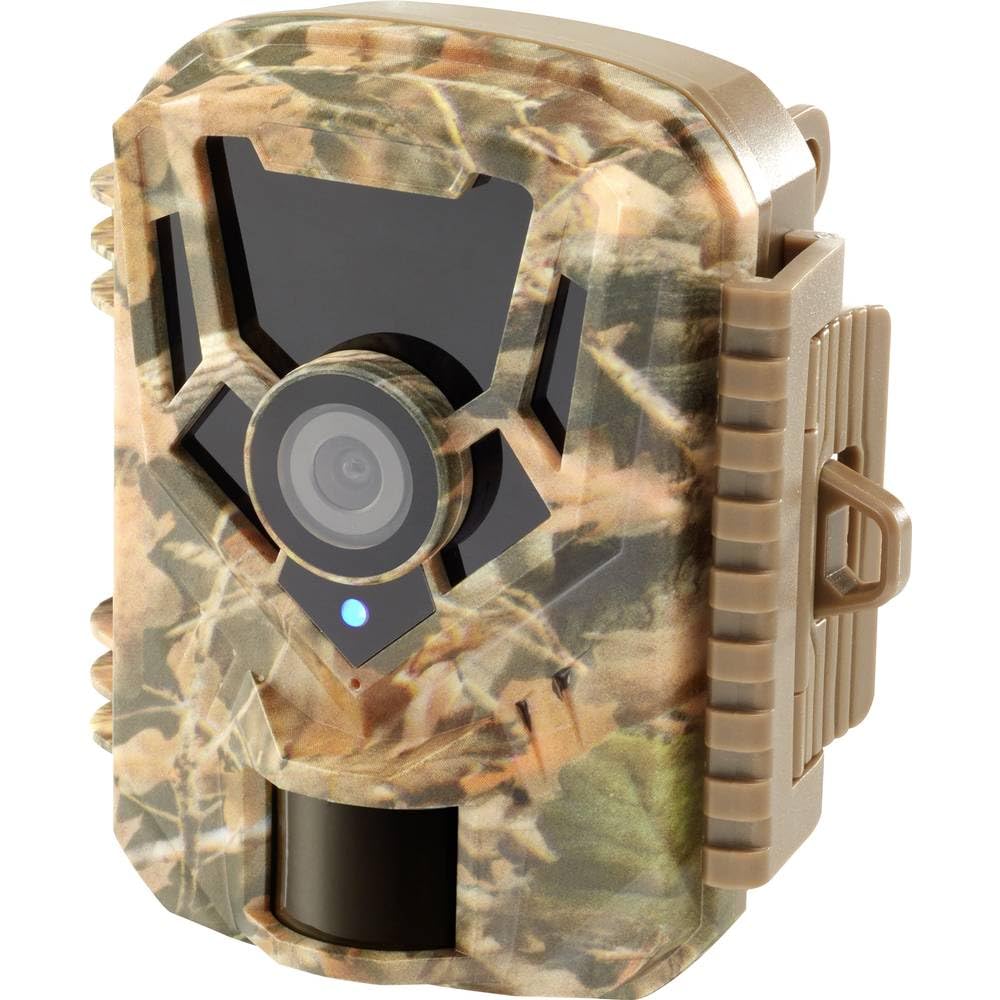
Kép: Elülső oldal view of the Renkforce RF-HC-100 Trail Camera, showcasinkompakt kialakításának és álcázó mintázatának köszönhetően.

Kép: elöl view of the Renkforce RF-HC-100 Trail Camera, highlighting the main lens and motion sensor.
1.2 A csomag tartalma
- 1 x Renkforce RF-HC-100 Trail Camera Unit
- Note: Additional accessories such as mounting straps, USB cables, or user manuals may be included depending on the specific package.
2. Biztonsági információk
- A készülék használata előtt figyelmesen olvassa el az összes utasítást.
- Do not expose the camera to extreme temperatures, direct sunlight for prolonged periods, or corrosive liquids.
- Ensure the battery compartment is properly sealed to maintain the IP65 weather resistance.
- Az elemeket a helyi előírásoknak megfelelően ártalmatlanítsa. Ne keverjen régi és új, illetve különböző típusú elemeket.
- Tartsa a készüléket gyermekektől távol.
- Ne próbálja meg szétszerelni vagy módosítani a kamerát, mert ez érvényteleníti a garanciát és károsodást okozhat.
3. A termék jellemzői
The Renkforce RF-HC-100 Trail Camera offers the following key features:
- Nagy felbontású képalkotás: 16 Megapixel effective capture resolution for clear photos and 1080p video recording.
- Éjszakai látás: Equipped with color night vision for monitoring in low-light conditions.
- Időzített felvétel funkció: Capture images at set intervals to observe long-term events.
- SD kártya foglalat: Supports external SD cards for ample storage of photos and videos.
- Időjárásállóság: IP65 international protection rating ensures durability in various outdoor environments.
- Kompakt kialakítás: Miniature form factor with a camouflage brown finish for discreet placement.
- Széles szög View: 90-degree angle of view széles területet lefedni.
- Csatlakozás: Features wired connectivity (USB, AV ports) and Wi-Fi protocol for data transfer and control via application.
- Szerelési lehetőségek: Includes support for wall mounting.
4. Beállítás
4.1 Az akkumulátor beszerelése
- Nyissa ki a kameraházat az oldalsó kapcsok kioldásával.
- Keresse meg az elemtartó rekeszt.
- Insert the required number of AA batteries (not included) according to the polarity markings (+/-).
- Biztonságosan zárja le az elemtartó rekeszt.
4.2 SD kártya behelyezése
- Nyitott kameraház mellett keresse meg az SD-kártya foglalatát.
- Insert a compatible SD card (up to 32GB, Class 10 recommended) into the slot with the metal contacts facing down until it clicks into place.
- Az eltávolításhoz nyomja be újra az SD-kártyát, amíg ki nem pattan.

Image: The Renkforce RF-HC-100 Trail Camera with its housing open, revealing the control panel, USB, AV, and DC ports, and the ON/SETUP/OFF switch.
4.3 A kamera felszerelése
The camera can be mounted using a strap or a wall mount bracket (if included or purchased separately).
- Pánt rögzítése: Thread a mounting strap through the slots on the back of the camera and secure it to a tree or pole.
- Falra szerelés: Use the integrated mounting points or a compatible wall mount bracket to attach the camera to a flat surface. Ensure the camera is stable and pointed in the desired direction.
5. Használati útmutató
5.1 Be-/kikapcsolás és üzemmódválasztás
Keresse meg a BE/BEÁLLÍT/KI kapcsolót a kameraházon belül.
- KI: Kikapcsolja a kamerát.
- BEÁLLÍT: Enters setup mode, allowing you to configure settings via the internal display.
- TOVÁBB: Activates the camera for recording based on the configured settings.
5.2 Configuring Settings
In SETUP mode, use the navigation buttons (if available) to access the menu and adjust parameters such as:
- Fotó/videó felbontás
- PIR érzékelő érzékenysége
- Észlelési késleltetés
- Time-Lapse Interval
- Dátum és idő
- Recording Mode (Photo, Video, Photo+Video, Time-Lapse)
5.3 Adatvisszakeresés
A rögzített hozzáférés eléréséhez files:
- USB -n keresztül: Connect the camera to a computer using a USB cable. The camera will appear as a removable disk.
- SD-kártyán keresztül: Remove the SD card from the camera and insert it into a computer's card reader.
6. Karbantartás
- Tisztítás: Use a soft, dry cloth to clean the camera lens and housing. For stubborn dirt, a slightly damp Használhat kendőt, de ügyeljen arra, hogy ne kerüljön nedvesség a készülékbe.
- Elem csere: Cserélje ki az elemeket, amikor megjelenik az alacsony elemtöltöttség jelzése, vagy ha a teljesítmény romlik.
- SD kártya kezelése: Regularly format the SD card (after backing up important data) to maintain optimal performance and prevent errors.
- Tárolás: Ha hosszabb ideig nem használja a fényképezőgépet, vegye ki az elemeket, és tárolja a fényképezőgépet hűvös, száraz, közvetlen napfénytől védett helyen.
7. Hibaelhárítás
| Probléma | Lehetséges ok | Megoldás |
|---|---|---|
| A kamera nem kapcsol be. | Low or dead batteries; incorrect battery installation; power switch in OFF position. | Replace batteries; ensure correct polarity; set switch to ON or SETUP. |
| Gyenge kép-/videóminőség. | Piszkos lencse; gyenge fényviszonyok; helytelen felbontási beállítások. | Clean the lens; ensure adequate lighting or use night vision; adjust resolution settings. |
| A kamera nem vesz fel felvételt. | SD card full or faulty; incorrect mode selected; PIR sensor blocked. | Format or replace SD card; select appropriate recording mode; clear sensor path. |
| Nem lehet csatlakozni a számítógéphez. | Faulty USB cable; camera not in correct mode; driver issues. | Try a different USB cable; ensure camera is in connection mode (if applicable); try another computer or card reader. |
8. Műszaki adatok
| Modell neve | RF-HC-100 (RF-4466574) |
| Effective Capture Resolution | 16 megapixel |
| Videó felbontás | 1080p |
| Méretek (H x Sz x Ma) | 21 x 12 x 9 cm (8.27 x 4.72 x 3.54 hüvelyk) |
| Súly | 186 gramm (0.41 font) |
| Csatlakozási technológia | Wired (USB, AV), Wi-Fi Protocol (for control/transfer) |
| Különleges jellemzők | Local Recording, Night Vision (Color Night Vision) |
| Használati környezet | Szabadtéri |
| Nemzetközi védelmi minősítés | IP65 |
| Áramforrás | Manual Operation (Battery-powered, batteries not included) |
| Wattage | 1.5 watt |
| View Szög | 90 fok |
| Szín | Camouflage Brown |
| Anyag | Metal (internal) |
| Szerelés típusa | Falra szerelhető támaszték |
9. Garancia és támogatás
Renkforce provides support for its products. Spare parts availability is indicated for 1 year from the date of purchase. For technical assistance, troubleshooting beyond this manual, or warranty claims, please refer to the contact information provided with your product packaging or visit the official Renkforce webtelek.