
Bevezetés
This manual provides essential instructions for the safe and efficient operation of your VisionTek Pitbull RockDoc Power Portable MP3 Speaker. Please read this manual thoroughly before using the device and retain it for future reference.
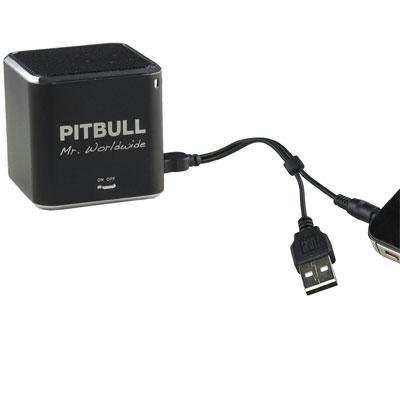
This image displays the compact, black cube-shaped Pitbull RockDoc Power Portable MP3 Speaker. The front face features the 'PITBULL Mr. Worldwide' logo and an 'ON OFF' switch. An integrated cable with a USB connector and a 3.5mm audio jack is shown connected to the speaker, ready for charging or audio input.
Termékjellemzők
- Hordozható kialakítás: Kompakt és könnyű a könnyű szállítás érdekében.
- Integrált MP3 lejátszó: Features 4GB of internal memory for direct music playback.
- Vezeték nélküli kapcsolat: Supports Bluetooth for audio streaming from compatible devices.
- Wired Audio Input: Includes a 3.5 mm audio jack for connecting non-Bluetooth devices.
- Elemről működik: Operates on an internal battery for cordless use.
- 1-utas hangszórórendszer: Delivers clear audio output.
Beállítás
A hangszóró töltése
- Locate the integrated USB cable attached to the speaker.
- Connect the USB-A end of the cable to a powered USB port (e.g., computer, USB wall adapter).
- The speaker's indicator light will illuminate to show charging status. Refer to the device for specific light indications.
- Miután teljesen feltöltötte, húzza ki az USB-kábelt.
Be-/Kikapcsolás
- To power on, slide the 'ON OFF' switch to the 'ON' position.
- To power off, slide the 'ON OFF' switch to the 'OFF' position.
Audioforrások csatlakoztatása
Your speaker supports three primary methods for audio input:
1. Using Internal 4GB Memory (MP3 Playback)
- To load music onto the internal 4GB memory, connect the speaker to a computer using the USB cable. The speaker should appear as a removable storage device.
- Húzd át az MP3 hanganyagodat files into the speaker's storage.
- Egyszer files are transferred, safely eject the speaker from your computer.
- The speaker will automatically play files from its internal memory when powered on and no other audio source is connected.
2. Bluetooth-kapcsolat
- Győződjön meg arról, hogy a hangszóró be van kapcsolva.
- Aktiválja a Bluetooth-t okostelefonján, táblagépén vagy más kompatibilis eszközén.
- Keressen rá available Bluetooth devices. The speaker should appear as "Pitbull RockDoc" or similar.
- Select the speaker from the list to pair. A confirmation sound or light indication may occur upon successful pairing.
3. 3.5 mm Audio Jack Connection
- Locate the integrated 3.5 mm audio jack on the speaker's cable.
- Connect this jack to the headphone output or audio-out port of your external audio device (e.g., MP3 player, phone, laptop).
- Ensure the speaker is powered on. Audio will be routed through this connection.
Kezelési útmutató
Alapvető lejátszási vezérlők
The speaker features basic controls for media playback. These controls typically include:
- Lejátszás/Szünet: Press to start or pause audio playback.
- Következő szám: Press to skip to the next audio file.
- Előző szám: Press to go back to the beginning of the current track or to the previous track.
- Hangerőszabályzó: Adjust the volume level. (Specific button layout not provided, assume standard controls).
Note: When connected via Bluetooth or 3.5mm audio jack, playback controls on the speaker may control the connected device, or you may need to control playback directly from the source device.
Karbantartás
Tisztítás
- Törölje át a hangszóró külsejét egy puha, száraz, szöszmentes ruhával.
- Ne használjon súrolószereket, oldószereket vagy erős vegyszereket.
- Kerülje a nedvesség bejutását a nyílásokba.
Tárolás
- A hangszórót hűvös, száraz helyen tárolja, távol a közvetlen napfénytől és a szélsőséges hőmérsékletektől.
- Hosszabb tárolás esetén ügyeljen arra, hogy az akkumulátor részben fel legyen töltve (körülbelül 50%-ban), hogy meghosszabbítsa az élettartamát.
Hibaelhárítás
| Probléma | Lehetséges ok | Megoldás |
|---|---|---|
| Nincs erő | Az akkumulátor lemerült | Töltse fel a hangszórót az USB-kábellel. |
| Nincs hang a hangszóróból | Volume too low; Incorrect input source; Device not paired (Bluetooth); Cable not connected (3.5mm) | Increase speaker volume; Ensure correct mode (internal MP3, Bluetooth, or AUX); Re-pair Bluetooth device; Check 3.5mm cable connection. |
| A Bluetooth párosítás sikertelen | A hangszóró nincs párosítási módban; Az eszköz túl messze van; Interferencia | Ensure speaker is discoverable; Move device closer to speaker; Turn off other Bluetooth devices. |
| Nem lehet átvinni files to 4GB memory | Incorrect USB connection; Driver issue; Memory full | Ensure speaker is connected to computer via USB; Try a different USB port/cable; Check available memory space. |
Műszaki adatok
| Funkció | Részlet |
|---|---|
| Modellszám | 900584 |
| Hangszóró típusa | 1-Way Portable Speaker |
| Belső memória | 4GB (for MP3 playback) |
| Kapcsolódás | Bluetooth, 3.5 mm Audio Jack |
| Áramforrás | Elemről működik |
| Hangszóró maximális kimeneti teljesítménye | 3 watt |
| Tétel súlya | 159 g |
| Termék méretei (HxSzxH) | 5 x 5 x 4.9 cm |
| Gyártó | VISIONTEK MASS STORAGE |
Jótállási információk
For detailed warranty information regarding your VisionTek Pitbull RockDoc Power Portable MP3 Speaker, please refer to the warranty card included with your purchase or contact the manufacturer directly. Amazon's buying options mention a 'Warranty Policy', indicating manufacturer coverage.
Támogatás
If you require technical assistance or have questions not covered in this manual, please contact VisionTek Mass Storage, the manufacturer of this product. Contact details can typically be found on their official webwebhely vagy a termék csomagolása.