
1. Bevezetés
The Sigma SD14 is a 14-megapixel Digital Single-Lens Reflex (DSLR) camera designed for advanced photographers. It features the Foveon X3 direct-image sensor, which captures full RGB color information at each pixel layer, aiming for high-definition images with rich gradation. This manual provides essential information for setting up, operating, and maintaining your SD14 camera.
Key features include a 2.5-inch LCD monitor, a durable shutter mechanism rated for over 100,000 cycles, a 5-point autofocus system, and continuous shooting capabilities. The camera supports both RAW and JPEG image recording formats and includes Sigma Photo Pro 3.0 software for RAW image processing.

1.1. ábra: Elöl view of the Sigma SD14 Digital SLR Camera, showing the lens mount and body design.
2. A doboz tartalma
Verify that all the following items are included in your Sigma SD14 package:
- Sigma SD14 Digital SLR Camera Body
- Lithium-ion Power Battery BP-21
- Battery Charger BC-21
- USB kábel
- video kábel
- Nyakpánt
- Eye Cap
- Body Cap
- Okulár kupak
- SIGMA Photo Pro 3.0 CD-ROM
- SD14 Instruction Manual (this document)
3. Beállítás
3.1. Az akkumulátor töltése és behelyezése
- Insert the Lithium-ion Battery BP-21 into the Battery Charger BC-21.
- Csatlakoztassa a töltőt a konnektorhoz. A töltésjelző világítani fog.
- Charging typically takes approximately 120 minutes for a full charge.
- Miután teljesen feltöltődött, vegye ki az akkumulátort a töltőből.
- Open the battery compartment cover on the camera body.
- Insert the charged battery into the compartment, ensuring correct orientation.
- Biztonságosan zárja le az elemtartó fedelét.
A fully charged BP-21 battery can capture approximately 500 images.
3.2. Memóriakártya behelyezése
The SD14 uses CompactFlash (CF) Type I/II cards. Ensure the card is formatted in the camera before first use.
- Open the CF card slot cover on the side of the camera.
- Helyezze be a CF kártyát a megfelelő irányban, amíg a helyére nem kattan.
- Close the CF card slot cover securely.
3.3. Objektív csatlakoztatása
The Sigma SD14 uses the Sigma SA Bayonet mount. Only Sigma SA mount lenses are directly compatible.
- Vegye le a vázsapkát a fényképezőgépről és a hátsó objektívsapkát az objektívről.
- Align the red index mark on the lens with the red index mark on the camera body's lens mount.
- Rögzítse az objektívet az óramutató járásával megegyező irányba forgatva, amíg kattanással a helyére nem rögzül.
- Az objektív eltávolításához nyomja meg az objektívkioldó gombot a fényképezőgép vázán, és forgassa el az objektívet az óramutató járásával ellentétes irányba.
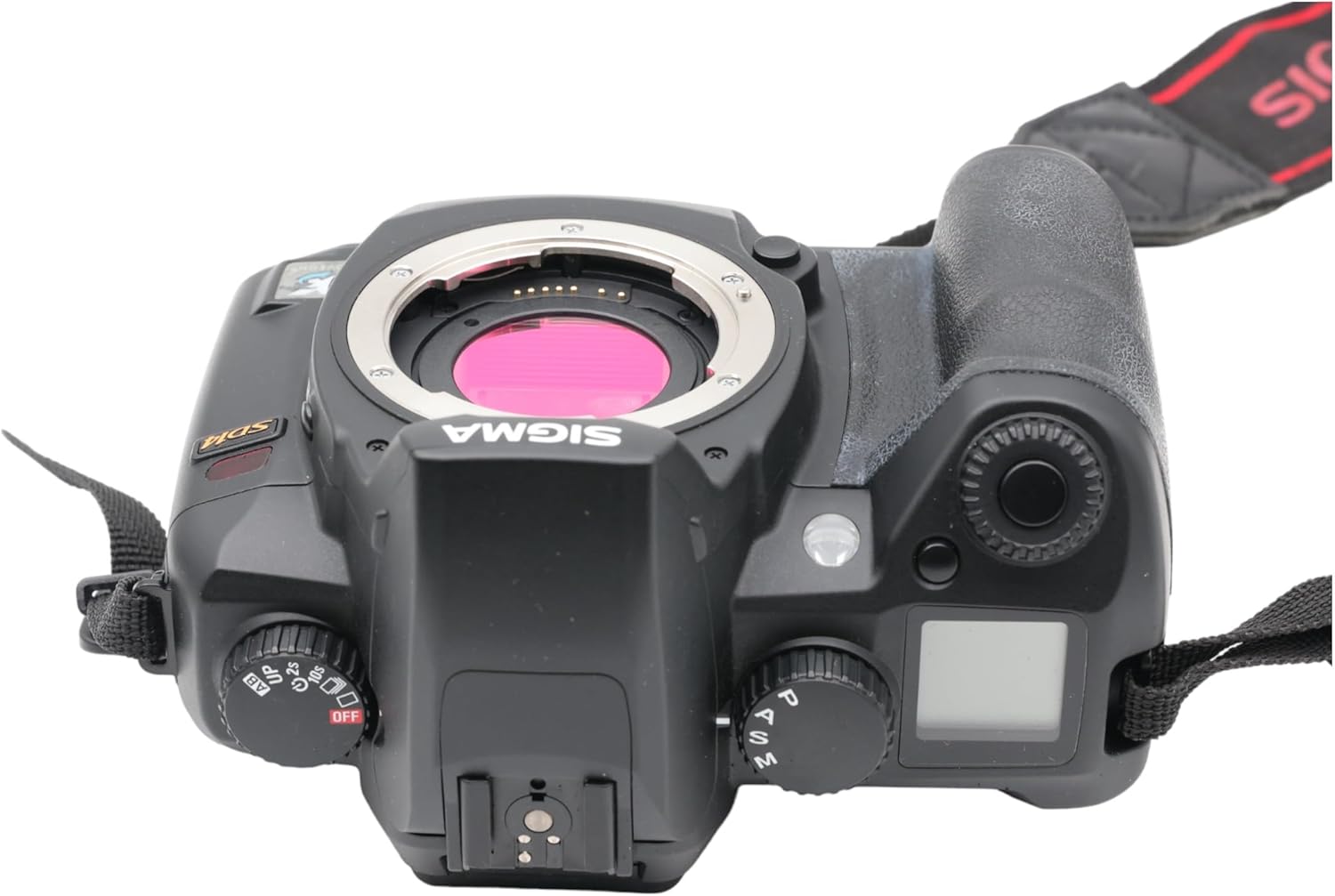
3.1. ábra: Felül view of the Sigma SD14, illustrating the lens mount and mode dials.
4. Működés
4.1. Be- / kikapcsolás
Rotate the power switch to the ON position to turn on the camera. Rotate it to OFF to power down.
4.2. Alapvető kezelőszervek és kijelző
The SD14 features a 2.5-inch LCD monitor for reviewing images and navigating menus, and a pentaprism viewfinder for composing shots. The top LCD panel displays key settings such as resolution, metering mode, battery status, and remaining shots.

4.1. ábra: Hátsó view of the Sigma SD14, showing the LCD monitor, viewkereső és vezérlőgombok.
Key buttons include MENU, ISO, WB (White Balance), and a 4-way controller with an OK button for navigation. The INFO button displays shutter speed, aperture, and other settings on the LCD.
4.3. Fókuszálás
The camera utilizes a 5-point autofocus (AF) system (center, left, right, up, and down). The center AF point features a cross-type sensor for enhanced precision. AF point selection can be automatic or manual.
4.4. Fénymérési módok
The SD14 offers three metering modes:
- 8-segment Evaluative Metering: Analyzes the entire scene for balanced exposure.
- Center Area Metering: Prioritizes the central area of the frame.
- Center Weighted Average Metering: Measures the entire frame but gives more weight to the central area.
Exposure compensation and auto bracketing functions are available for fine-tuning exposure.
4.5. Képrögzítés
The camera supports both RAW (X3F) and JPEG formats. JPEG recording offers four sizes (Super High, High, Medium, Low) and three quality settings (Fine, Normal, Basic).
- Super High (4608 x 3072 pixels): Suitable for A3 or larger prints.
- High (2640 x 1760 pixels): Suitable for A4 prints.
- Medium (1776 x 1184 pixels): Suitable for regular size prints.
- Low (1296 x 864 pixels): Alkalmas web oldalak és e-mailek.
4.6. Sorozatfelvétel
The SD14 can shoot continuously at 3 frames per second. The number of frames captured in a burst depends on the resolution setting:
- Magas: 6 képkocka
- Közepes: 12 képkocka
- Alacsony: 24 képkocka
These figures apply to both RAW and JPEG modes.
4.7. Built-in Flash
The built-in flash has a guide number of 11 (ISO 100) and covers a 17mm lens angle (28mm equivalent on 35mm format). It supports S-TTL automatic flash metering and can synchronize with shutter speeds up to 1/180 second.
4.8. Mirror Lock-up
Activate the mirror lock-up mechanism to prevent camera shake caused by mirror movement during exposure. This is particularly useful for macro photography, long telephoto shots, or scientific applications. For best results, use with a remote controller or cable release (sold separately).
4.9. Sigma Photo Pro 3.0 Software
The included Sigma Photo Pro 3.0 software is a RAW image developer. It allows for quick conversion of RAW data and offers three adjustment modes: X3F Mode (original settings), Auto Adjustment Mode, and Custom Mode for manual adjustments (exposure, contrast, shadow, highlight, saturation, sharpness, fill-light). The software supports 8-bit TIFF, 16-bit TIFF, and JPEG file formats, and sRGB, Apple RGB, Adobe RGB, and ColorMatch RGB color spaces.
5. Karbantartás
5.1. Image Sensor Dust Protector
The SD14 features a dust protector positioned in front of the image sensor. This design prevents dust from adhering directly to the sensor, minimizing its impact on image quality. If dust accumulates on the protector, it will be out of focus and generally not visible in images.
5.2. Cleaning the Camera Body and Lens
- Puha, szöszmentes ruhával törölje át a kamera vázát. Makacs szennyeződések esetén enyhén dörzsölje át.amphu vízzel vagy enyhe tisztítóoldattal törölje le a ruhát.
- For lenses, use a lens brush to remove loose dust, then a lens cleaning solution and a microfiber cloth. Avoid touching the lens surface with your fingers.
- Never use organic solvents like paint thinner or benzene to clean the camera or lens.
5.3. Az akkumulátor gondozása
- Használaton kívül tárolja az akkumulátorokat hűvös, száraz helyen.
- Kerülje az akkumulátor gyakori teljes lemerítését az élettartamának meghosszabbítása érdekében.
- Ha a fényképezőgépet hosszabb ideig nem fogja használni, vegye ki az akkumulátort.
6. Hibaelhárítás
| Probléma | Lehetséges ok | Megoldás |
|---|---|---|
| A kamera nem kapcsol be. | Az akkumulátor lemerült vagy helytelenül van behelyezve. | Töltse fel teljesen az akkumulátort, és győződjön meg arról, hogy megfelelően van behelyezve. |
| A képek homályosak. | Helytelen fókusz, bemozdult a kamera, vagy piszkos az objektív. | Győződjön meg a megfelelő fókuszról. Használjon gyorsabb záridőt vagy állványt. Tisztítsa meg az objektívet. |
| Images are too dark or too bright. | Incorrect exposure settings or metering mode. | Adjust exposure compensation. Select an appropriate metering mode for the scene. |
| Color blotching in underexposed areas. | Characteristic of the Foveon sensor when severely underexposed. | Aim to slightly overexpose images (e.g., +.7 EV) to retain shadow detail and avoid this effect. |
| Cannot record images. | Memory card is full, locked, or not inserted correctly. | Insert an empty card, unlock the card, or reinsert it correctly. Format the card if necessary (this will erase all data). |
| A kamera lefagy vagy nem reagál. | Ideiglenes szoftverhiba. | A kamera alaphelyzetbe állításához vegye ki, majd helyezze vissza az akkumulátort. |
For more detailed troubleshooting or error codes, please refer to the comprehensive instruction manual included with your camera or visit the Sigma support webtelek.
7. Műszaki adatok
| Funkció | Részlet |
|---|---|
| Modell neve | SD14 |
| Fotóérzékelő felbontása | 14 MP (Foveon X3 direct-image sensor) |
| Fotóérzékelő mérete | APS-C |
| Kompatibilis rögzítések | Sigma SA Bayonet |
| Támogatott File Formátumok | JPEG, RAW (X3F), TIFF |
| Képernyőméret | 2.5 Inches (150,000 pixels) |
| Viewkereső | Optical Pentaprism (98% coverage, 0.9x magnification) |
| Autofókuszpontok | 5-point (Phase Detection) |
| Sorozatfelvételi sebesség | 3 képkocka másodpercenként |
| Maximális zársebesség | 1/4000 másodperc |
| Minimális zársebesség | 30 másodperc |
| Kiterjesztett ISO-tartomány | 100-1600 |
| Fénymérési módok | 8-segment Evaluative, Center Area, Center Weighted Average |
| Built-in Flash Guide Number | 11 (ISO 100) |
| Tároló adathordozók | Compact Flash (CF) Type I/II |
| Áramforrás | Lithium-ion Battery BP-21 |
| Kapcsolódás | USB, Video Out |
| Tétel súlya | 1.65 font (kb. 748 g) |
| Modellszám | C23900 |
| UPC | 085126924416 |
7.1. Opcionális tartozékok (külön megvásárolhatók)
- Sigma Lenses (over 40 compatible models)
- Flashguns: EF-500 DG SUPER, EF-500 DG ST, EM-140 DG
- Power Grip PG-21
- Cable Release CR-21
- Remote Controller RS-31
- AC Adapter SAC-21
8. Garancia és támogatás
8.1. Jótállási információk
A részletes jótállási feltételekért kérjük, tekintse meg a termékhez mellékelt jótállási jegyet, vagy látogassa meg a hivatalos Sigma weboldalt. webA jótállás jellemzően az anyag- és gyártási hibákra vonatkozik a vásárlás dátumától számított meghatározott ideig.
8.2. Ügyfélszolgálat
If you encounter any issues or have questions not covered in this manual, please contact Sigma customer support. Contact information can usually be found on the official Sigma weba weboldalon vagy a jótállási dokumentációban.
Online források: Visit the official Sigma website for product registration, firmware updates, FAQs, and additional support resources.